Hogar Controls
3 Touch Panel Switch
HTP-3S0
On/Off Power Switch
HW: 10 FW: 2.05
ZM5202
6.81.01
0x0293 (659)
0x0003 (3)
0x4413 (17427)
ZC10-19046449
2019-04-26 19:06:29.191528
N/A
Enhanced 232 Slave
Always On Slave
The Hogar 3 Touch Switch is a perfect replacement for your conventional three-channel relay switch used to turn devices on or off. The 3 Touch Switch can be configured to work with any device that works with three-channel relay switches.
With a stunning glass face and an advanced capacitive touch sensor, all you need to do is just use a finger for turning your lights on and off. Tap once on the backlit touch button to switch the device on and tap it again to turn it off, it’s that simple. This 3 Touch Switch ensures an accurate response to every command that is sent through it. The Hogar 3 Touch Switch can operate either independently or as a part of the Hogar smart home automation system, and even with any other certified Z-Wave home automation system. It is an extremely easy-to-use panel that can be installed in a standard BS 2 gang box. Its operating capabilities include a bi-stable mode, a relay mode or a touch pulse mode for scene control with a maximum load current of 3 amp. It communicates with the Hogar smart home automation system using the Z-Wave wireless communication protocol.
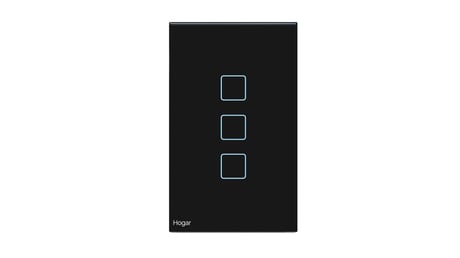
Product Picture
1. Put the controller into INCLUSION mode. Follow the instructions provided by the controller manufacturer. 2. Touch and hold any key on the panel for more than 5 seconds. All indication lights will blink in blue. At this point release the key, the touch panel will start the inclusion process.
1. Put the controller into EXCLUSION mode. Follow the instructions provided by the controller manufacturer. 2. Touch and hold any key on the panel for more than 5 seconds. All indication lights will blink blue in color. At this point release the key, the touch panel will start the exclusion process.
1. Press the config button 5 times, Indication LED lights will blink red in color, touch panel will start local reset. Touch panel switch will erase network inclusion state after local reset. Please use this procedure only when the network primary controller is missing or otherwise inoperable
| Type | Value(s) |
|---|