DONEXON
varmo TZ eco
4251660900025.0
Thermostat - HVAC
HW: 49 FW: 0.16:00.10
ZM5202
6.71.01
0x0148 (328)
0x0003 (3)
0x0004 (4)
ZC10-19056474
2019-05-07 19:47:30.823608
N/A
Enhanced 232 Slave
Listening Sleeping Slave
Yes
• The varmo TZ eco radiator valve regulates your radiator with energy-saving Z-Wave wireless standard. This will allow you to add an additional component to your Z-Wave Smart Home network.
• The varmo TZ eco radiator valve regulates your radiator with energy-saving Z-Wave wireless standard. Thus, you can add a component to your Z-Wave Smart Home network. • Thanks to the FLiRS (Frequently Listening Receiver Slave), the heating valve responds to incoming commands without any major delays, for example changing the temperature. Design covers are available in various colors, so you can change them according to your wishes and interior design. • The varmo TZ eco radiator valve is easy to operate, has an orange backlit display and an extra large temperature display. Heating periods are programmable, the daily and weekly times are individually programmable and the valve detects when a window is open. The manual adjustment is of course possible at any time. • In addition, the valve has a child safety lock and various security levels, a frost and lime protection function and fits on many common radiator valves. • The display can be rotated 180 degrees.
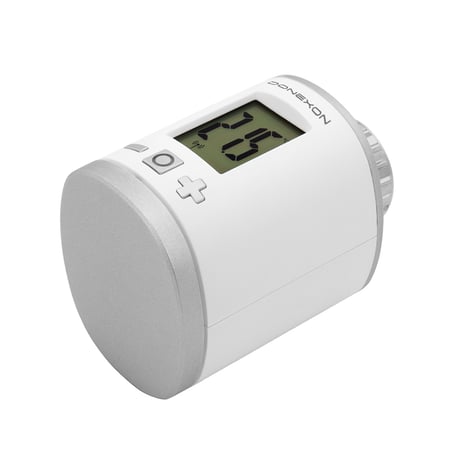
Product Picture


1 - LCD invert
Size: 1 byte
Default: 0
Minimum: 0
Maximum: 0
Possible values
| From | To | Desription |
|---|---|---|
| 0 | 0 | Normal orientation |
| 1 | 1 | LCD content inverted |
2 - LCD Timeout
Size: 1 byte
Default: 0
Minimum: 0
Maximum: 0
Possible values
| From | To | Desription |
|---|---|---|
| 0 | 0 | LCD always on |
| 5 | 30 | LCD timeout in seconds |
3 - Backlight
Size: 1 byte
Default: 1
Minimum: 0
Maximum: 0
Possible values
| From | To | Desription |
|---|---|---|
| 0 | 0 | Backlight disabled |
| 1 | 1 | Backlight enabled |
4 - Battery report
Size: 1 byte
Default: 1
Minimum: 0
Maximum: 0
Possible values
| From | To | Desription |
|---|---|---|
| 0 | 0 | Battery reporting disabled |
| 1 | 1 | Battery reporting enabled |
5 - Measured temperature report
Size: 1 byte
Default: 5
Minimum: 0
Maximum: 0
Possible values
| From | To | Desription |
|---|---|---|
| 0 | 0 | Reporting disabled |
| 1 | 50 | Reporting Delta in 1/10 Celcius |
6 - Valve percentage report
Size: 1 byte
Default: 0
Minimum: 0
Maximum: 0
Possible values
| From | To | Desription |
|---|---|---|
| 0 | 0 | Reporting disabled |
| 1 | 100 | Reporting Delta in percent |
7 - Window open detection
Size: 1 byte
Default: 2
Minimum: 0
Maximum: 0
Possible values
| From | To | Desription |
|---|---|---|
| 0 | 0 | Detection disabled |
| 1 | 3 | Sensitivity level |
8 - Measured temperature offset
Size: 1 byte
Default: 0
Minimum: 0
Maximum: 0
Possible values
| From | To | Desription |
|---|---|---|
| -50 | 50 | Offset in 1/10 Celcius |
| -128 | 0 | Temperature is supplied externaly |
Start Inclusion mode of your primary Z-Wave Controller. Press the Boost-Button. varmo TZ eco will show the assigned NodeID.
Start Exclusion mode of your primary Z-Wave Controller. Now press and hold the boost button of the varmo TZ eco for at least 5 seconds.
Remove batteries. Press and hold boost button. While still holding boost button insert batteries. The LCD shows RES. Release boost button. To perform the factory reset press boost button. Please use this procedure only when the network primary controller is missing or otherwise inoperable.
| Type | Value(s) |
|---|
| Group | Type |
|---|---|
| Power Management | (Refer to parameters): State idle |
| System | (Refer to parameters): State idle |
| Sensor type |
|---|
| Air Temperature |