TAGURI
Z-WAVE_BLE_Converter
LTA-ML
Door Lock - Keypad
HW: 255 FW: 1.00
ZM5202
6.81.03
0x0412 (1042)
0x0001 (1)
0x0001 (1)
ZC10-19066528
2019-06-05 23:39:37.641505
N/A
Enhanced 232 Slave
Always On Slave
Z-Wave Bridge product for MIWA Lock product
This is the Z-Wave Bridge product to convert BLE into Z-Wave. There has not been such item in Japan and this item is the first item in Japan. This item can bridge our IoT system “TAGURI” and MIWA Lock’s electric lock (such as PiACK ǁ and DTRS) and allows to open/lock electric lock.
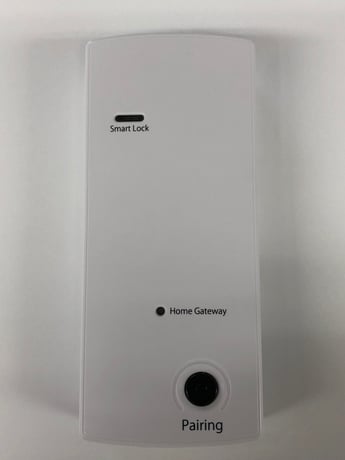
Product Picture
To add or include the LTA-ML into a Z-Wave network: After installing LTA-ML near the PiACK II, and then connecting to the AC Adapter which is included in the same package: 1. Set the controller in inclusion mode. 2. Push the “pairing” button once. 3. Wait 5 seconds. 4. Confirm the “Home Gateway” LED of the front panel is on.
To remove or exclude the LTA-ML from a Z-Wave network: 1. Set the controller in exclusion mode. 2. Push the “pairing” button 3 times. 3. Confirm the “Home Gateway” LED of the front panel is off.
To factory reset the LTA-ML: 1. Confirm the LTA-ML has been already included into a Z-Wave network. 2. Remove the AC adapter’s plug and turn off the LTA-ML. 3. Set the AC adapter’s plug again and wait more than 15 seconds but no longer than 75 seconds. 4. Push the “pairing” button for 10 seconds and the “Home Gateway” LED turns off. ※Please use this procedure only when the primary controller is missing or otherwise inoperable.
| Type | Value(s) |
|---|
| Group | Type |
|---|---|
| Access Control | (Refer to parameters): State idle |