Sunricher
Micro Smart Dimmer
SR-ZV9040A-A
Light Dimmer Switch
HW: 1 FW: 1.06
ZM5101
6.71.03
0x0330 (816)
0x0200 (512)
0xD00C (53260)
ZC10-19046456
2019-04-27 19:55:14.013093
N/A
Enhanced 232 Slave
Always On Slave
The micro smart dimmer is a Z-Wave device designed to work with various types of light sources. It may be connected to two-wire or three-wire configuration so it can operate with or without neutral lead.
The micro smart dimmer is a Z-Wave device designed to work with various types of light sources. It may be connected to two-wire or three-wire configuration so it can operate with or without neutral lead. The dimmer can switch or dim connected light source either through Z-Wave devices or through the wall switch connected directly to it. The smart dimmer is equipped with an algorithm of smart light source detection which makes configuration easier and ensures high compatibility of the device. It may be used as a switch with non-dimmable light sources (in 3-wire connection).
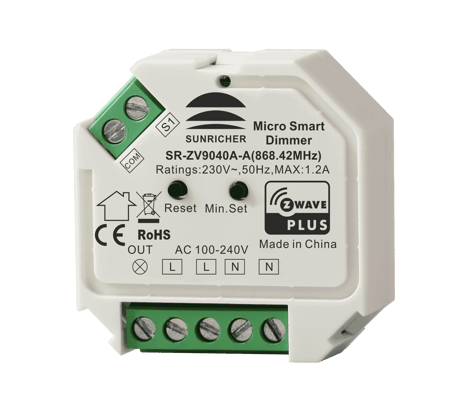
Product Picture


2 - Saving load state before power failure
Saving load state before power failureSize: 1 byte
Default: 2
Minimum: 0
Maximum: 0
Possible values
| From | To | Desription |
|---|---|---|
| 0 | 0 | shutoff load |
| 1 | 1 | turn on load |
| 2 | 2 | save load state before power failure |
3 - Enable/disable to send the basic report
Enable/disable to send the basic report to the Lifeline when the load state changed (When value set as 1, re-power on the dimmer, it will send Basic report automatically)Size: 1 byte
Default: 1
Minimum: 0
Maximum: 0
Possible values
| From | To | Desription |
|---|---|---|
| 0 | 0 | Disable to send Basic report |
| 1 | 1 | Enable to send Basic report |
4 - Default fade time
Default fade time (unit is second)Size: 1 byte
Default: 1
Minimum: 0
Maximum: 0
Possible values
| From | To | Desription |
|---|---|---|
| 0 | 0 | Instantly |
| 1 | 127 | 1 second (0x01) to 127 seconds (0x7F) in 1 second resolution. |
5 - Setting minimum brightness value
Setting minimum brightness valueSize: 1 byte
Default: 0
Minimum: 0
Maximum: 0
Possible values
| From | To | Desription |
|---|---|---|
| 0 | 50 | the bigger the value is, the higher the load’s minimum brightness is |
6 - Setting maximum brightness value
Setting maximum brightness valueSize: 1 byte
Default: 100
Minimum: 0
Maximum: 0
Possible values
| From | To | Desription |
|---|---|---|
| 0 | 100 | the maximum brightness value |
7 - Choose MOSFET driving type
Choose MOSFET driving typeSize: 1 byte
Default: 0
Minimum: 0
Maximum: 0
Possible values
| From | To | Desription |
|---|---|---|
| 0 | 0 | trailing edge |
| 1 | 1 | leading edge |
8 - External switch type
External switch typeSize: 1 byte
Default: 0
Minimum: 0
Maximum: 0
Possible values
| From | To | Desription |
|---|---|---|
| 0 | 0 | Push button switch |
| 1 | 1 | normal on/off switch |
| 2 | 2 | 3-way switch |
9 - Enable/disable external switch to be added to and removed from a network
Enable/disable external switch to be added to and removed from a network (when enables this function, triple press the external switch within 1.5 seconds to be added to or removed from a network)Size: 1 byte
Default: 1
Minimum: 0
Maximum: 0
Possible values
| From | To | Desription |
|---|---|---|
| 0 | 0 | disable |
| 1 | 1 | enable |
10 - Enable/disable to detect load after re-power on
Enable/disable to detect load after re-power on (detect load type, minimum brightness, maximum brightness) Note: When the device does not belong to any network, load detection will be enabled every time after re-power on. When the device has already been added to a network, load detection will be disabled.Size: 1 byte
Default: 0
Minimum: 0
Maximum: 0
Possible values
| From | To | Desription |
|---|---|---|
| 0 | 0 | disable |
| 1 | 1 | enable to detect every time after re-power on |
| 2 | 2 | enable to detect only after first re-power on |
11 - Wiring type
Wiring type Note: this parameter is read onlySize: 1 byte
Default: 0
Minimum: 0
Maximum: 0
Possible values
| From | To | Desription |
|---|---|---|
| 0 | 0 | unknown |
| 1 | 1 | 2 Wire With No Neutral |
| 2 | 2 | 3 Wire With Neutral |
12 - Load type
Load type Note: this parameter is read onlySize: 1 byte
Default: 0
Minimum: 0
Maximum: 0
Possible values
| From | To | Desription |
|---|---|---|
| 0 | 0 | unknown |
| 1 | 1 | resistive |
| 2 | 2 | inductive |
| 3 | 3 | capacitive |
13 - Enable/disable over current protection
Enable/disable over current protection (over 1.5A for 20 seconds continuously)Size: 1 byte
Default: 1
Minimum: 0
Maximum: 0
Possible values
| From | To | Desription |
|---|---|---|
| 0 | 0 | disable |
| 1 | 1 | enable |
14 - Power automatic report absolute threshold, unit is W
Power automatic report absolute threshold, unit is W When power changes above the absolute threshold, immediately report current power valueSize: 2 bytes
Default: 10
Minimum: 0
Maximum: 0
Possible values
| From | To | Desription |
|---|---|---|
| 0 | 32767 | When power changes above the absolute threshold, immediately report current power value |
15 - Power automatic report percentage threshold, unit is %
Power automatic report percentage threshold, unit is % When power changes above the percentage threshold, immediately report current power valueSize: 1 byte
Default: 20
Minimum: 0
Maximum: 0
Possible values
| From | To | Desription |
|---|---|---|
| 0 | 100 | When power changes above the percentage threshold, immediately report current power value |
21 - Power metering automatic report time cycle, unit is second
Power metering automatic report time cycle, unit is secondSize: 4 bytes
Default: 600
Minimum: 0
Maximum: 0
Possible values
| From | To | Desription |
|---|---|---|
| 5 | 2678400 | Power metering automatic report time cycle, unit is second |
22 - Energy metering automatic report time cycle, unit is second
Energy metering automatic report time cycle, unit is secondSize: 4 bytes
Default: 1800
Minimum: 0
Maximum: 0
Possible values
| From | To | Desription |
|---|---|---|
| 5 | 2678400 | Energy metering automatic report time cycle, unit is second |
23 - Voltage metering automatic report time cycle, unit is second
Voltage metering automatic report time cycle, unit is secondSize: 4 bytes
Default: 3600
Minimum: 0
Maximum: 0
Possible values
| From | To | Desription |
|---|---|---|
| 5 | 2678400 | Voltage metering automatic report time cycle, unit is second |
24 - Current metering automatic report time cycle, unit is second
Current metering automatic report time cycle, unit is secondSize: 4 bytes
Default: 3600
Minimum: 0
Maximum: 0
Possible values
| From | To | Desription |
|---|---|---|
| 5 | 2678400 | Current metering automatic report time cycle, unit is second |
1. Set primary controller/gateway into inclusion mode (Please refer to your primary controller’s manual on how to turn your controller into inclusion). 2. Power on the in-wall dimmer and set it into inclusion mode. There are two methods to set the in-wall dimmer into inclusion mode: 1)Repower on the dimmer, it will be set into inclusion mode automatically, and waiting to be included. 2)Triple press the action button on the dimmer, it will set the dimmer into inclusion mode. The connected light will stay solid on for 3 seconds to indicate successful inclusion.
There are two exclusion methods: Method 1: Exclusion from the primary controller/gateway as follows: 1. Set the primary controller/gateway into exclusion mode (Please refer to your primary controllers manual on how to set your controller into exclusion). 2. Triple press the action button, the dimmer will be set to exclusion mode, and waiting to be excluded, then the dimmer will be excluded from the network. Method 2: Factory reset the dimmer will force it to be excluded from a network. (please refer to the part “Factory Reset” of this manual) Note: Factory reset is not recommended for exclusion, please use this procedure only if the primary controller/gateway is missing or otherwise inoperable.
Press and hold down the action button for over 10 seconds, the dimmer will be reset to factory defaults. Note: Factory reset is not recommended for exclusion, please use this procedure only if the primary controller/gateway is missing or otherwise inoperable.
| Type | Value(s) |
|---|
| Group | Type |
|---|---|
| Power Management | (Refer to parameters): State idle |
| System | (Refer to parameters): State idle |
| Meter type |
|---|
| Electric Meter Consumption |