Sunricher
Curtain Motor Controller
SR-ZV9080A-B
Window Covering - Pos/End Aware
HW: 1 FW: 1.06
ZM5101
6.71.03
0x0330 (816)
0x0201 (513)
0xD00D (53261)
ZC10-19046459
2019-04-30 01:03:41.571606
N/A
Enhanced 232 Slave
Always On Slave
The curtain motor controller is a universal, Z-Wave Plus compatible, electric motor controller. The device allows for controlling motors of roller blinds and venetian blinds, which are single phase AC powered.
The curtain motor controller is a universal, Z-Wave Plus compatible, electric motor controller. The device allows for controlling motors of roller blinds and venetian blinds, which are single phase AC powered. The curtain motor controller allows for precise positioning of a roller blind or venetian blind slats. Precise positioning is available for the motors equipped with mechanic and electronic end switches. The device also allows for controlling on/off of lights. The module may be controlled wirelessly, through the Z-Wave network primary controller, or through the switch keys connected to it. In addition, the curtain motor controller is equipped with Power Metering and over current protection.
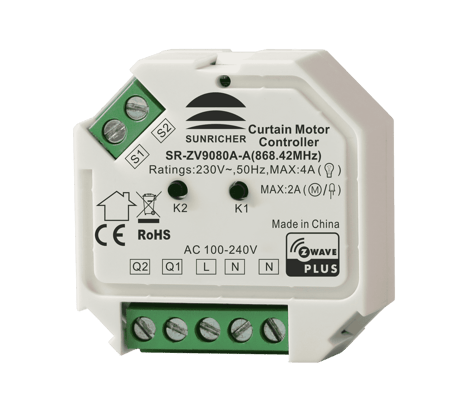
Product Picture


2 - Saving load state before power failure
Enable/disable the curtain motor controller to report state change percentage threshold (report only when change value at the specified percentage), if enabled, report when the value reaches both 0% and 99%. When the working mode is configured as light mode, as long as the state changes, the state change percentage threshold will be reported. SWITCH_MULTILEVEL_REPORTSize: 1 byte
Default: 1
Minimum: 0
Maximum: 0
Possible values
| From | To | Desription |
|---|---|---|
| 0 | 0 | disable to report actively |
| 1 | 1 | value to report, unit is one percent |
3 - Working mode
Working modeSize: 1 byte
Default: 2
Minimum: 0
Maximum: 0
Possible values
| From | To | Desription |
|---|---|---|
| 0 | 0 | light mode |
| 1 | 1 | Shutter mode without positioning |
| 2 | 2 | Shutter mode with positioning |
| 3 | 3 | venetian mode (up/down and slats rotation) |
4 - Enable/disable to save positioning
Enable/disable to save positioning percentage, record and save current positioning every time when the curtain moves to specified position, if the working mode is configured as light mode, record on/off state.Size: 1 byte
Default: 1
Minimum: 0
Maximum: 0
Possible values
| From | To | Desription |
|---|---|---|
| 0 | 0 | disable |
| 1 | 1 | enable |
5 - Enable/disable over current protection
Enable/disable over current protection 0: disable 1: enable, when over current detected, there are two methods to cancel alarm: 1. short press either switch button S1 or S2, the alarm will last at least 1 minute and then be cancelled. 2. re-power on the curtain motor controllerSize: 1 byte
Default: 1
Minimum: 0
Maximum: 0
Possible values
| From | To | Desription |
|---|---|---|
| 0 | 0 | disable |
| 1 | 1 | enable, when over current detected, there are two methods to cancel alarm: 1. short press either switch button S1 or S2, the alarm will last at least 1 minute and then be cancelled. 2. re-power on the curtain motor controller |
6 - starting positioning calibration
Only value 1 can be written in, which means starting positioning calibration. When read, 0x01: positioning calibration completed 0x00: positioning not calibrated This parameter is only valid when parameter 3 configured as shutter mode with positioning or venetian mode (up/down and slats rotation).Size: 1 byte
Default: 0
Minimum: 0
Maximum: 0
Possible values
| From | To | Desription |
|---|---|---|
| 0 | 0 | positioning not calibrated |
| 1 | 1 | positioning calibration completed |
7 - When parameter 3 value configured as 0 (light mode), configuration of button S1 and S2 control.
When parameter 3 value configured as 0 (light mode), configuration of button S1 and S2 control.Size: 1 byte
Default: 0
Minimum: 0
Maximum: 0
Possible values
| From | To | Desription |
|---|---|---|
| 0 | 0 | Short press S1 to switch ON/OFF Q1. Press and hold down S1 to switch ON Q1, then release to switch OFF Q2. Short press S2 to switch ON/OFF Q2. Press and hold down S2 to switch ON Q2, then release to switch OFF Q2. |
| 1 | 1 | Short press S1 to switch ON/OFF Q1. When S1 is pressed and held down, then released, not processed. Short press S2 to switch ON/OFF Q2. When S2 pressed and held down, then released, not processed. |
| 2 | 2 | Press and hold down S1 to switch ON Q1, then release to switch OFF Q2. When S1 short pressed, not processed. Press and hold down S2 to switch ON Q2, then release to switch OFF Q2. When S2 short pressed, not processed. |
| 3 | 3 | Short press S1 or S2 to switch ON/OFF of both Q1 and Q2 simultaneously. When S1 or S2 pressed and held down, not processed |
| 4 | 4 | Press and hold down S1 to switch ON Q1 and Q2. When S1 short pressed, not processed. Press and hold down S2 to switch OFF Q1 and Q2. When S2 short pressed, not processed. |
8 - Enable/disable to add the device to or remove it from a Z-Wave network through button S1.
Enable/disable to add the device to or remove it from a Z-Wave network through button S1. Please refer to the parts of inclusion and exclusion for details.Size: 1 byte
Default: 1
Minimum: 0
Maximum: 0
Possible values
| From | To | Desription |
|---|---|---|
| 0 | 0 | enable |
| 1 | 1 | disable |
9 - Enable/disable to send scene activation command CENTRAL_ SCENE_ NOTIFICATION_ V3 when the switches S1 and S2 are pressed.
Enable/disable to send scene activation command CENTRAL_ SCENE_ NOTIFICATION_ V3 when the switches S1 and S2 are pressed.Size: 1 byte
Default: 1
Minimum: 0
Maximum: 0
Possible values
| From | To | Desription |
|---|---|---|
| 0 | 0 | disable to send for action of both S1 and S2 |
| 1 | 1 | enable to send for action of both S1 and S2 |
| 2 | 2 | enable to send for action of only S1 |
| 3 | 3 | enable to send for action of only S2 |
10 - Power change absolute threshold report, unit is W
Power change absolute threshold report, unit is WSize: 1 byte
Default: 10
Minimum: 0
Maximum: 0
Possible values
| From | To | Desription |
|---|---|---|
| 0 | 0 | disable absolute threshold report function |
| 1 | 100 | value of the power change absolute threshold, if power change value is over the threshold value, report the power change value using METER_REPORT |
11 - Current change absolute threshold, unit is 0.1A
Wiring type Note: this parameter is read onlySize: 1 byte
Default: 0
Minimum: 0
Maximum: 0
Possible values
| From | To | Desription |
|---|---|---|
| 0 | 0 | disable absolute threshold function |
| 1 | 10 | value of the current change absolute threshold, if current change value is over the threshold value, report the current change value using METER_REPORT |
12 - Voltage change absolute threshold, unit is 1V
Voltage change absolute threshold, unit is 1VSize: 1 byte
Default: 0
Minimum: 0
Maximum: 0
Possible values
| From | To | Desription |
|---|---|---|
| 0 | 0 | disable absolute threshold function |
| 1 | 1 | value of the voltage change absolute threshold, if voltage change value is over the threshold value, report the voltage change value using METER_REPORT |
13 - Slats rotation time, unit is 0.1S
Enable/disable over current protection (over 1.5A for 20 seconds continuously)Size: 1 byte
Default: 15
Minimum: 0
Maximum: 0
Possible values
| From | To | Desription |
|---|---|---|
| 0 | 0 | disable the function |
| 5 | 250 | value of the slats rotation time This parameter is only valid when parameter 3 is configured as venetian mode (up/down and slats rotation). |
14 - Time cycle to report the values of energy consumption, voltage, current and load power actively
Time cycle to report the values of energy consumption, voltage, current and load power activelySize: 4 bytes
Default: 3600
Minimum: 0
Maximum: 0
Possible values
| From | To | Desription |
|---|---|---|
| 60 | 2678400 | value of the time cycle, unit is S. |
1. Set primary controller/gateway into inclusion mode (Please refer to your primary controller’s manual on how to turn your controller into inclusion). 2. Power on the curtain motor controller and set it into inclusion mode. There are two methods to set the curtain motor controller into inclusion mode: 1)Triple press the network inclusion/exclusion button, it will set the curtain motor controller into inclusion mode.6 seconds timeout if there is no reply from the Z-Wave primary controller, repeat the operation. 2)When the value of configuration parameter 8 is set as 1, triple press the switch connected to S1, it will set the curtain motor controller into inclusion mode. 6 seconds timeout if there is no reply from the Z-Wave primary controller, repeat the operation. 3. The curtain motor controller will be added to the Z-Wave network.
1. Set the primary controller/gateway into exclusion mode (Please refer to your primary controllers manual on how to set your controller into exclusion). 2. Power on the curtain motor controller and set it into exclusion mode. There are two methods to set the curtain motor controller into exclusion mode: 1)Triple press the network inclusion/exclusion button, it will set the curtain motor controller into exclusion mode. 6 seconds timeout if there is no reply from the Z-Wave primary controller, repeat the operation. 2)When the value of configuration parameter 8 is set as 1, triple press the switch connected to S1, it will set the curtain motor controller into exclusion mode. 6 seconds timeout if there is no reply from the ZWave primary controller, repeat the operation. 3. The curtain motor controller will be removed from the Z-Wave network.
Press and hold down network inclusion/exclusion button for over 10 seconds, the curtain motor controller will be reset to factory defaults.
| Type | Value(s) |
|---|
| Group | Type |
|---|---|
| Power Management | (Refer to parameters): State idle |
| System | (Refer to parameters): State idle |
| Meter type |
|---|
| Electric Meter Consumption |