REHAU
RE.GUARD Water Sensor
14573101001.0
Notification Sensor
HW: 1 FW: 1.03
ZM5202
6.71.01
0x0413 (1043)
0x021a (538)
0x0002 (2)
ZC10-19056475
2019-05-07 22:38:27.68598
N/A
Enhanced 232 Slave
Reporting Sleeping Slave
Yes
RE.GUARD Water Sensor is a wireless sensor powered by ER14250 battery. It is used for detecting water overflowing.
RE.GUARD Water Sensor is a wireless sensor powered by ER14250 battery. It is used for detecting water overflowing. It can communicate with an associated Z-Wave device, such as RE.GUARD Water Control, Siren, Smart Switch, etc. The features list: 1) Z-Wave Plus certified for wide compatibility (500 serials product). 2) Supports security 0 and security 2 protected mode with AES-128 encryption. 3) Contains an extension water detecting probe. 4) Temperature measurement. 5) The battery life is up to 1 year. 6) Support low battery alarm function. 7) Support firmware OTA.
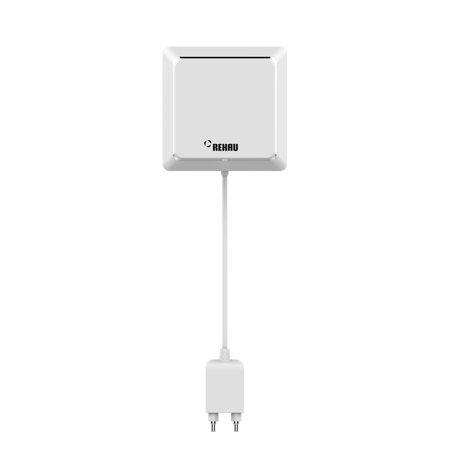
Product Picture


14 - Enable/Disable BASIC SET command
Water Sensor can send BASIC SET command to nodes associated with group 2.Size: 1 byte
Default: 0
Minimum: 0
Maximum: 0
Possible values
| From | To | Desription |
|---|---|---|
| 0 | 0 | Disable |
| 1 | 1 | Enable |
15 - Value of the BASIC SET
Water sensor can reverse its value of BASIC SET when flooding is triggered.Size: 1 byte
Default: 0
Minimum: 0
Maximum: 0
Possible values
| From | To | Desription |
|---|---|---|
| 0 | 0 | Send BASIC SET VALUE = 255 to nodes associated with group 2 when flooding alarm is triggered. Send BASIC SET VALUE = 0 to nodes associated with group 2 when flooding alarm is canceled. |
| 1 | 1 | Send BASIC SET VALUE = 0 to nodes associated with group 2 when flooding alarm is triggered. Send BASIC SET VALUE = 255 to nodes associated with group 2 when flooding alarm is canceled. |
17 - Set resend flooding alarm interval (minute)
How much time interval is reported by flooding alarm.Size: 1 byte
Default: 5
Minimum: 0
Maximum: 0
Possible values
| From | To | Desription |
|---|---|---|
| 1 | 240 | The higher the value, the long the report periodically - in decimal values from 1 to 240 |
19 - Temperature report tme (10 minutes)
The sensor measures the temperature every ten minutes, change of 1 degree Celsius will be reported. By default, it must report at least once a day.Size: 1 byte
Default: 144
Minimum: 0
Maximum: 0
Possible values
| From | To | Desription |
|---|---|---|
| 3 | 240 | the higher the value ,the long the report time |
20 - Set the high temperature alarm trigger value
The accuracy is 0.1 degrees, the United States uses Fahrenheit, and the Fahrenheit temperature range is -670~2570, which is -67.0~257.0°F. Other countries use Celsius temperature, Celsius temperature range -550~1250, which is -55.0~125.0 °C.Size: 2 bytes
Default: 400
Minimum: 0
Maximum: 0
Possible values
| From | To | Desription |
|---|---|---|
| -670 | 2570 | the larger the value , the higher the high temperature(US) |
| -550 | 1250 | the larger the value , the higher the high temperature(other) |
22 - Set the low temperature alarm trigger value
The accuracy is 0.1 degrees, the United States uses Fahrenheit, and the Fahrenheit temperature range is -670~2570, which is -67.0~257.0°F. Other countries use Celsius temperature, Celsius temperature range -550~1250, which is -55.0~125.0 °C.Size: 2 bytes
Default: 0
Minimum: 0
Maximum: 0
Possible values
| From | To | Desription |
|---|---|---|
| -670 | 2570 | the smaller the value , the lower the low temperature(US) |
| -550 | 1250 | the smaller the value , the lower the low temperature(other) |
24 - Enable/Disable blinking LED when alarm being triggered
Whether the light flashes when the alarm occurs. when the value is 0, the product will not alarm when being triggered; when the value is 1, the product will alarm when being triggeredSize: 1 byte
Default: 1
Minimum: 0
Maximum: 0
Possible values
| From | To | Desription |
|---|---|---|
| 0 | 0 | Disable |
| 1 | 1 | Enable |
32 - Level of low battery
The low voltage alarm threshold corresponds to the amount of power, the unit is the percentage of power, the value range is 10~50, other values are invalid, that is, the power corresponding to the low voltage can be configured to be 10% to 50%.Size: 1 byte
Default: 20
Minimum: 0
Maximum: 0
Possible values
| From | To | Desription |
|---|---|---|
| 10 | 50 | Set the trigger value for the low battery alarm |
1) Open the cover. 2) Place the device within the direct range of your Z-Wave controller. 3) Set the main controller in add mode (see the controller’s manual). 4) Click the Z-button once or triple click the Z-button quickly, the LED indicator should blink fast. 5) Wait for the adding process to end. 6) Successful adding will be confirmed by the Z-Wave controller’s message.
) Open the cover. 2) Place the device within the direct range of your Z-Wave controller. 3) Set the main controller remove mode (see the controller’s manual). 4) Triple click the Z-button quickly, the LED indicator should blink fast. 5) Wait for the removing process to end. 6) Successful adding will be confirmed by the Z-Wave controller’s message.
Press and hold the Z button for more than 3 seconds and release.
1)Power on the device 2) Press and hold the Z button for more than 20 seconds 3)If holding time more than 20 seconds, the LED indicator will keep on for 2 seconds, which means resetting is complete. The reset feature works only when the device has been included into a Z-Wave network. Use this procedure only in the event that the network primary controller is missing or otherwise inoperable.
| Type | Value(s) |
|---|
| Group | Type |
|---|---|
| Heat Alarm | (Refer to parameters): State idle |
| Water Alarm | (Refer to parameters): State idle |
| Home Security | (Refer to parameters): State idle |
| Sensor type |
|---|
| Air Temperature |