myTEM SmartHome
Radio Switch Dual Plus
MTSWI-101-WL
On/Off Power Switch
HW: 1 FW: 1.00
ZM5101
6.71.03
0x034E (846)
0x0001 (1)
0x0008 (8)
ZC10-19076686
2019-05-23 20:11:59.536299
N/A
Enhanced 232 Slave
Always On Slave
The myTEM Radio Switch Dual Plus is a universal, Z-Wave compatible wall or ceiling switch.
The myTEM Radio Switch Dual Plus is a universal, Z-Wave compatible wall or ceiling switch (ON/OFF) and is used to control two electrical devices. Two additional digital inputs and the programmable behav-ior to the wireless commands allow flexible use in the house. Optionally, a myTEM Touch Add-on control panel can be attached to the connector. The device is intended for installation in a flush-mounted box.
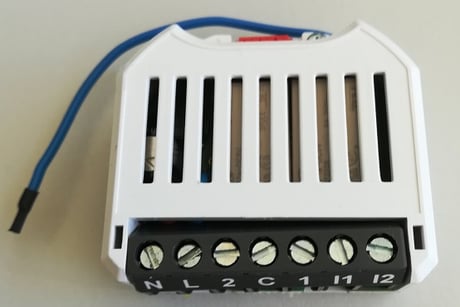
Product Picture


1 - Heartbeat Rate
If the notification System Heartbeat is on, a notification report System Heartbeat is sent periodically every 60 minutes (default value).Size: 2 bytes
Default: 60
Minimum: 1
Maximum: 1440
Possible values
| From | To | Desription |
|---|---|---|
| 1 | 1440 | Heartbeat rate [min] |
2 - Send Interval Temperature
Period with which the measured temperature is sent by a Multilevel Sensor Report.Size: 2 bytes
Default: 30
Minimum: 1
Maximum: 120
Possible values
| From | To | Desription |
|---|---|---|
| 1 | 120 | Send interval temperature [min] |
3 - Minum Delta Temperature Send
When the temperature changes this anount the temperature value is sent by a Multilevel Sensor Report.Size: 2 bytes
Default: 5
Minimum: 1
Maximum: 100
Possible values
| From | To | Desription |
|---|---|---|
| 1 | 100 | Minimum delta temperature [0.1 K] |
4 - Send Interval Humidity
Period with which the measured humidity is sent by a Multilevel Sensor Report.Size: 2 bytes
Default: 30
Minimum: 1
Maximum: 120
Possible values
| From | To | Desription |
|---|---|---|
| 1 | 120 | Send interval humidiy [min] |
5 - Minimum Delta Humidity Send
When the humidity changes this anount the temperature value is sent by a Multilevel Sensor Report.Size: 2 bytes
Default: 10
Minimum: 10
Maximum: 1000
Possible values
| From | To | Desription |
|---|---|---|
| 10 | 1000 | Minimum delta humidity [0.1 %] |
Automatic inclusion (“Add”) The device supports the so-called auto-inclusion. To use this function the device must be in factory default. 1. Activate the “Add” mode on your controller. 2. Turn on the power and the unit starts in its own Add mode for 30 seconds. If the connection is successful, the device registers on the controller. When the device is in the “Add” mode, the LED flashes green. When finished, the new status is: Add: The LED lights up briefly in green Remove: The LED lights up briefly in red. Manual inclusion (“Add”) 1. Activate the “Add” mode on your controller. 2. When 110 – 230 VAC is used, press a button connected to input I1 or I2 four times in quick succession to start include (“Add”). If a switch is used instead of the button, it must be changed accordingly eight times. 3. Alternatively, when 24 VDC is used, you can press the small lever (T) four times in quick succession with a pen to start “Add”. When the device is in the “Add” mode, the LED flashes green. When finished, the new status is: Add: The LED lights up briefly in green Remove: The LED lights up briefly in red
Manual exclusion (“Remove”) 1. Activate the “Remove” mode on your controller. 2. When 110 – 230 VAC is used, press a button connected to input I1 or I2 four times in quick succession to start exclude (“Remove”). If a switch is used instead of the button, it must be changed accordingly eight times. 3. Alternatively, when 24 VDC is used, you can press the small lever (T) four times in quick succession with a pen to start “Remove”. When finished, the new status is: Add: The LED lights up briefly in green Remove: The LED lights up briefly in red
Reset to factory default If the myTEM Radio Switch Dual Plus shows status “Add”, the “Remove” can be performed with any controller in the network or with the help of a new controller. However it is recommended to use the primary controller of the previous network unless it is no longer available or damaged. “Remove” deletes the memory chip, including all Z-Wave network and custom configuration settings.
| Type | Value(s) |
|---|
| Group | Type |
|---|---|
| Power Management | (Refer to parameters): State idle |
| System | (Refer to parameters): State idle |
| Sensor type |
|---|
| Air Temperature |
| Humidity |