CONFIO
2-Channel Dimmer
CT2D
Light Dimmer Switch
HW: 1 FW: 1.00
ZM5101
6.81.03
0x0419 (1049)
0x4000 (16384)
0xC002 (49154)
ZC10-19096735
2019-06-25 15:29:37.063903
N/A
Enhanced 232 Slave
Always On Slave
CT2D is a two-channel multilevel power socket with one channel Phase Cut and another PWM, capable of dimming Incandescent lamps and dimmable LED lights.
CT2D is a 2-channel multilevel power socket capable of dimming Incandescent lamps and dimmable LED lights. Both channels/loads operate independently, Two corresponding local switches and potentiometers are available to directly control these channels irrespective of inclusion state. Local switches can be configured to different modes. CT2D Channel #1: TRIAC/FET based edge control dimming. This channel can be operated in two modes LEC/TEC respectively. CT2D Channel #2: PWM dimmer. This channel is capable of dimming LED lamps which have PWM dimming capabilities. This needs a PWM enabled LED driver. CT2D can be used out of the box and needs no configuration. However, it supports different configuration parameters that extend its functionality
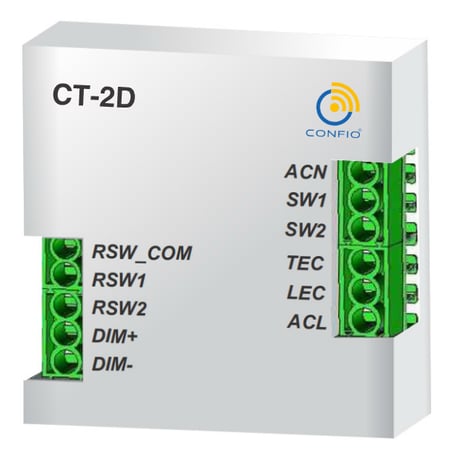
Product Image Published


1 - Power ON status of TEC/LEC load
This parameter decides the power ON state (when the module is powered ON) of Load connected on TEC or LEC channel. This parameter provides two options either power ON to memory (previous state as it was before power OFF) or present switch position.Size: 1 byte
Default: 1
Minimum: 0
Maximum: 0
Possible values
| From | To | Desription |
|---|---|---|
| 0 | 1 | 0: Switch SW1, 1: Memory) |
2 - Power ON status of PWM LED load
This parameter decides the power ON state (when the module is powered ON) of Load connected on DIM+/- channel. This parameter provides two options either power ON to memory (previous state as it was before power OFF) or present switch position.Size: 1 byte
Default: 1
Minimum: 0
Maximum: 0
Possible values
| From | To | Desription |
|---|---|---|
| 0 | 1 | 0: Switch SW2, 1: Memory |
3 - Dimming preference for TEC/LEC load
This parameter switch between the dimming preference Smooth dimming or Instant dimming for the load connected on TEC/LEC channelSize: 1 byte
Default: 1
Minimum: 0
Maximum: 0
Possible values
| From | To | Desription |
|---|---|---|
| 0 | 1 | 0: Instant, 1: Smooth |
4 - Dimming preference for PWM LED load
This parameter switch between the dimming preference Smooth dimming or Instant dimming for the load connected on DIM+/- channel.Size: 1 byte
Default: 1
Minimum: 0
Maximum: 0
Possible values
| From | To | Desription |
|---|---|---|
| 0 | 1 | 0: Instant, 1: Smooth |
5 - Dimming speed for TEC/LEC load
This parameter sets the dimming speed of load connected on TEC/LEC channelSize: 1 byte
Default: 3
Minimum: 0
Maximum: 0
Possible values
| From | To | Desription |
|---|---|---|
| 1 | 5 | 1: Very fast, 2: Fast, 3: Medium, 4: Slow, 5: Very Slow |
6 - Dimming speed for PWM LED load
This parameter sets the dimming speed of load connected on PWM LED channel.Size: 1 byte
Default: 3
Minimum: 0
Maximum: 0
Possible values
| From | To | Desription |
|---|---|---|
| 1 | 5 | 1: Very fast, 2: Fast, 3: Medium, 4: Slow, 5: Very Slow |
7 - Potentiometer Status (RSW1 & RSW2)
This parameter enable/disable potentiometer service for both TEC/LEC and PWM LED loads.Size: 1 byte
Default: 3
Minimum: 0
Maximum: 0
Possible values
| From | To | Desription |
|---|---|---|
| 0 | 3 | 0: RSW1 & RSW2 Disable, 1: RSW1 Enable, 2: RSW2 Enable, 3: RSW1 & RSW2 Enable |
8 - SW1 Functionality
This parameter switch between the switch functionality for SW1 i.e. Position switch OR toggle switch OR Bell switch dimmingSize: 1 byte
Default: 2
Minimum: 0
Maximum: 0
Possible values
| From | To | Desription |
|---|---|---|
| 0 | 2 | 0: Position switch ON-to-ON and OFF-to-OFF, 1: Toggle switch, 2: Bell switch |
9 - SW2 Functionality
This parameter switch between the switch functionality for SW2 i.e. Position switch OR toggle switch OR Bell switch dimming.Size: 1 byte
Default: 2
Minimum: 0
Maximum: 0
Possible values
| From | To | Desription |
|---|---|---|
| 0 | 2 | 0: Position switch ON-to-ON and OFF-to-OFF, 1: Toggle switch, 2: Bell switch |
10 - On board LED enable/disable
This parameter enables or disables onboard LEDs.Size: 1 byte
Default: 1
Minimum: 0
Maximum: 0
Possible values
| From | To | Desription |
|---|---|---|
| 0 | 1 | 0: Disable, 1: Enable |
Inclusion mode can be invoked by a one-time short press of NODE_INFO key. User indication: Blinking of green LED shows successful inclusion.
Exclusion mode can be invoked by a one-time press of NODE_INFO key. User indication: Blinking of red LED shows successful exclusion.
Device Reset can be invoked by press & hold NODE_INFO key for more than 10 seconds, User indication: Blinking of red LED shows a successful reset. The controller will be informed about this event via COMMAND_CLASS_DEVICE_RESET_LOCALLY command, Once the device resets, it will no longer be a part of the Z-Wave network and all the user configuration parameters are set to their default values. Note: RED led also flash after 5 seconds for mode change. Continue to hold NODE_INFO key for 10 seconds to reset the device. Please use this procedure only when the network primary controller is missing or otherwise inoperable.
| Type | Value(s) |
|---|