LUX
KONOzw Smart Hub Thermostat
KN-ZW-WH1-B04
Thermostat - HVAC
HW: 2 FW: 1.00:00.114
ZM5202
6.71.03
0x0411 (1041)
0x0001 (1)
0x2111 (8465)
ZC10-19076681
2019-07-25 20:22:07.146848
N/A
Enhanced 232 Slave
Always On Slave
Yes
KONOzw battery powered or 24Vac wireless thermostat
KONOzw is the smart hub thermostat made with you in mind. It seamlessly connects to many smart hubs and blends in or stands out with its interchangeable Décorsnap covers™. KONOzw makes it easier than ever to personalize your comfort, décor, and savings.
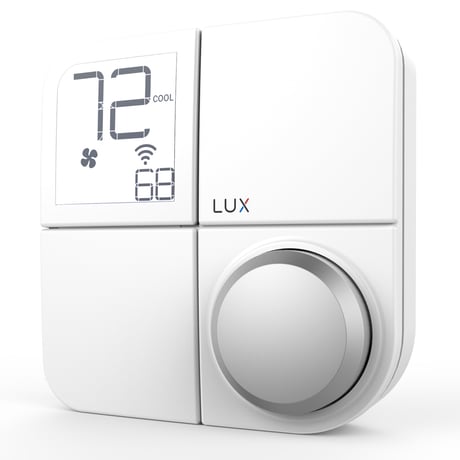
Product Picture


1 - User Temperature Calibration
User Temperature Calibration. For example, sending a value of +50 means the calibration offset is +0.5FSize: 2 bytes
Default: 0
Minimum: 0
Maximum: 0
Possible values
| From | To | Desription |
|---|---|---|
| -250 | 250 | Step-size = 10 |
2 - Temperature Unit (C/F)
Temperature Unit (C/F)Size: 1 byte
Default: 1
Minimum: 0
Maximum: 0
Possible values
| From | To | Desription |
|---|---|---|
| 0 | 0 | Celsius |
| 1 | 1 | Fahrenheit |
3 - Available Control mode
Available Control modeSize: 1 byte
Default: 0
Minimum: 0
Maximum: 0
Possible values
| From | To | Desription |
|---|---|---|
| 0 | 0 | Heat and Cool, Auto |
| 1 | 1 | Heat Only |
| 2 | 2 | Cool Only |
| 3 | 3 | Heat and Cool, no Auto |
| 4 | 4 | reserved |
4 - System Type
Size: 1 byte
Default: 0
Minimum: 0
Maximum: 0
Possible values
| From | To | Desription |
|---|---|---|
| 0 | 0 | Furnace Gas |
| 1 | 1 | Furnace Electric |
| 2 | 2 | Heat Pump |
| 3 | 3 | Boiler no fan |
| 4 | 4 | reserved |
5 - Reversal valve Type in Heat Pump
Size: 1 byte
Default: 0
Minimum: 0
Maximum: 0
Possible values
| From | To | Desription |
|---|---|---|
| 0 | 0 | O-valve |
| 1 | 1 | B-valve |
8 - Temperature Limit - Heat Max
Size: 2 bytes
Default: 90
Minimum: 0
Maximum: 0
Possible values
| From | To | Desription |
|---|---|---|
| 60 | 90 | Increment by 1F |
9 - Temperature Limit - Heat Min
Size: 2 bytes
Default: 45
Minimum: 0
Maximum: 0
Possible values
| From | To | Desription |
|---|---|---|
| 45 | 60 | Increment by 1F |
10 - Temperature Limit - Cool Max
Size: 2 bytes
Default: 95
Minimum: 0
Maximum: 0
Possible values
| From | To | Desription |
|---|---|---|
| 60 | 95 | Increment by 1F. The actual allowable range is dependent on the heat set point limit |
11 - Temperature Limit - Cool Min
Size: 2 bytes
Default: 50
Minimum: 0
Maximum: 0
Possible values
| From | To | Desription |
|---|---|---|
| 50 | 75 | Increment by 1F. The actual allowable range is dependent on the heat set point limit |
12 - Temperature Minimum Setpoint Deadband
Temperature Minimum Setpoint Deadband. For example, setting the value to 200 means the deadband is +2.0FSize: 2 bytes
Default: 200
Minimum: 0
Maximum: 0
Possible values
| From | To | Desription |
|---|---|---|
| 100 | 250 | Step-size = 10 |
14 - Ambient Temperature Change Stepsize
Degree of change in ambient temperature in order to trigger the sending of temperature reportSize: 2 bytes
Default: 50
Minimum: 0
Maximum: 0
Possible values
| From | To | Desription |
|---|---|---|
| 50 | 50 | 0.5F |
| 100 | 100 | 1.0F |
| 150 | 150 | 1.5F |
| 200 | 200 | 2.0F |
| 250 | 250 | 2.5F |
| 300 | 300 | 3.0F |
| 350 | 350 | 3.5F |
| 400 | 400 | 4.0F |
15 - Regular Ambient Temperature Reporting Interval
Regular Ambient Temperature Reporting IntervalSize: 1 byte
Default: 4
Minimum: 0
Maximum: 0
Possible values
| From | To | Desription |
|---|---|---|
| 1 | 24 | 1-24 hours |
16 - Regular Operating State Reporting Interval
Regular Operating State Reporting IntervalSize: 1 byte
Default: 4
Minimum: 0
Maximum: 0
Possible values
| From | To | Desription |
|---|---|---|
| 1 | 24 | 1-24 hours |
17 - Command Echo Enable
Command Echo for - Thermostat Mode - Thermostat Fan mode - Thermostat SetpointSize: 1 byte
Default: 0
Minimum: 0
Maximum: 0
Possible values
| From | To | Desription |
|---|---|---|
| 0 | 0 | Disable |
| 1 | 1 | Enable |
Initiate inclusion on your home control system using the instructions provided with it - In HOME screen, press the knob once to enter the menu settings -Rotate the knob to select RF icon , then press the knob to enter the inclusion/exclusion menu -In the inclusion/exclusion menu, select ADD and press the knob to confirm -The device will begin the adding process – you will see this screen: Step 1: Device prepares to add to the hub -Step 2: At the hub portal, click “Add device” -Noted: If the hub is supporting S2 (authenticated) security mode, it will ask the user to provide the DSK code of the device to complete the inclusion process. The DSK code is printed on the product label Input the first 5 digits in the hub portal and follow the instructions provided by the hub. Remove the décor snap cover from the device and the product label is attached on the device front housing. There is also the same product label attached on the product gift-box. Step 3: Device is added to the hub successfully
-In HOME screen, press the knob once to enter the menu settings Rotate the knob to select , then press the knob to enter the inclusion/exclusion menu - In the inclusion/exclusion menu, select RST and press the knob to confirm -The device will begin the removal process – you will see this screen: Step 1: Device prepares to be removed from the hub -Step 2: At the hub portal, click “Remove device”. -Step 3: Device is removed from the hub successfully. -If the exclusion process is not successful, then HOME screen will display ER:02 to indicate the error. Press and hold the knob for over 5 seconds to return to the CONNECTION menu and retry the exclusion.
Rotate knob or send command from hub.
Factory Reset Note: Please use this procedure only when the network primary controller is missing or otherwise inoperable. 1. Enter the installer setting menu and select the installer option #99, then press the knob to confirm. 2. All the device parameters will be restored to factory default. The Z-Wave network setting will also be erased. User must perform the device inclusion with their hub / gateway again to re-establish the network.
| Type | Value(s) |
|---|
| Group | Type |
|---|---|
| Power Management | (Refer to parameters): State idle |
| Sensor type |
|---|
| Air Temperature |