FIBARO
FIBARO Smoke Sensor
FGSD-002
Notification Sensor
HW: 2 FW: 3.03:03.03
ZM5202
6.51.07
0x010F (271)
0x0C02 (3074)
0xB003 (45059)
ZC10-19076595
2019-07-01 22:17:52.790825
N/A
Enhanced 232 Slave
Reporting Sleeping Slave
Yes
A battery powered smoke detector which gives protection from flaming and smoldering fires.
The FIBARO Smoke Sensor is a universal, ultra-light, perfectly designed, optical Z-Wave smoke detector. Fire alarm is signalled by sound, visual indicator blinking and alarm reports sent to the other devices within Z-wave network. The optical sensor detects smoke at an early stage of fire, often before flames appear and temperature starts to rise significantly. Moreover, the device has a built-in temperature sensor, which is adjustable to allow detection of fire by exceeding given temperature threshold. The FIBARO Smoke Sensor is a battery powered device designed to be placed on the wall or ceiling. Visual indicator signals fire, operating mode and it is used to check if the device is within the Z-wave network using a built-in Z-Wave range tester. The Smoke Sensor is designed to operate in confined spaces, under normal conditions (lacking of smoke, dust or condensed water vapor). Product video: https://www.youtube.com/watch?v=50QGfkdUtns
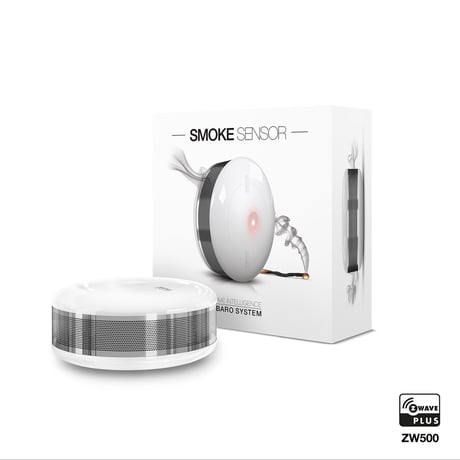
Product Picture


1 - Fibaro Smoke Sensor sensitivity
There are 3 levels of sensitivity to smoke presence. Level 1 means the highest sensitivity. Rising the parameter value lowers the sensitivity to smoke presence.Size: 1 byte
Default: 2
Minimum: 0
Maximum: 0
Possible values
| From | To | Desription |
|---|---|---|
| 1 | 1 | HIGH Sensitivity |
| 2 | 2 | MEDIUM Sensitivity |
| 3 | 3 | LOW Sensitivity |
2 - Z-Wave notifications status
This parameter allows to activate excess temperature and/or casing opening notifications sent to the main controller. Parameter values may be combined, e.g. 1+2=3, means that all notifications are enabled.Size: 1 byte
Default: 0
Minimum: 0
Maximum: 0
Possible values
| From | To | Desription |
|---|---|---|
| 0 | 0 | all notifications disabled |
| 1 | 1 | casing opening notification enabled |
| 2 | 2 | exceeding temperature threshold notification enabled |
3 - Visual indicator notifications status
This parameter allows to activate visual indications but does not apply to major alarms, such as Fire, Trouble and Low battery alarm. Parameter values may be combined, e.g. 1+2+4=7, means that all notifications are enabled.Size: 1 byte
Default: 0
Minimum: 0
Maximum: 0
Possible values
| From | To | Desription |
|---|---|---|
| 0 | 0 | all notifications disabled |
| 1 | 1 | casing opening notification enabled |
| 2 | 2 | exceeding temperature threshold notification enabled |
| 4 | 4 | lack of Z-Wave range notification |
4 - Sound notifications status
This parameter allows to activate sound signals but does not apply to major alarms, such as Fire, Trouble and Low battery alarm. Parameter values may be combined, e.g. 1+2+4=7, means that all notifications are enabled.Size: 1 byte
Default: 0
Minimum: 0
Maximum: 0
Possible values
| From | To | Desription |
|---|---|---|
| 0 | 0 | all notifications disabled |
| 1 | 1 | casing opening notification enabled |
| 2 | 2 | exceeding temperature threshold notification enabled |
| 4 | 4 | lack of Z-Wave range notification |
10 - Configuration of control frames in BASIC command class
This parameter defines which frames will be sent in the 2-nd Association Group (SMOKE ALARM). The values of BASIC ON and BASIC OFF frames may be defined as described in further parameters.Size: 1 byte
Default: 0
Minimum: 0
Maximum: 0
Possible values
| From | To | Desription |
|---|---|---|
| 0 | 0 | BASIC ON & BASIC OFF enabled |
| 1 | 1 | BASIC ON enabled |
| 2 | 2 | BASIC OFF enabled |
11 - BASIC ON frame value
BASIC ON frame is sent in case of smoke presence detection and Fire Alarm triggering. Its value is defined by the parameter.Size: 2 bytes
Default: 255
Minimum: 0
Maximum: 0
Possible values
| From | To | Desription |
|---|---|---|
| 0 | 0 | turn off the device |
| 1 | 99 | set the device to 1-99% |
| 255 | 255 | set the last status |
12 - BASIC OFF frame value
BASIC OFF frame is sent in case of Fire Alarm cancellation. Its value is defined by the parameter.Size: 2 bytes
Default: 0
Minimum: 0
Maximum: 0
Possible values
| From | To | Desription |
|---|---|---|
| 0 | 0 | turn off the device |
| 1 | 99 | set the device to 1-99% |
| 255 | 255 | set the last status |
13 - Alarm broadcast
A value other than 0 means that alarms are being sent in broadcast mode, i.e. to all devices within a Fibaro Smoke Sensor’s range. NOTE Operating in Z-Wave network security mode automatically disables sending alarms in broadcast mode.Size: 1 byte
Default: 0
Minimum: 0
Maximum: 0
Possible values
| From | To | Desription |
|---|---|---|
| 0 | 0 | broadcast inactive |
| 1 | 1 | SMOKE ALARM command broadcast (2-nd & 4-th Association Group) active; casing opening notification broadcast (3-rd & 5-th Association Group) inactive |
| 2 | 2 | SMOKE ALARM command broadcast (2-nd & 4-th Association Group) inactive; casing opening notification broadcast (3-rd & 5-th Association Group) active |
| 3 | 3 | SMOKE ALARM command broadcast (2-nd & 4-th Association Group) active; casing opening notification broadcast (3-rd & 5-th Association Group) active. |
14 - Associations in Z-Wave network security mode
This parameter defines how commands are sent in specified association groups: as secure or non-secure. Parameter is active only in Z-Wave network security mode. It doesn’t apply to 1st Lifeline group. Parameter values may be combined, e.g. 1+2=3 means that 2nd & 3rd group are sent as secure.Size: 1 byte
Default: 15
Minimum: 0
Maximum: 0
Possible values
| From | To | Desription |
|---|---|---|
| 0 | 0 | all groups sent as non-secure |
| 1 | 1 | 2nd group sent as secure |
| 2 | 2 | 3rd group sent as secure |
| 4 | 4 | 4th group sent as secure |
| 8 | 8 | 5th group sent as secure |
20 - Temperature report interval
Time interval between consecutive temperature reports. Report is sent when new temperature value is different from the one previously reported - according to the set hysteresis (parameter 21). Temperature reports can be also sent as a result of polling.Size: 2 bytes
Default: 1
Minimum: 0
Maximum: 0
Possible values
| From | To | Desription |
|---|---|---|
| 0 | 0 | reports inactive |
| 1 | 8640 | [10s-24h] |
21 - Temperature report hysteresis
The temperature report will only be sent if there is a difference in temperature value from the previous value reported, defined in this parameter (hysteresis). Temperature reports can be also sent as a result of polling.Size: 1 byte
Default: 10
Minimum: 0
Maximum: 0
Possible values
| From | To | Desription |
|---|---|---|
| 1 | 100 | (multiply by 0.1) |
30 - Temperature threshold
Temperature value measured by the built-in temperature sensor above which the excess temperature notification is sent (visual indication/sound/Z-Wave report).Size: 1 byte
Default: 55
Minimum: 0
Maximum: 0
Possible values
| From | To | Desription |
|---|---|---|
| 1 | 100 | 1°C - 100°C |
31 - Excess temperature signaling interval
Time interval of signaling (visual indication/sound) excess temperature levelSize: 2 bytes
Default: 1
Minimum: 0
Maximum: 0
Possible values
| From | To | Desription |
|---|---|---|
| 1 | 8640 | [10s-24h] |
32 - Lack of Z-Wave range indication interval
Time interval of signaling (visual indication/sound) lack of Z-Wave rangeSize: 2 bytes
Default: 180
Minimum: 0
Maximum: 0
Possible values
| From | To | Desription |
|---|---|---|
| 1 | 8640 | [10s-24h] |
1) Install the battery. Visual indicator will signal the Z-Wave network adding status (green - device added, red - device not added). 2) Make sure the device is located within direct range of the Z-Wave controller. 3) Set the main controller in add mode (see main controller’s operating manual). 4) Quickly, triple click the B-button, located on FIBARO Smoke Sensor enclosure. 5) FIBARO Smoke Sensor will be detected and added to the Z-Wave network.
1) Make sure there is a battery installed. 2) Set the main controller in remove mode (see main controller’s operating manual). 3) Quickly, triple click the B-button, located on FIBARO Smoke Sensor enclosure.
The Smoke Sensor will wake up at defined time interval and will ALWAYS try to communicate with the main controller. There is a possibility to wake the device up manually by triple-clicking the B-button.
Please use this procedure only in the event that the system primary controller is missing or otherwise inoperable. FIBARO Smoke Sensor reset procedure: 1) Make sure the device is powered. 2) Press and hold the B-button for 3 seconds. Visual indicator will glow white. 3) You will hear a short signal. 4) Release the B-button.
| Type | Value(s) |
|---|
| Group | Type |
|---|---|
| Smoke Alarm | State Idle |
| Sensor type |
|---|
| Smoke Density |