FIBARO
Button
FGPB-101
Wall Controller
HW: 1 FW: 3.02
ZM5101
6.51.09
0x010F (271)
0x0F01 (3841)
0x9000 (36864)
ZC10-19076591
2019-07-01 22:14:27.10798
N/A
Enhanced 232 Slave
Portable Slave
Yes
FIBARO Button is a compact, battery-powered, Z-Wave scene controller.
FIBARO Button is a compact, battery-powered, Z-Wave Plus compatible device. It allows you to control devices through the Z-Wave network and run various scenes defined in FIBARO System. Different actions may be triggered with one to five clicks or by holding the button down. In Panic Button mode, each press of the button results in triggering the Fibaro Alarm. With its small design and wireless communication, the FIBARO Button can be conveniently mounted on any surface and in any position or location at home, e.g. beside the bed or under the desk.
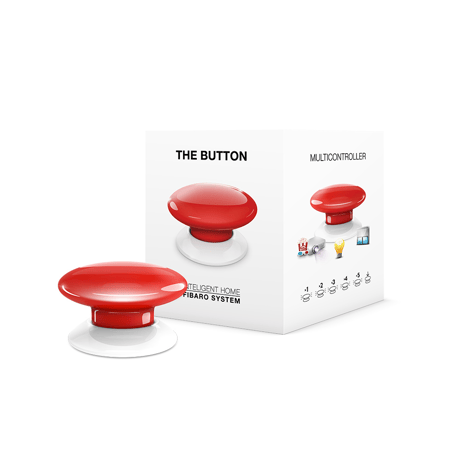
Product Picture


1 - Scenes sent to the controller
This parameter determines which actions result in sending scene IDs and attributes assigned to them. 1 - Key Pressed 1 time 2 - Key Pressed 2 times 4 - Key Pressed 3 times 8 - Key Pressed 4 times 16 - Key Pressed 5 times 32 - Key Held Down 64 - Key Released NOTE Values of parameter 1 may be combined, e.g. 1+2=3 means that scenes will be sent after pressing the button once or twice.Size: 1 byte
Default: 127
Minimum: 0
Maximum: 0
Possible values
| From | To | Desription |
|---|---|---|
| 1 | 1 | Key Pressed 1 time |
| 2 | 2 | Key Pressed 2 times |
| 4 | 4 | Key Pressed 3 times |
| 8 | 8 | Key Pressed 4 times |
| 16 | 16 | Key Pressed 5 times |
| 32 | 32 | Key Held Down |
| 64 | 64 | Key Released |
3 - Associations in Z-Wave network security mode
This parameter defines how commands are sent in specified association groups: as secure or non-secure. Parameter is active only in Z-Wave network security mode. It does not apply to 1st „Lifeline” group. 1 - 2nd group sent as secure 2 - 3rd group sent as secure 4 - 4th group sent as secure NOTE Values of parameter 3 may be combined, e.g. 1+2=3 means that 2nd & 3rd group are sent as secure.Size: 1 byte
Default: 7
Minimum: 0
Maximum: 0
Possible values
| From | To | Desription |
|---|---|---|
| 1 | 1 | 2nd group sent as secure |
| 2 | 2 | 3rd group sent as secure |
| 4 | 4 | 4th group sent as secure |
10 - Key Pressed 1 time – command sent to 2nd association group
This parameter defines commands sent to devices associated in 2nd association group after a single click. 0 - no action 1 - SWITCH ON 2 - SWITCH OFF 3 - SWITCH ON/OFF – alternatelySize: 1 byte
Default: 3
Minimum: 0
Maximum: 0
Possible values
| From | To | Desription |
|---|---|---|
| 0 | 0 | no action |
| 1 | 1 | SWITCH ON |
| 2 | 2 | SWITCH OFF |
| 3 | 3 | SWITCH ON/OFF – alternately |
11 - Key Pressed 1 time – value of SWITCH ON command sent to 2nd association group
This parameter defines value of SWITCH ON command sent to devices in 2nd association group after a single click. 1-255- sent value NOTE Setting parameters 11, 13, 15, 21, 23 and 25 to appropriate value will result in: 1-99 - forcing level of associated devices 255 - setting associated devices to the last remembered state or turning them onSize: 2 bytes
Default: 255
Minimum: 0
Maximum: 0
Possible values
| From | To | Desription |
|---|---|---|
| 1 | 99 | forcing level of associated devices |
| 255 | 255 | setting associated devices to the last remembered state or turning them on |
12 - Key Pressed 2 times – command sent to 2nd association group
This parameter defines commands sent to devices associated in 2nd association group after a double click.Size: 1 byte
Default: 1
Minimum: 0
Maximum: 0
Possible values
| From | To | Desription |
|---|---|---|
| 0 | 0 | no action |
| 1 | 1 | SWITCH ON |
| 2 | 2 | SWITCH OFF |
| 3 | 3 | SWITCH ON/OFF – alternately |
13 - Key Pressed 2 times – value of SWITCH ON command sent to 2nd association group
This parameter defines value of SWITCH ON command sent to devices in 2nd association group after a double click. 1-255 - sent valueSize: 2 bytes
Default: 99
Minimum: 0
Maximum: 0
Possible values
| From | To | Desription |
|---|---|---|
| 1 | 99 | forcing level of associated devices |
| 255 | 255 | setting associated devices to the last remembered state or turning them on |
14 - Key Pressed 3 times – command sent to 2nd association group
This parameter defines commands sent to devices associated in 2nd association group after a triple click. 0- no action 1- SWITCH ON 2- SWITCH OFF 3- SWITCH ON/OFF – alternatelySize: 1 byte
Default: 0
Minimum: 0
Maximum: 0
Possible values
| From | To | Desription |
|---|---|---|
| 0 | 0 | no action |
| 1 | 1 | SWITCH ON |
| 2 | 2 | SWITCH OFF |
| 3 | 3 | SWITCH ON/OFF – alternately |
15 - Key Pressed 3 times – value of SWITCH ON command sent to 2nd association group
This parameter defines value of SWITCH ON command sent to devices in 2nd association group after a triple click. 1-255 - sent valueSize: 2 bytes
Default: 255
Minimum: 0
Maximum: 0
Possible values
| From | To | Desription |
|---|---|---|
| 1 | 99 | forcing level of associated devices |
| 255 | 255 | setting associated devices to the last remembered state or turning them on |
20 - Key Pressed 1 time – command sent to 3rd association group
This parameter defines commands sent to devices associated in 3rd association group after a single click. 0- no action 1- SWITCH ON 2- SWITCH OFF 3- SWITCH ON/OFF – alternatelySize: 1 byte
Default: 3
Minimum: 0
Maximum: 0
Possible values
| From | To | Desription |
|---|---|---|
| 0 | 0 | no action |
| 1 | 1 | SWITCH ON |
| 2 | 2 | SWITCH OFF |
| 3 | 3 | SWITCH ON/OFF – alternately |
21 - Key Pressed 1 time – value of SWITCH ON command sent to 3rd association group
This parameter defines value of SWITCH ON command sent to devices in 3rd association group after a single click. 1-255 - sent valueSize: 2 bytes
Default: 255
Minimum: 0
Maximum: 0
Possible values
| From | To | Desription |
|---|---|---|
| 1 | 99 | forcing level of associated devices |
| 255 | 255 | setting associated devices to the last remembered state or turning them on |
22 - Key Pressed 2 times – command sent to 3rd association group
This parameter defines commands sent to devices associated in 3rd association group after a double click.Size: 1 byte
Default: 1
Minimum: 0
Maximum: 0
Possible values
| From | To | Desription |
|---|---|---|
| 0 | 0 | no action |
| 1 | 1 | SWITCH ON |
| 2 | 2 | SWITCH OFF |
| 3 | 3 | SWITCH ON/OFF – alternately |
23 - Key Pressed 2 times – value of SWITCH ON command sent to 3rd association group
This parameter defines value of SWITCH ON command sent to devices in 3rd association group after a double click.Size: 2 bytes
Default: 99
Minimum: 0
Maximum: 0
Possible values
| From | To | Desription |
|---|---|---|
| 1 | 99 | forcing level of associated devices |
| 255 | 255 | setting associated devices to the last remembered state or turning them on |
24 - Key Pressed 3 times – command sent to 3rd association group
This parameter defines commands sent to devices associated in 3rd association group after a triple click.Size: 1 byte
Default: 0
Minimum: 0
Maximum: 0
Possible values
| From | To | Desription |
|---|---|---|
| 0 | 0 | no action |
| 1 | 1 | SWITCH ON |
| 2 | 2 | SWITCH OFF |
| 3 | 3 | SWITCH ON/OFF – alternately |
25 - Key Pressed 3 times – value of SWITCH ON command sent to 3rd association group
This parameter defines value of SWITCH ON command sent to devices in 3rd association group after a triple click.Size: 2 bytes
Default: 255
Minimum: 0
Maximum: 0
Possible values
| From | To | Desription |
|---|---|---|
| 1 | 99 | forcing level of associated devices |
| 255 | 255 | setting associated devices to the last remembered state or turning them on |
29 - Key Held Down – command sent to 3rd association group
This parameter defines commands sent to devices associated in 3rd association group after holding the button down.Size: 1 byte
Default: 3
Minimum: 0
Maximum: 0
Possible values
| From | To | Desription |
|---|---|---|
| 0 | 0 | no action |
| 1 | 1 | START LEVEL CHANGE UP (brightening) |
| 2 | 2 | START LEVEL CHANGE DOWN (dimming) |
| 3 | 3 | START LEVEL CHANGE UP/DOWN (brightening/dimming) – alternately |
30 - Alarm frame triggers
Parameter determines which actions result in sending alarm frames to 4th association group. 1 - Key Pressed 1 time 2 - Key Pressed 2 times 4 - Key Pressed 3 times 8 - Key Pressed 4 times 16 - Key Pressed 5 times 32 - Key Held Down 64 - Key Released NOTE Values of parameter 30 may be combined, e.g. 1+2=3 means that alarm frames will be sent after pressing the button once or twice.Size: 1 byte
Default: 127
Minimum: 0
Maximum: 0
Possible values
| From | To | Desription |
|---|---|---|
| 1 | 1 | Key Pressed 1 time |
| 2 | 2 | Key Pressed 2 times |
| 4 | 4 | Key Pressed 3 times |
| 8 | 8 | Key Pressed 4 times |
| 16 | 16 | Key Pressed 5 times |
| 32 | 32 | Key Held Down |
| 64 | 64 | Key Released |
1) Place the Button within the direct range of your Z-Wave controller. 2) Set the main controller in (security/non-security) add mode (see the controller’s manual). 3) Click the Button at least six times. 4) Wait for the adding process to end. 5) Successful adding will be confirmed by the Z-Wave controller’s message.
1) Place the Button within the direct range of your Z-Wave controller. 2) Set the main controller in remove mode (see the controller’s manual). 3) Click the Button at least six times. 4) Wait for the removing process to end. 5) Successful removing will be confirmed by the Z-Wave controller’s message.
The Button needs to be woken up to receive information about the new configuration from the controller, like parameters and associations. 1) Click the Button 4 times to wake it up.
Reset procedure allows to restore the device back to its factory settings, which means all information about the Z-Wave controller and user configuration will be deleted. In order to reset the device: 1) Click the Button exactly five times. 2) Press and hold the Button for at least 5 seconds. Resetting the device is not the recommend- ed way of removing the device from the Z-Wave network. Use reset procedure only if the primary controller is missing or inoperable. Certain device removal can be achieved by the procedure of removing.
| Type | Value(s) |
|---|
| Group | Type |
|---|---|
| Home Security |
|