Aeotec
Door/Window Sensor 7
ZWA008-B
Notification Sensor
HW: 1 FW: 1.00
ZM5101
6.81.01
0x0371 (881)
0x0202 (514)
0x0007 (7)
ZC10-19076678
2019-07-17 17:23:20.383301
N/A
Enhanced 232 Slave
Reporting Sleeping Slave
Yes
Z-Wave Door/ Window Sensor 7.
Aeotec Door/ Window Sensor 7 is a small window position sensor for your smart home, it monitors window and their exact opening position and lets your know when a window is tilted or completely opened. It also supports connecting external binary sensors through the dry binary contact of the Door/ Window sensor.
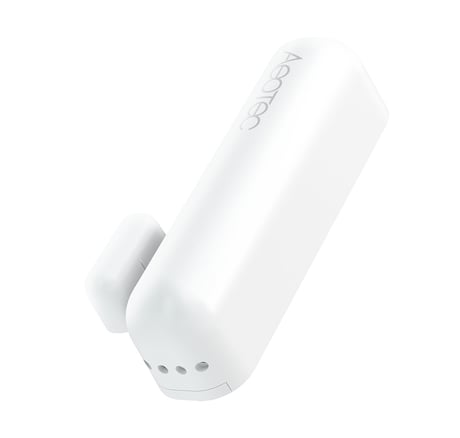
Product Picture


1 - Sensor Operation Mode
This parameter defines if the internal magnet sensor or the external terminal input is detected and used to issue alarm notification. There is always one input active only. The other sensor input the deactivated.Size: 1 byte
Default: 0
Minimum: 0
Maximum: 0
Possible values
| From | To | Desription |
|---|---|---|
| 0 | 0 | Internal Magnet Sensor Used |
| 1 | 1 | External Terminal Inputs Used |
2 - Sensor State Polarity
This parameter defines the polarity of the magnet sensor.Size: 1 byte
Default: 0
Minimum: 0
Maximum: 0
Possible values
| From | To | Desription |
|---|---|---|
| 0 | 0 | Closed when Magnet in proximity |
| 1 | 1 | Opened when Magnet in proximity |
3 - Visual LED Indications
This parameter defines when the red LED will indicate events. Disabling all indications may extend battery life.Size: 1 byte
Default: 7
Minimum: 0
Maximum: 0
Possible values
| From | To | Desription |
|---|---|---|
| 1 | 1 | No Indications |
| 2 | 2 | Open/Close Status Change |
| 4 | 4 | Wake Up |
| 16 | 16 | Device Tampering |
4 - Range Test after double click
Allows to enable the activation of a Z-Wave range test with double clicking the tamper switch.Size: 1 byte
Default: 0
Minimum: 0
Maximum: 0
Possible values
| From | To | Desription |
|---|---|---|
| 0 | 0 | Disabled |
| 1 | 1 | Enabled |
5 - 2nd Association Group Trigger
his parameter defines the status of the magnet switch that causes sending a BASIC command to all devices of Association Group 2.Size: 1 byte
Default: 0
Minimum: 0
Maximum: 0
Possible values
| From | To | Desription |
|---|---|---|
| 0 | 0 | Switch after ‘Open‘ and ‘Close‘ |
| 1 | 1 | Switch after ‘Open‘ |
| 2 | 2 | Switch after ‘Close‘ |
6 - Command Sent to Devices of Association Group 2
This parameter defines which commands is sent to 2nd Association GroupSize: 1 byte
Default: 2
Minimum: 0
Maximum: 0
Possible values
| From | To | Desription |
|---|---|---|
| 0 | 0 | On |
| 1 | 1 | Off |
| 2 | 2 | On and Off |
7 - BASIC command value sent to 2nd Association Group on ‘On‘ event
This is the BASIC command value sent in case of ‘On‘ event.Size: 1 byte
Default: -1
Minimum: 0
Maximum: 0
Possible values
| From | To | Desription |
|---|---|---|
| -1 | -1 | Value |
| 0 | 99 | Value |
8 - BASIC command value sent to 2nd Association Group on ‘Off‘ event
This is the BASIC command value sent in case of ‘Off‘ event.Size: 1 byte
Default: 0
Minimum: 0
Maximum: 0
Possible values
| From | To | Desription |
|---|---|---|
| -1 | -1 | Value |
| 0 | 99 | Value |
9 - Time Delay of ‘Off‘ command frame
Off command is sent after a delay defined in this parameter.Size: 2 bytes
Default: 0
Minimum: 0
Maximum: 0
Possible values
| From | To | Desription |
|---|---|---|
| 0 | 32400 | seconds |
10 - Time Delay of ‘Off‘ command frame
Off command is sent after a delay defined in this parameter.Size: 2 bytes
Default: 0
Minimum: 0
Maximum: 0
Possible values
| From | To | Desription |
|---|---|---|
| 0 | 32400 | seconds |
11 - Delay of Tamper Alarm Cancellation
Time a tamper alarm is delayed.Size: 2 bytes
Default: 0
Minimum: 0
Maximum: 0
Possible values
| From | To | Desription |
|---|---|---|
| 0 | 32400 | seconds |
12 - Reporting Tamper Alarm Cancellation
This parameter defines if the alarm cancellation event is reported.Size: 1 byte
Default: 1
Minimum: 0
Maximum: 0
Possible values
| From | To | Desription |
|---|---|---|
| 0 | 0 | Do not send Report |
| 1 | 1 | Send Report |
13 - Central Scene Event Functionality
This parameter enables/disables the central scene function.Size: 1 byte
Default: 0
Minimum: 0
Maximum: 0
Possible values
| From | To | Desription |
|---|---|---|
| 0 | 0 | Disabled |
| 1 | 1 | Enabled |
14 - Tilt Sensor Functionality
This parameter enables/disables the tilt function.Size: 1 byte
Default: 1
Minimum: 0
Maximum: 0
Possible values
| From | To | Desription |
|---|---|---|
| 0 | 0 | Disabled |
| 1 | 1 | Enabled |
Tripple clicking the tamper button includes (adds) the device.
Tripple clicking the tamper button excludes (removes) the device.
A single click on the tamper button will wakeup the device.
This device also allows to be reset without any involvement of a Z-Wave controller. This procedure should only be used when the primary controller is inoperable. Once Cover is removed and tamper switch is tripped, push the tamper for 5 seconds until red LED blinks. Then release tamper and push it again for 5 seconds until LED blinks.
It supports connecting external sensor. E.g. Dry Contact Sensor, Water Sensor probes.
| Type | Value(s) |
|---|
| Group | Type |
|---|---|
| Access Control | (Refer to parameters): State idle |
| Home Security | (Refer to parameters): State idle |
| Power Management | (Refer to parameters): State idle |
| Sensor type |
|---|
| General Purpose |