Great Connection System Pte. Ltd.
Recessed Door/ Window Sensor
ZD2105US-5
Notification Sensor
HW: 1 FW: 24.01
ZM5202
6.81.00
0x042A (1066)
0x2022 (8226)
0x2202 (8706)
ZC10-19086709
2019-08-07 18:07:28.801472
N/A
Enhanced 232 Slave
Reporting Sleeping Slave
Yes
Battery powered door and window sensor with magnetic reed switch and external switch contacts for adding additional sensor contacts.
The ZD2105-5 Door and Window sensor is used in any Z-Wave network to detect the opening or closing of a door or window. Special Design can fit most of door/window frame. The primary sensing element is a magnetic reed switch, the ZD2105-5 is supplied with the sensor, sensor mounting bracket and the trigger magnet. An additional set of sensor inputs are provided through a 2 position screw terminal and can be used to expand the sensor capability to multiple inputs. The ZD2105-5 is powered by 2 x AAA Battery (supplied with unit, battery life is more than 2 years) and is intended for indoor use only. The ZD2105-5 features tamper proof switch, low battery warning and can be firmware updated over the air.
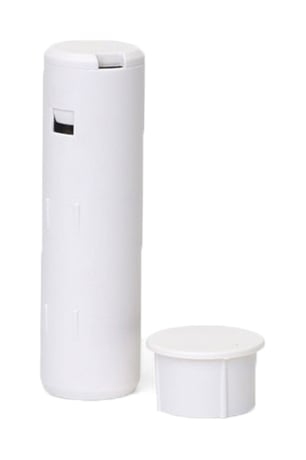
Product Picture
For “Inclusion” in (adding to) a network: Put the Z-Wave™ Interface Controller into “inclusion” mode, and following its instruction to add the ZD2105 to your controller. To get in the “inclusion” mode, the distance between sensor and controller is suggested to be in one meter. Press the program switch of ZD2105 then the device will send a signal to be included (or excluded) to/from the network; otherwise, ZD2105 will go to sleep after 20 seconds.
For “Exclusion” from (removing from) a network: Put the Z-Wave™ Interface Controller into “exclusion” mode, and following its instruction to remove the ZD2105 from your controller. Press the program switch of ZD2105 for 1 second at least to be excluded. Note: All user and network settings will be cleared and the device reset to factory defaults when the device is excluded.
Press program switch to send the NIF and after 3 seconds to send Wake Up Notification for receiving all the command class from controller. If ZD2105 received “Wake Up No More Information” command then the ZD2105 will go to sleep mode or it will wait 10 seconds then go sleep mode. It will proceed all the commands after sending the “Wake Up Notification”
Factory Default Reset: Trigger the rear cover switch to send the Alarm Report and trigger the reed switch (close & open) 5 times in 10 seconds, ZD2105 will send the “Device Reset Locally Notification” command and reset to the factory default. (Remark: This is to be used only in the case of primary controller being inoperable or otherwise unavailable.)
PowerLevel Control, Battery Votlage Detection(Auto report low battery),OTA function
| Type | Value(s) |
|---|
| Group | Type |
|---|---|
| Access Control | (Refer to parameters): State idle |
| Sensor type |
|---|
| General Purpose |