Gerber Technology 2016 Ltd.
Gerber Prime Switch
GPS-2000
On/Off Power Switch
HW: 1 FW: 1.20:01.10
SD3502
6.81.03
0x0408 (1032)
0x0001 (1)
0x0073 (115)
ZC10-19086724
2019-08-26 19:15:46.939864
N/A
Enhanced 232 Slave
Always On Slave
The Gerber Prime Switch is a Z-Wave TM enabled wireless device fully compatible with any Z-Wave TM enabled networks. Inclusion of this unit on other manufacturer’s Wireless Controller menu allows remote operation of the unit and connected load. Remote control of Dimmer/Relay modules are possible with other manufacturer’s wireless Controller as well.
The Gerber Prime Switch is a Z-Wave TM enabled wireless device fully compatible with any Z-Wave TM enabled networks. This device is a security enabled Z-Wave Plus product that uses encrypted Z-Wave Plus messages to communicate to other security enabled Z-Wave Plus products. Z-Wave TM enabled devices displaying the Z-Wave TM logo can also be used with this device regardless of the manufacturer, and this device can also be used in other manufacturer’s Z-Wave TM enabled networks. This device must be used in conjunction with a Security Enabled Z-Wave Controller in order to fully utilize all functions. Inclusion of this unit on other manufacturer’s Wireless Controller menu allows remote operation of the unit and connected load. Remote control of Dimmer/Relay modules are possible with other manufacturer’s wireless Controller as well. GPS-2000 is designed to act as a repeater. Repeaters will re-transmit the RF signal to ensure that the signal is received by its intended destination by routing the signal around obstacles and radio dead spots. Its functionality and supported command classes are identical when included as a secure and non-secure device.
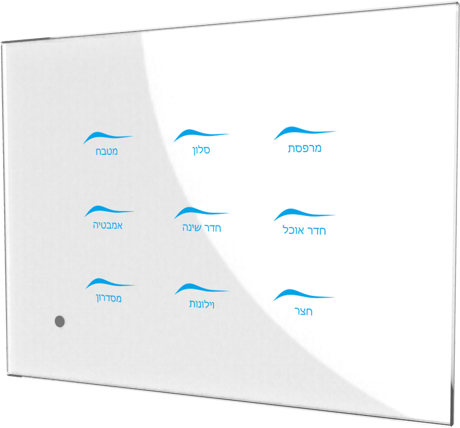
Product Image Published
1.Set your Z-Wave controller into inclusion mode by following the instructions provided by the controller manufacturer. 2. Press the middle button (button ⑤) three times within 2 seconds intervals and device will enter inclusion mode. 3. Node ID is included.
1.Set your Z-Wave controller into exclusion mode by following the instructions provided by the controller manufacturer. 2. Press the middle button (button ⑤) three times within 2 seconds intervals and device will enter exclusion mode. 3. Node ID is excluded.
Use this procedure only in the event that the primary controller is missing or otherwise inoperable. 1.Press the middle button (button ⑤) four times and hold the button on the 4th time for about 3~10 seconds, then release button. The green LED will light on ⑤ when every pressing and light off when every releasing. User should check LED whether ⑤ it accepted the pressing or not. 2.IDs will get excluded and all settings will be reset. Surround Blue LED will light on at the 4th pressing and 5 seconds later light off. If reset successfully, Surround Blue LED light will flash one time.
1. The product has a DSK string. For example : 44092-23875-12431-52375-41125-14558-37629-65457 User can find QR Code and DSK string on our product package and back of product. 2. SmartStart enabled products can be added into a Z-Wave network by scanning the Z-Wave QR Code on the product, with a controller providing SmartStart inclusion. No further action is required and the SmartStart product will be added automatically to the closest network within 10 minutes of being switched on in the network vicinity.
| Type | Value(s) |
|---|