Everspring
Dual Relay In-Wall Module
AN196-0
On/Off Power Switch
HW: 1 FW: 1.01:00.01
SD3502
6.81.03
0x0060 (96)
0x0004 (4)
0x000E (14)
ZC10-19096738
2019-09-09 18:52:49.124492
N/A
Enhanced 232 Slave
Always On Slave
The dual relay in-wall module contains two sets of relays and switches, with each set dedicated for controlling lighting or an appliance in your home.
The dual relay in-wall module contains two sets of relays and switches, with each set dedicated for controlling lighting or an appliance in your home. The module is a Z-Wave enabled device which is fully compatible with any Z-Wave enabled network. Each relay can be turned on/off individually using Z-wave commands or using the switches connected to the module. At 230V voltage, this module can support up to 2*4.3A output, 2*1000W resistive load. This unit is to be installed and sealed inside an electrical switch box.
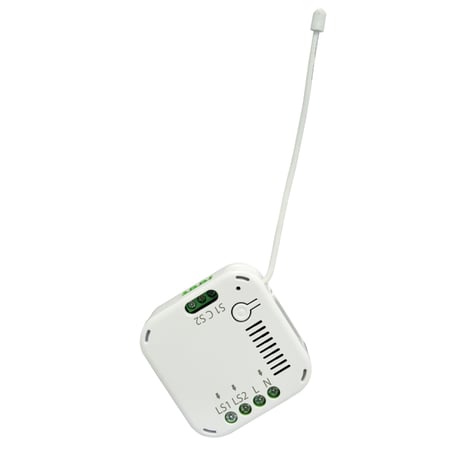
Product Image Published


1 - Parameter 1
Switch 1 TypeSize: 1 byte
Default: 0
Minimum: 0
Maximum: 1
Possible values
| From | To | Desription |
|---|---|---|
| 0 | 0 | Momentary |
| 1 | 1 | Toggle |
2 - Parameter 2
Switch 2 TypeSize: 1 byte
Default: 0
Minimum: 0
Maximum: 1
Possible values
| From | To | Desription |
|---|---|---|
| 0 | 0 | Momentary |
| 1 | 1 | Toggle |
3 - Parameter 3
Relay 1 Auto Off TimeSize: 4 bytes
Default: 0
Minimum: 0
Maximum: 43200
Possible values
| From | To | Desription |
|---|---|---|
| 0 | 43200 | Max 12hrs |
4 - Parameter 4
Relay 2 Auto Off TimeSize: 4 bytes
Default: 43200
Minimum: 0
Maximum: 43200
Possible values
| From | To | Desription |
|---|---|---|
| 0 | 43200 | Max 12hrs |
5 - Parameter 5
Set whether to remember the last status of Relay 1Size: 1 byte
Default: 1
Minimum: 0
Maximum: 1
Possible values
| From | To | Desription |
|---|---|---|
| 0 | 0 | do not remember |
| 1 | 1 | remember |
6 - Parameter 6
Set whether to remember the last status of Relay 2Size: 1 byte
Default: 1
Minimum: 0
Maximum: 1
Possible values
| From | To | Desription |
|---|---|---|
| 0 | 0 | do not remember |
| 1 | 1 | remember |
1. Put the Z-Wave Controller into inclusion mode. 2. Press the link key three times within 1.5 seconds to put the unit into inclusion mode.
1. Put the Z-Wave Controller into exclusion mode. 2. Press the link key three times within 1.5 seconds to put the unit into exclusion mode.
1. Press the link key three times within 1.5 seconds to put the unit into exclusion mode. 2. Within 1 second of step 1, press link key again and hold until LED is off (about 5 seconds). 3. Node ID is excluded. The device reverts to factory default state and will be in auto-inclusion mode for 4 minutes. (This procedure should only be used when the network primary controller is inoperable.)
If you are connecting this unit to a Z-Wave Controller that utilizes the S2 security protocol, you may be asked to enter a 5 digit Device Specific Key (DSK) that is unique to each unit by your controller. This can be found in one of two places: - on the QR code label on the back of the unit - on the insert card inside the packaging
| Type | Value(s) |
|---|
| Group | Type |
|---|---|
| Power Management | Power status: Power has been applied |