Dooya
Curtain Motor
DT82TV / F-1.2 / 14
Window Covering - Pos/End Aware
HW: 144 FW: 1.14:01.04
ZM5202
6.71.01
0x030A (778)
0x0103 (259)
0x0190 (400)
ZC10-20016829
2020-01-07 23:56:29.255171
N/A
Enhanced 232 Slave
Always On Slave
Z-Wave integrated Curtain Motor
DOOYA Z-wave curtain motor is designed with exceeding commercial standards, with its exceptional quietness and user friendly set up. Multiple control options enable the users to operate the curtain by remote, APP, or with hands. Pull to move function would be especially helpful and convenient to users who are not yet familiar with motorization. Durability in use guarantee a 10,000 times use. Additionally, the motor is more than what were mentioned above.
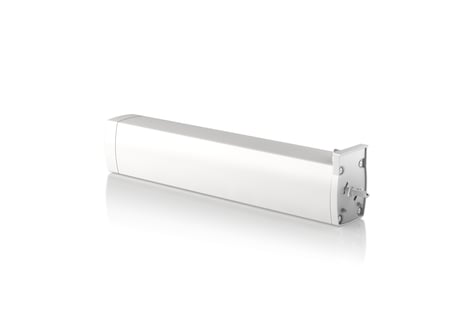
Product Image


1 - CONFIGURATION_SET
This parameter can be used to set the motor rotation direction,the motor direction is forward (Configuration Value set to 0) or the opposite direction(Configuration Value set to 1),The default value is 0Size: 1 byte
Default: 0
Minimum: 0
Maximum: 1
Possible values
| From | To | Desription |
|---|---|---|
| 0 | 1 | 0: Forward 1: Opposite direction |
2 - Set to start holding hands
This parameter can be used to set the motor open hand start function(Configuration Value set to 0) or closed(Configuration Value set to 1),The default value is 0Size: 1 byte
Default: 0
Minimum: 0
Maximum: 1
Possible values
| From | To | Desription |
|---|---|---|
| 0 | 1 | 0: Enable motor open hand start function 1: Disable motor open hand start function |
3 - Parameter 3
Configure weak electric switch mode:This parameter can be used to set the need of weak electric switch mode. Provide 4 kinds of weak electric switch mode is optional,respectively:Double-button reboundable switch(Configuration Value set to 1),Double-button not reboundable switch(Configuration Value set to 2),DC246 switch(Configuration Value set to 3),Single-button cyclic switch mode(Configuration Value set to 4),The default value is 1.Size: 1 byte
Default: 1
Minimum: 1
Maximum: 4
Possible values
| From | To | Desription |
|---|---|---|
| 1 | 4 | weak electric switch mode selection |
4 - Parameter 4
Configure strong electric switch mode:This parameter can be used to set the need of strong electric switch mode. Provide 3 kinds of weak electric switch mode is optional,respectively:Double-button not reboundable(Configuration Value set to 0) ,Hotel mode(Configuration Value set to 1),Double-button reboundable mode(Configuration Value set to 2),The default value is 0.Size: 1 byte
Default: 0
Minimum: 0
Maximum: 2
Possible values
| From | To | Desription |
|---|---|---|
| 0 | 2 | Configure strong electric switch mode |
5 - Parameter 5
Read whether the total limit is set:This parameter can be used to read the motor's total limit is already set.Not set the, limit(Read into the Configuration Value is 0);Already set the limit(Read into the Configuration Value is 1)Size: 1 byte
Default: 0
Minimum: 0
Maximum: 0
Possible values
| From | To | Desription |
|---|---|---|
| 0 | 0 | Read whether the total limit is set |
6 - Parameter 6
Read the device type:This parameter can be used to read the type of the motor.Motor types are divided into curtain,motor(Read into the Configuration Value is 0x01),shutter(Read into the Configuration Value is 0x11),Venetian blinds (Read into the Configuration Value is 0x12)Size: 1 byte
Default: 0
Minimum: 0
Maximum: 0
Possible values
| From | To | Desription |
|---|---|---|
| 0 | 0 | Read the device type:This parameter can be used to read the type of the motor |
| 0 | 0 | Read the device type:This parameter can be used to read the type of the motor |
7 - Parameter 7
Read the motor power supply type:This parameter can be used to read the motor power supply type,The power ofmotor is classified into:Mains power supply(Read into the Configuration Value is 0),battery power(Read into the Configuration Value is 1).Size: 1 byte
Default: 0
Minimum: 0
Maximum: 0
Possible values
| From | To | Desription |
|---|---|---|
| 0 | 0 | Read the motor power supply type |
8 - Parameter 8
Manually set / cancel open borders:Manually set the open boundary of the curtain(Configuration Value set to 1), cancel manually open the border of the curtain(Configuration Value set to 0).Size: 1 byte
Default: 0
Minimum: 0
Maximum: 1
Possible values
| From | To | Desription |
|---|---|---|
| 0 | 1 | Manually set / cancel open borders |
9 - Parameter 9
Manually set / cancel close borders:Manually set the close boundary of the curtain(Configuration Value set to 1), cancel manually close the border of the curtain(Configuration Value set to 0).Size: 1 byte
Default: 0
Minimum: 0
Maximum: 1
Possible values
| From | To | Desription |
|---|---|---|
| 0 | 1 | anually set / cancel close borders |
10 - Parameter 10
Delete the limit:This command can delete the limit that has been set for the motor.Size: 1 byte
Default: 127
Minimum: 127
Maximum: 127
Possible values
| From | To | Desription |
|---|---|---|
| 127 | 127 | 0x7F: Delete the device limits |
Power on the motor, press the Z-Wave setting button three times in 1.5 secs. The motor will be detected by your main Z-wave controller and will be included into the Z-Wave network
Power on the motor, press the Z-Wave setting button three times in 1.5 secs. The device will exclude the Z-Wave Network.
Press and hold the Z-Wave setting button for 15 secs to reset the product to the factory default settings; Please use this procedure only when the network primary controller is missing or otherwise inoperable.
No other special features