Philio Technology
Air Quality Multi Sensor
PAT05
Notification Sensor
HW: 1 FW: 1.01:01.01
SD3502
6.81.03
0x013C (316)
0x0002 (2)
0x0052 (82)
ZC10-19096741
2019-09-11 18:25:01.764449
N/A
Enhanced 232 Slave
Always On Slave
The PAT05 multi-sensor is a device that allows you to check the air quality in your home.
The PAT05 multi-sensor is a device that allows you to check the air quality in your home. The PAT05 Multi-sensor is easy to use and very convenient for your home. Just set the sensor on the wall of the rooms you would like to control, and you are ready to go. Moreover, the PAT05 can be integrated to other Z-Wave certified devices, and controlled with Philio app “Home Mate 2.” You can now protect your family and make sure there are no gas leaks that can harm those you love the most. Set up your PAT05 to send regular notifications and take control even when not at home. This device is a security enabled Z-Wave Plus product that is able to use encrypted Z-Wave Plus messages to communicate to other security enabled Z-Wave Plus products. Z-WaveTM enabled devices displaying the Z-WaveTM logo can also be used with it regardless of the manufacturer, and ours can also be used in other manufacturer’s Z-WaveTM enabled networks. The product supports Over The Air(OTA) feature for the products firmware upgrade. This product can be included and operated in any Z-WaveTM network with other Z-WaveTM certified devices from other manufacturers and/or other applications. All non-battery operated nodes within the network will act as repeaters regardless of vendor to increase reliability of the network. The device adopt the Z-WaveTM 500 series chip, when your Z-WaveTM network system is all made by Z-WaveTM 500 series devices. The network system will have the advantages as below.
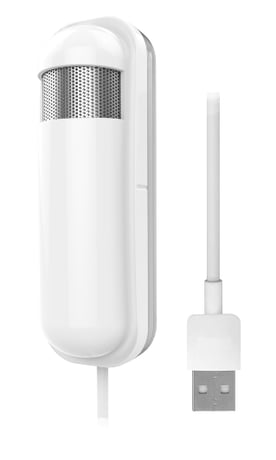
Product Image Published


3 - eCO2 Threshold line 1
eCO2 difference return: The Unit is 100ppm. 0 means turn off eCO2 detected function. When there is a set value, it means that it will exceed or fall below the report.Size: 1 byte
Default: 0
Minimum: 0
Maximum: 100
Possible values
| From | To | Desription |
|---|---|---|
| 0 | 100 |
4 - eCO2 Threshold line 2
eCO2 difference return: The Unit is 100ppm. 0 means turn off eCO2 detected function. When there is a set value, it means that it will exceed or fall below the report.Size: 1 byte
Default: 0
Minimum: 0
Maximum: 100
Possible values
| From | To | Desription |
|---|---|---|
| 0 | 100 |
5 - eCO2 Threshold line 3
eCO2 difference return: The Unit is 100ppm. 0 means turn off eCO2 detected function. When there is a set value, it means that it will exceed or fall below the report.Size: 1 byte
Default: 0
Minimum: 0
Maximum: 100
Possible values
| From | To | Desription |
|---|---|---|
| 0 | 100 |
6 - eCO2 Threshold line 4
eCO2 difference return: The Unit is 100ppm. 0 means turn off eCO2 detected function. When there is a set value, it means that it will exceed or fall below the report.Size: 1 byte
Default: 0
Minimum: 0
Maximum: 100
Possible values
| From | To | Desription |
|---|---|---|
| 0 | 100 |
7 - eCO2 Threshold line 5
eCO2 difference return: The Unit is 100ppm. 0 means turn off eCO2 detected function. When there is a set value, it means that it will exceed or fall below the report.Size: 1 byte
Default: 0
Minimum: 0
Maximum: 100
Possible values
| From | To | Desription |
|---|---|---|
| 0 | 100 |
8 - TVOC Threshold line 1
TVOC difference return: The Unit is 100ppb. 0 means turn off TVOC detected function. When there is a set value, it means that it will exceed or fall below the report.Size: 1 byte
Default: 0
Minimum: 0
Maximum: 100
Possible values
| From | To | Desription |
|---|---|---|
| 0 | 100 |
9 - TVOC Threshold line 2
TVOC difference return: The Unit is 100ppb. 0 means turn off TVOC detected function. When there is a set value, it means that it will exceed or fall below the report.Size: 1 byte
Default: 0
Minimum: 0
Maximum: 100
Possible values
| From | To | Desription |
|---|---|---|
| 0 | 100 |
10 - TVOC Threshold line 3
TVOC difference return: The Unit is 100ppb. 0 means turn off TVOC detected function. When there is a set value, it means that it will exceed or fall below the report.Size: 1 byte
Default: 0
Minimum: 0
Maximum: 100
Possible values
| From | To | Desription |
|---|---|---|
| 0 | 100 |
11 - TVOC Threshold line 4
TVOC difference return: The Unit is 100ppb. 0 means turn off TVOC detected function. When there is a set value, it means that it will exceed or fall below the report.Size: 1 byte
Default: 0
Minimum: 0
Maximum: 100
Possible values
| From | To | Desription |
|---|---|---|
| 0 | 100 |
12 - TVOC Threshold line 5
TVOC difference return: The Unit is 100ppb. 0 means turn off TVOC detected function. When there is a set value, it means that it will exceed or fall below the report.Size: 1 byte
Default: 0
Minimum: 0
Maximum: 100
Possible values
| From | To | Desription |
|---|---|---|
| 0 | 100 |
13 - Customer Function
Customer function switch, using bit control. Caution: The value is unsigned byte, the range is from 0x00 ~ 0x7F.Size: 1 byte
Default: 1
Minimum: 0
Maximum: 127
Possible values
| From | To | Desription |
|---|---|---|
| 0 | 127 |
14 - ECO2 Auto Report Time
The interval time for auto report the eCO2. The default value is 1. The tick time can setting by the configuration No.16.Size: 1 byte
Default: 1
Minimum: 1
Maximum: 127
Possible values
| From | To | Desription |
|---|---|---|
| 1 | 127 |
15 - TVOC Auto Report Time
The interval time for auto report the TVOC. The default value is 1. The tick time can setting by the configuration No.16.Size: 1 byte
Default: 0
Minimum: 1
Maximum: 127
Possible values
| From | To | Desription |
|---|---|---|
| 1 | 127 |
16 - Auto Report Tick Interval
The interval time for auto report each tick. Setting this configuration will effect configuration No.14 and No.15. The unit is 1 minute. Caution1: The value is unsigned byte, the range is from 0x00 ~ 0x7F.Size: 1 byte
Default: 60
Minimum: 1
Maximum: 127
Possible values
| From | To | Desription |
|---|---|---|
| 1 | 127 |
17 - eCO2 Differential percent Report
The eCO2 Differential to report. 0 means turn off this function. The unit is percentage. Enable this function the device will detect every percentage. And when the lightSensor is over 10 percentage, it will continue report.Size: 1 byte
Default: 10
Minimum: 0
Maximum: 100
Possible values
| From | To | Desription |
|---|---|---|
| 0 | 100 |
18 - TVOC Differential percent Report
The TVOC Differential to report. 0 means turn off this function. The unit is percentage. Enable this function the device will detect every percentage. And when the lightSensor is over 10 percentage, it will continue report.Size: 1 byte
Default: 10
Minimum: 0
Maximum: 100
Possible values
| From | To | Desription |
|---|---|---|
| 0 | 100 |
1. Have Z-WaveTM Controller entered inclusion mode. 2. Pressing tamper key three times within 2 seconds to enter the inclusion mode.
1. Have Z-WaveTM Controller entered exclusion mode. 2. Pressing tamper key three times within 2 seconds to enter the exclusion mode. 3. Node ID has been excluded.
1. Pressing Include button of PAT05 three times within 2 seconds will enter inclusion mode. 2. Within 1 second, press Include button of PAT05 again for 5 seconds. 3. Node ID has been reset excluded. Please use this procedure only when the network primary controller is missing or otherwise inoperable.
The DSK can be found on the front of your product.
| Type | Value(s) |
|---|
| Group | Type |
|---|---|
| Home Security | Tampering, invalid code |
| Sensor type |
|---|
| Carbon Dioxide (CO2) Level |
| Volatile Organic Compound Level |