Philio
CO2 Sensor-A
PAT12
Notification Sensor
HW: 1 FW: 1.02:01.02
SD3502
6.81.03
0x013C (316)
0x0002 (2)
0x006B (107)
ZC10-19096749
2019-09-12 15:57:33.812051
N/A
Enhanced 232 Slave
Always On Slave
The PAT12 CO2 sensor is a device that allows you to check the air quality in your home by detecting and measuring CO2 concentrations.
The PAT12 sensor is easy to use and very convenient for your home. Just set the sensor on the wall in the rooms you would like to control, and you are ready to go. Moreover, the PAT12 can be integrated to other Z-Wave certified devices, and controlled with Philio app “Home Mate 2.” You can now protect your family and your business and make sure that air you are breathing is safe. Set up your PAT12 to send regular notifications and take control even when not at home.
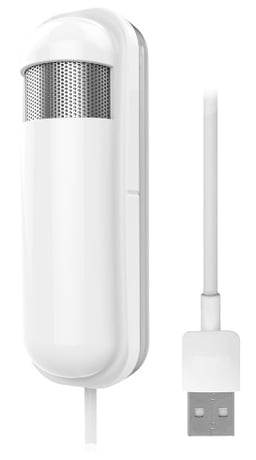
Product Image Published


1 - Auto report CO2 Concentra- tion time
Units of 1 minute.Size: 2 bytes
Default: 60
Minimum: 1
Maximum: 32767
Possible values
| From | To | Desription |
|---|---|---|
| 1 | 32767 | Units of 1 minute. |
2 - CO2 Concentration differen- tial report
Units of 1 %. 0 means turn off the reportSize: 1 byte
Default: 10
Minimum: 1
Maximum: 100
Possible values
| From | To | Desription |
|---|---|---|
| 1 | 100 | Units of 1 % |
3 - Baseline level 1
Units of 100 ppm. 0 means turn off the reportSize: 1 byte
Default: 0
Minimum: 0
Maximum: 50
Possible values
| From | To | Desription |
|---|---|---|
| 0 | 50 | Units of 100 ppm. |
4 - Baseline level 2
Units of 100 ppm. 0 means turn off the reportSize: 1 byte
Default: 0
Minimum: 0
Maximum: 50
Possible values
| From | To | Desription |
|---|---|---|
| 0 | 50 | Units of 100 ppm. |
5 - Baseline level 3
Units of 100 ppm. 0 means turn off the reportSize: 1 byte
Default: 0
Minimum: 0
Maximum: 50
Possible values
| From | To | Desription |
|---|---|---|
| 0 | 50 | Units of 100 ppm. |
6 - Baseline level 4
Units of 100 ppm. 0 means turn off the reportSize: 1 byte
Default: 0
Minimum: 0
Maximum: 50
Possible values
| From | To | Desription |
|---|---|---|
| 0 | 50 | Units of 100 ppm. |
7 - Baseline level 5
Units of 100 ppm. 0 means turn off the reportSize: 1 byte
Default: 0
Minimum: 0
Maximum: 50
Possible values
| From | To | Desription |
|---|---|---|
| 0 | 50 | Units of 100 ppm. |
1. Set your Z-Wave controller into inclusion mode by following the instructions provided by the controller manufacturer. 2. Press the include button of the PAT12 three times within 3 seconds to enter inclusion mode.
1. Set your Z-Wave controller into exclusion mode by following the instructions provided by the controller manufacturer. 2. Press the include button of the PAT12 three times within 3 seconds to enter exclusion mode. 3. Node ID has been excluded.
1. Press the include button of the PAT12 three times within 3 seconds to enter inclusion mode. 2. Within 1 second, again press the include button of the PAT12 for 5 seconds. 3. IDs will get excluded. notice1:Please use this procedure only when the network primary controller is missing or otherwise inoperable.
The QR code can befoundon the device PAT12 or in the box.
| Type | Value(s) |
|---|
| Sensor type |
|---|
| Carbon Dioxide (CO2) Level |