LG U+
UPowerSwitch
UPowerSwitch
Binary Switch
HW: 1 FW: 10.11
ZGM130
7.11.00
0x0357 (855)
0x0059 (89)
0x0002 (2)
ZC12-19090015
2019-09-24 16:15:41.268037
N/A
Enhanced 232 Slave
Listening Sleeping Slave
This device is a smart light switch.
This device is a smart light switch. It has 3 buttons, using 1 wire AC line. You can control the light from the remote or manually. Input AC power : 220V
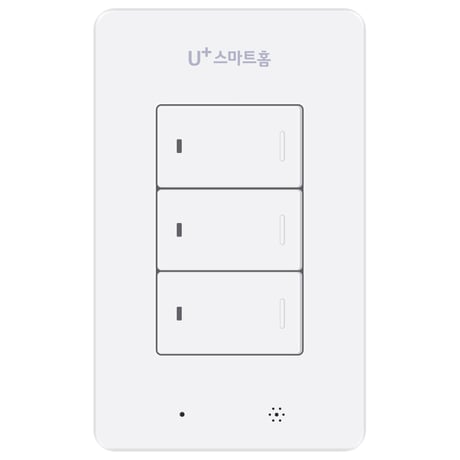
Product Image


1 - PeriodOfReport
Time period of Multi Level Sensor Report by second.Size: 2 bytes
Default: 600
Minimum: 60
Maximum: 3600
Possible values
| From | To | Desription |
|---|---|---|
| 60 | 3600 | Setting a value in this range means to set the period value of the report. For example, 600 means that the reporting period is 600 seconds. |
2 - TempSensor
During the cycle, if the temperature change is greater than the set value, a report of the current temperature value will be immediately issued.Size: 1 byte
Default: 20
Minimum: 10
Maximum: 30
Possible values
| From | To | Desription |
|---|---|---|
| 10 | 30 | 10-30: represents the range of temperature change that can be set from 1℃ to 3℃. For example, the value 20 means that if the temperature change is greater than 2℃, a report of the current temperature value will be immediately issued during the reporting cycle. |
3 - HumSensor
During the cycle, if the humidity change is greater than the set value, a report of the current humidity value will be immediately issued.Size: 1 byte
Default: 10
Minimum: 5
Maximum: 20
Possible values
| From | To | Desription |
|---|---|---|
| 5 | 20 | 5-20: represents the range of humidity that can be set from 5% to 20%. For example, the value 10 means that if the humidity change is greater than 10%, a report of the current humidity value will be immediately issued during the reporting cycle. |
Press the 3rd button for above 5 seconds. Then, red color LED blinks every 0.5 second 6 times. At this time released the button during the red color LED blinking. Then, ZWAVE Add / Remove operation is started.
Press the 3rd button for above 5 seconds. Then, red color LED blinks every 0.5 second 6 times. At this time released the button during the red color LED blinking. Then, ZWAVE Add / Remove operation is started.
The device can be woken up by pressing a button manually or sending a software command. If there is no action within 2s after wake-up, it will re-enter sleep.
Hold the low button for 10 seconds. -Keep holding the button, then at 5 second,red LED of 3rd button is blinking 6 times, and keep holding. The red LED blinking 6 times after 10 seconds. When you release your hand, the LED will stop blinking and return to the factory settings. *NOTES: Use this procedure only when the network primary controller is missing or otherwise inoperable.
DSK 키 정보는 제품 상자의 QR 코드 스티커에 표기되어 있습니다.
| Type | Value(s) |
|---|
| Group | Type |
|---|---|
| Heat Alarm |
|
| System | SW status: System software failure (manufacturer proprietary failure code provided) |
| Sensor type |
|---|
| Air Temperature |
| Humidity |