ABUS
Z-Wave 230V relay module
PLHA10000
On/Off Power Switch
HW: 1 FW: 1.01:00.01
SD3502
6.81.03
0x0403 (1027)
0x0003 (3)
0x0005 (5)
ZC10-19116788
2019-11-04 18:17:12.503603
N/A
Enhanced 232 Slave
Always On Slave
The module is a Z-Wave enabled device which is fully compatible with any Z-Wave enabled network. It supports two Inputs, to be wired to existing switches, and two outputs, to be wired to any 230V actuator, such as lighting.
The dual relay in-wall module contains two sets of relays and switches, with each set dedicated for controlling lighting or an appliance in your home. Each relay can be turned on/off individually using Z-wave commands or using the switches connected to the module. At 230V voltage, this module can support up to 2*4.3A output, 2*1000W resistive load. This unit is to be installed and sealed inside an electrical switch box.
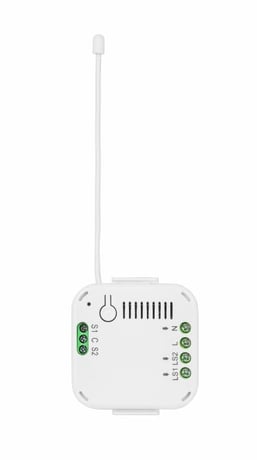
Product Image
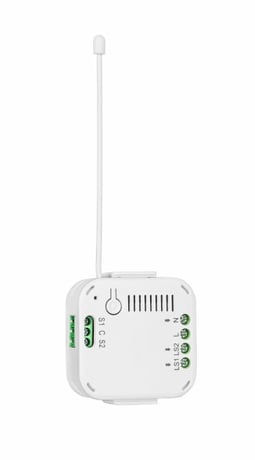
left
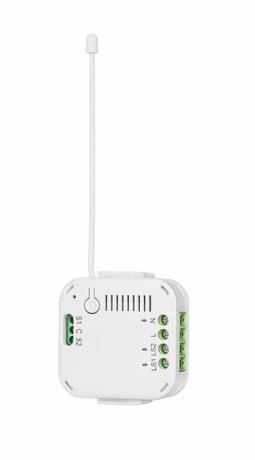
front


1 - Key 1
0: Momentary button 1: Switch (Toggle)Size: 1 byte
Default: 0
Minimum: 0
Maximum: 1
Possible values
| From | To | Desription |
|---|---|---|
| 0 | 1 | 0: Momentary button, 1: Switch (Toggle) |
2 - Key 2
0: Momentary button 1: Switch (Toggle)Size: 1 byte
Default: 0
Minimum: 0
Maximum: 1
Possible values
| From | To | Desription |
|---|---|---|
| 0 | 1 | 0: Momentary button, 1: Switch (Toggle) |
3 - Relay 1 Auto Off Time
0: No Auto OffSize: 4 bytes
Default: 0
Minimum: 0
Maximum: 43200
Possible values
| From | To | Desription |
|---|---|---|
| 0 | 43200 | 0: No Auto Off |
4 - Relay 2 Auto Off Time
0: No Auto OffSize: 4 bytes
Default: 0
Minimum: 0
Maximum: 43200
Possible values
| From | To | Desription |
|---|---|---|
| 0 | 43200 | 0: No Auto Off |
5 - Remember relay 1 last state
0: do not remember 1: rememberSize: 1 byte
Default: 1
Minimum: 0
Maximum: 1
Possible values
| From | To | Desription |
|---|---|---|
| 0 | 1 | 0: do not remember, 1: remember |
6 - Remember relay 2 last state
0: do not remember 1: rememberSize: 1 byte
Default: 1
Minimum: 0
Maximum: 1
Possible values
| From | To | Desription |
|---|---|---|
| 0 | 1 | 0: do not remember, 1: remember |
Activate the inclusion mode on the gateway. (for further details please refer to the gateways manual) Press the "+" key (Add / Inclusion) in your Z-Wave app and follow the instructions to set the gateway to Inclusion mode. The unit supports SmartStart function, where inclusion is initiated automatically on power-on, and repeated at dynamic intervals for as long as the device is not included into a Z-Wave network. Z-Wave SmartStart is based on the embedded SDK 6.8x and requires related gateway software components. The LED starts flashing. Alternative Inclusion: If the automatic inclusion did not work, instead press the Link button 3 times quickly (within 1.5 seconds) to start the inclusion on the device.
Activate the exclusion mode at the gateway. (for further details please refer to the gateways manual) Press the "-" key (Remove / Exclusion) in your Z-Wave app and follow the instructions to set the gateway to exclusion mode. Press the Link button 3 times quickly (within 1.5 seconds) to start the exclusion on the device.
Press the Link button 3 times quickly (within 1.5 seconds). Press quickly (within 1 second) a fourth time and press and hold the Link button for at least 5 seconds. The button is now reset to factory settings. Hint: Please use this procedure only when the network primary controller is missing or otherwise inoperable. If the device is set to factory default, the status is set to "not included" and the association settings and possible configurations are reset to default.
The DSK Code (Device-Specific-Key) is the device-specific key of your device and is required for secure teach-in (including) via S2 at the gateway. The first 5 digits of the DSK code can be found on the QR code label on top of the product. Please enter these in the inclusion process when prompted. Alternatively, you can transfer the entire DSK code found on the enclosed DSK card to the gateway via QR code scan. Please keep the DSK card in a safe place!
| Type | Value(s) |
|---|
| Group | Type |
|---|---|
| Appliance | (Refer to parameters): State idle |