Ring
Range Extender
4AR1S70EN0
Repeater
HW: 1 FW: 3.04
ZM5101
6.81.03
0x0346 (838)
0x0401 (1025)
0x0201 (513)
ZC10-19106782
2019-10-28 17:05:22.630693
N/A
Enhanced 232 Slave
Always On Slave
The Ring Extender is a Z-Wave range extender with battery backup. It is a Security Enabled Z-Wave Plus product and requires a security-enabled Z-Wave Plus controller to make use of all of its features.
Range Extenders extend the signal from your Alarm Base Station to all its components, so you can make sure your entire system stays online - Requires the Ring Alarm Security Kit. The Ring Extender is a Z-Wave range extender with battery backup. It is a Security Enabled Z-Wave Plus Product and requires a security-enabled Z-Wave Plus controller to make use of all of its features. It will repeat Z-Wave commands from all nodes in the network, from any certified Z-Wave device manufacturer. Any non-battery powered Z-Wave device will also repeat signals in a Z-Wave network.
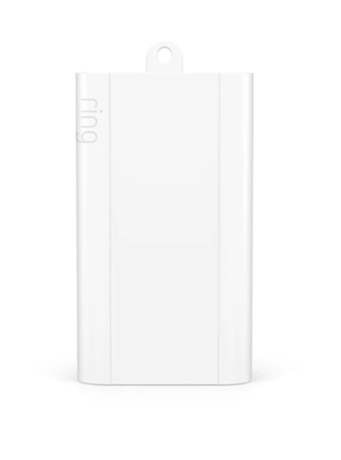
Product Image


1 - Battery Report Interval
This parameter is the number of minutes between heartbeats. Heartbeats are automatic battery reports on a timer after the last event.Size: 1 byte
Default: 70
Minimum: 4
Maximum: 70
Possible values
| From | To | Desription |
|---|---|---|
| 4 | 70 | This parameter is the number of minutes between heartbeats. Heartbeats are automatic battery reports on a timer after the last event. |
2 - Supervision Timeout
The number of seconds waiting for a supervision report in response to a supervision get from the sensor.Size: 1 byte
Default: 15
Minimum: 5
Maximum: 50
Possible values
| From | To | Desription |
|---|---|---|
| 5 | 50 | The number of seconds waiting for a supervision report in response to a supervision get from the sensor. |
3 - Supervision Retry
Number of application level retries attempted for messages either not ACKed or messages encapsulated via supervision get that did not receive a report.Size: 1 byte
Default: 1
Minimum: 0
Maximum: 5
Possible values
| From | To | Desription |
|---|---|---|
| 0 | 5 | Number of application level retries attempted for messages either not ACKed or messages encapsulated via supervision get that did not receive a report. |
4 - Supervision Back Off
The number base seconds used in the calculation for sleeping between retry messages.Size: 1 byte
Default: 5
Minimum: 1
Maximum: 60
Possible values
| From | To | Desription |
|---|---|---|
| 1 | 60 | The number base seconds used in the calculation for sleeping between retry messages. |
5 - Supervision Battery Report
The number of battery report messages sent before being encapsulated in supervision.Size: 1 byte
Default: 5
Minimum: 0
Maximum: 31
Possible values
| From | To | Desription |
|---|---|---|
| 0 | 31 | The number of battery report messages sent before being encapsulated in supervision. |
6 - Build Number
The Jenkins build number for this FWSize: 4 bytes
Default: 0
Minimum: 0
Maximum: 0
Possible values
| From | To | Desription |
|---|---|---|
| 0 | 0 | The Jenkins build number for this FW |
Classic Inclusion (Add to System) - S2 1. For proper inclusion, bring the Range Extender to the final location where it will be used*. 2. Follow the instructions provided in Ring Alarm Mobile Application, enter DSK pin to enter inclusion mode. 3. Supply power to the Range Extender and then press the button once to begin inclusion mode using S2 encryption. 4. The device will enter inclusion mode indefinitely and the LED Indicator will blink slowly (1 flash/2 sec) until it’s included in a system. 5. Upon successful inclusion, the LED Indicator will stop blinking. *For non Z-Wave Plus networks, please consult the owner’s manual for your primary controller to determine the best method and location for adding the Range Extender to your Z-Wave network. SmartStart Inclusion (Add to System) - SmartStart 1. For proper inclusion, bring the Range Extender to the final location where it will be used*. 2. Follow the instructions provided in Ring Alarm Mobile Application, scan QR code to enter inclusion mode. 3. Supply power to the Range Extender to begin Smart Start (inclusion) mode. 4. The device will enter inclusion mode indefinitely and the LED Indicator will blink slowly (1 flash/2 sec) until it’s included in a system. 5. Upon successful inclusion, the LED Indicator will stop blinking.
Exclusion (Remove from System) 1. Make sure the Range Extender is powered on. 2. Follow the instructions in Ring Alarm Mobile Application to enter exclusion mode. When prompted by the controller: 3. Press the Button once. 4. Upon successful exclusion, the LED Indicator blink quickly five times and then blink five times quickly every minute.
Ring Alarm Extender is listening device and is always awake as long as it connected to line power or running on battery.
If needed, the Range Extender can be reset locally by following these steps. Only do this if your Z-Wave controller is missing or otherwise unreachable. Beware that resetting your device will disconnect it from the system: 1. Make sure that your Range Extender is powered on. 2. Press and hold the Button for 10 seconds. The Range Extender’s memory will be erased to factory settings and the LED Indicator will blink very quickly six times and then blink once every half second until it is included in a system. Note: Use this procedure only in the event that the network primary controller is missing or otherwise inoperable.
The QR Code and DSK label is shown on the outside packaging of the box. The full DSK string is also located in the leaflet inside the packaging. The same DSK is printed in the form of a QR code on the back of the device as well.
| Type | Value(s) |
|---|
| Group | Type |
|---|---|
| Power Management |
|