Hank
Smart Plug
HKZW-SO13
On/Off Power Switch
HW: 1 FW: 1.02
ZM5202
6.81.01
0x0208 (520)
0x0100 (256)
0x0022 (34)
ZC10-19116791
2019-11-07 17:56:25.46768
N/A
Enhanced 232 Slave
Always On Slave
Smart Plug is a Z-Wave Switch plugin module specifically used to enable Z-Wave command and control (on/off) of any plug-in tool.
Smart Plug is a Z-Wave Switch plugin module specifically used to enable Z-Wave command and control (on/off) of any plug-in tool. It can report wattage consumption or kWh energy usage. This device is a security enabled Z-Wave Plus product that is able to use encrypted Z-Wave Plus messages to communicate to other security enabled Z-Wave Plus products. Smart Plug is also a security Z-Wave device and supports the Over The Air (OTA) feature for the product’s firmware upgrade. This device must be used in conjunction with a Security Enabled Z-Wave Controller in order to fully utilize all implemented functions. Features: 1) AC output switch on/off by manual or Z-Wave command; 2) RGB LED indicates the Z-WAVE network range and load power; 3) Support S0 and S2 security network; 4) Supporting power meter; 5) Supporting repeater role; 6) Supporting firmware OTA; 7) Supporting Smart Start; 8) Supports over-current protection
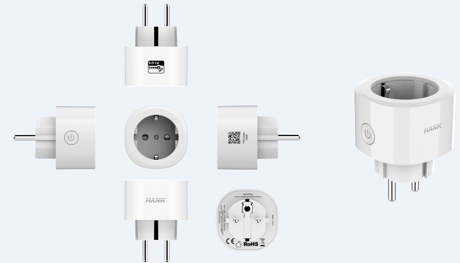
Product Image
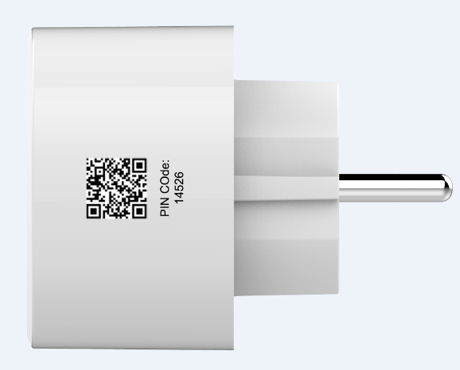
This is QR code
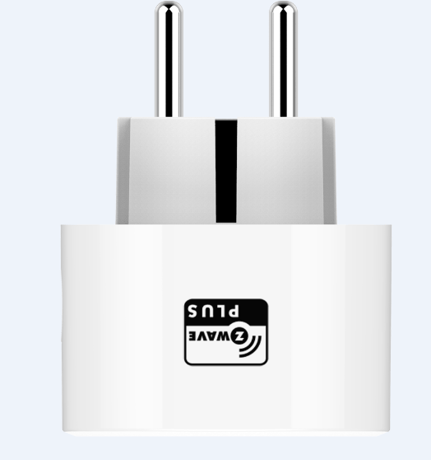
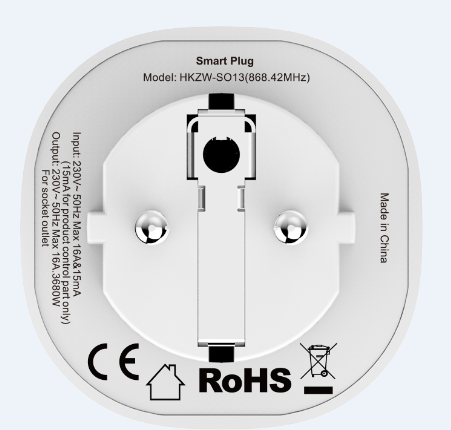
This is the screen print at the bottom
This is the appearance picture of the product


20 - Overload protection
Smart Plug keep detecting the load power, once the AC current exceeds 17.5A for more than 5s, smart plug's relay will turn off.Size: 1 byte
Default: 1
Minimum: 0
Maximum: 0
Possible values
| From | To | Desription |
|---|---|---|
| 0 | 0 | The function is disabled |
| 1 | 1 | The function is enabled. |
21 - Setting device status after power failure
Define how the Plug reacts after the power supply is back on.Size: 1 byte
Default: 0
Minimum: 0
Maximum: 0
Possible values
| From | To | Desription |
|---|---|---|
| 0 | 0 | Smart Plug memorizes its state after a power failure. |
| 1 | 1 | Smart Plug does not memorize its state after a power failure. Connected device will be on after the power supply is reconnected. |
| 2 | 2 | Smart Plug does not memorize its state after a power failure. Connected device will be off after the power supply is reconnected. |
24 - Notification when Load status change
Smart Plug can send notifications to association device (Group Lifeline) when state of smart plug’s load change.Size: 1 byte
Default: 1
Minimum: 0
Maximum: 0
Possible values
| From | To | Desription |
|---|---|---|
| 0 | 0 | The function is disabled. |
| 1 | 1 | Send Basic report. |
| 2 | 2 | Send Basic report only when Load condition is not changed by Z-WAVE Command. |
27 - Indicator modes
After smart plug being included into a Z-Wave network, the RGB LED indicator will indicator the situation of load.Size: 1 byte
Default: 0
Minimum: 0
Maximum: 0
Possible values
| From | To | Desription |
|---|---|---|
| 0 | 0 | The indicator light remains the same as the load on/off status. When the load is on, the light is on, and the off is off. |
| 1 | 1 | Within 5 seconds after the operation load, the indicator light is consistent with the load on/off status, and then the indicator is off. |
151 - Threshold of power report
Power threshold to be interpreted, when the change value of load power exceeds the setting threshold, the smart plug will send meter report to association device (Group Lifeline).Size: 2 bytes
Default: 50
Minimum: 0
Maximum: 0
Possible values
| From | To | Desription |
|---|---|---|
| 0 | 200 | Available settings: 0 - 200 (0 - 200W) |
| 0 | 0 | 0 - The function is disabled. |
152 - Percentage threshold of power report
Power percentage threshold to be interpreted, when change value of the load power exceeds the setting threshold, the smart plug will send meter report to association device (Group Lifeline).Size: 1 byte
Default: 10
Minimum: 0
Maximum: 0
Possible values
| From | To | Desription |
|---|---|---|
| 0 | 0 | The function is disabled. |
| 0 | 100 | Available settings: 0 - 100 (0 - 100%) |
171 - Power report frequency
The interval of sending power report to association device (Group Lifeline).Size: 4 bytes
Default: 3600
Minimum: 0
Maximum: 0
Possible values
| From | To | Desription |
|---|---|---|
| 0 | 0 | The function is disabled. |
| 3600 | 2678400 | Available settings: 3600- 2678400 (3600 - 2678400s) |
172 - Energy report frequency
The interval of sending energy report to association device (Group Lifeline).Size: 4 bytes
Default: 7200
Minimum: 0
Maximum: 0
Possible values
| From | To | Desription |
|---|---|---|
| 0 | 0 | The function is disabled. |
| 3600 | 2678400 | Available settings: 3600- 2678400 (3600 - 2678400s) |
173 - Voltage report frequency
The interval of sending voltage report to association device (Group Lifeline).Size: 4 bytes
Default: 0
Minimum: 0
Maximum: 0
Possible values
| From | To | Desription |
|---|---|---|
| 0 | 0 | The function is disabled. |
| 3600 | 2678400 | Available settings: 3600- 2678400 (3600 - 2678400s) |
174 - Electricity report frequency
The interval of sending electricity report to association device (Group Lifeline).Size: 4 bytes
Default: 0
Minimum: 0
Maximum: 0
Possible values
| From | To | Desription |
|---|---|---|
| 0 | 0 | The function is disabled. |
| 3600 | 2678400 | Available settings: 3600- 2678400 (3600 - 2678400s) |
254 - Enable/disable the configuration command
Lock/unlock all configuration parameters.Size: 1 byte
Default: 0
Minimum: 0
Maximum: 0
Possible values
| From | To | Desription |
|---|---|---|
| 0 | 0 | Unlock |
| 1 | 1 | Lock |
Add for inclusion (non-security and security): 1)Connect the power supply. 2)Set the Z-Wave network main controller into learning mode. 3)Triple click the Z-button, the LED indicator will be flashing 3 times in Blue. 4)Smart Plug should be recognized and included into the Z-Wave network.
1) Insert the Plug into a socket. 2) Set the Z-Wave network controller into the exclusion mode. 3) Triple click the Z button. 4) LED will blink in blue for 3 times, and then start slow flashing to indicate that the remove for exclusion is successful. LED will indicate network status after it is removed from Z-Wave network.
Long press the button for 20 seconds and the blue LED will speed up the flash and then LED will keep on for 3 seconds in blue and Smart Plug will send ”Device Reset Locally Notification” to the main controller and exclude from the Z-Wave network, this procedure will reset Smart Plug to factory default. Please use this procedure only when the network primary controller is missing or otherwise inoperable.
If you want your Smart Plug to be a security device that use secure/encrypted message to communicate in a Z-Wave network, then a security enabled Z-Wave controller is needed
The position of the QR code is on the side of the product, using 29*29 pixels, which will be attached to the product in the form of a label
| Type | Value(s) |
|---|
| Meter type |
|---|
| Electric Meter Consumption |