HYUNDAI TELECOM
DIGITAL DOOR LOCK
HDL-7300SK
Door Lock - Keypad
HW: 1 FW: 1.00:01.00
ZM5101
6.81.06
0x0374 (884)
0x0001 (1)
0x0082 (130)
ZC10-19116802
2019-11-26 17:01:20.634303
N/A
Enhanced 232 Slave
Listening Sleeping Slave
- Lock & Unlock Automatically - Supports Z-Wave
- Lock & Unlock Automatically - Supports Z-Wave - Touchscreen Keypad - Push/Pull Type
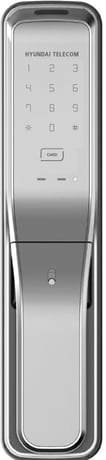
Product Image
To add or include the HDL-7300SK into a Z-Wave network 1. Set the controller in inclusion mode. 2. Open the battery cover of the indoor body and press the [REG 1] button. 3. Press the [1][4] button after pressing the [*] button.
To remove or exclude the HDL-7300SK into a Z-Wave network 1. Set the controller in exclusion mode. 2. Open the battery cover of the indoor body and press the [REG 1] button. 3. Press the [3][6] button after pressing the [*] button.
KeyPad Touch
To Factory Reset 1. Open the battery cover of the indoor body and press the [REG 1] button. 2. Press the [8][0] button after pressing the [*] button.
SmartStart enabled products can be added into a Z-Wave network by scanning the Z-Wave QR Code present on the product with a controller providing SmartStart inclusion. No further action is required and the SmartStart product will be added automatically within 10 minutes of being switched on in the network vicinity. Please Save the QR Code carefully.If both the DSK representation on the product and any DSK provided in the product packaging were to fade,rub off or, be lost,the device would not be able to be added to a Z-Wave network. You can find the QR code and DSK inside of battery box.
| Group | Type |
|---|---|
| Access Control |
|
| Emergency Alarm |
|