HELTUN
Fan Coil Thermostat
HE-FT01
Thermostat - HVAC
HW: 20 FW: 2.01
ZGM130
7.11.1
0x0344 (836)
0x0004 (4)
0x0002 (2)
ZC12-20010025
2019-12-12 18:44:56.068745
N/A
Enhanced 232 Slave
Always On Slave
Advanced Programmable Z-Wave Plus v2 Thermostat for Fan Coil Heating/Cooling Systems—with S2 security and Smart Start on the Z-Wave 700 platform.
The HE-FT01 is HELTUN’s advanced programmable Z-Wave thermostat for heating/cooling systems such as fan coil units, floor convectors, and wall, window, or ceiling mounted air conditioning units. The HE-FT01 thermostat is ‘impossibly thin’ on the wall while still being packed full of features, delivering highly accurate comfort control through proprietary technology and four built-in sensors. You can monitor and control the HE-FT01 from anywhere in the world using a Z-Wave hub and your smartphone.* And because it uses Z-Wave Plus version 2, Smart Start, S2 Security and 700 platform technologies, the HE-FT01 can be placed up to 100 meters away from the hub and is a snap to install. Best of all, the built-in Power Consumption System precisely monitors how much energy you used during any particular day, week or month, helping you save money on energy costs while staying comfortable all year long. The HELTUN HE-FT01 is part of an entire line of smart, connected products designed to provide the best technology has to offer without compromising stylish living. (*hub and smartphone not included)
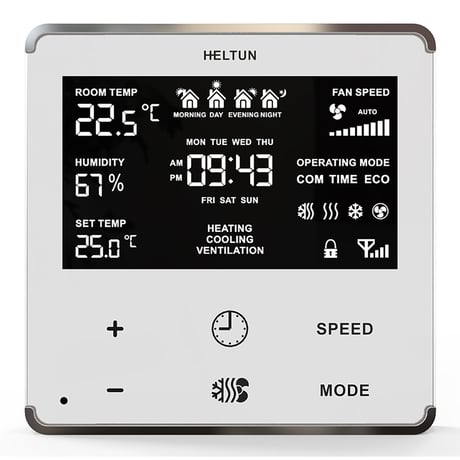
Product Image
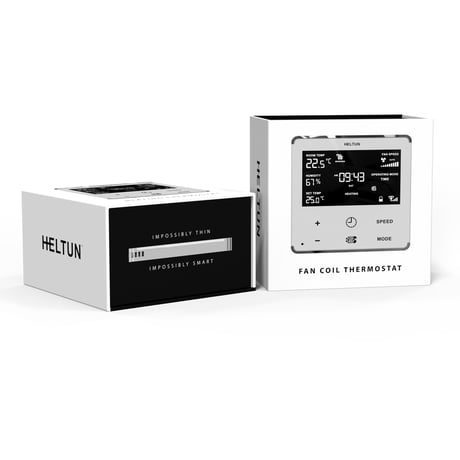
Package Box
.jpg)
30 colour combinations available
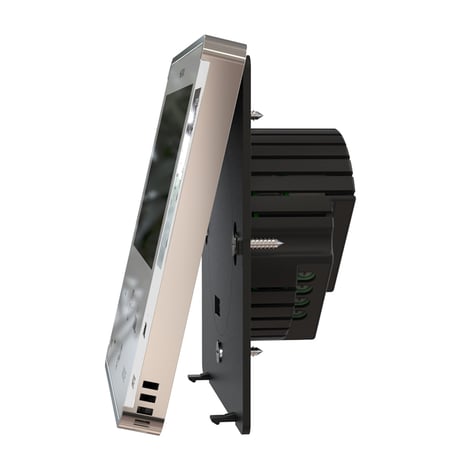
Snap-in Installation
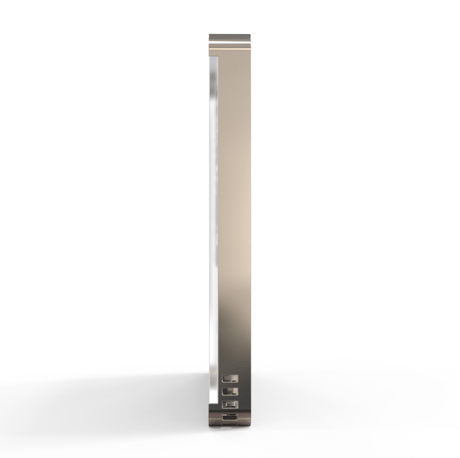
Side View
.png)
HELTUN HE-FT01 Fan Coil Thermostat (Black glass Chrome frame)


1 - TIME CORRECTION
Time correction by controllerSize: 1 byte
Default: 1
Minimum: 0
Maximum: 1
Possible values
| From | To | Desription |
|---|---|---|
| 0 | 0 | Switch off auto-correction |
| 1 | 0 | If thermostat is connected to a Z-Wave gateway, the time and day will be periodically polled and corrected from the gateway |
2 - TIME FORMAT
Time formatSize: 1 byte
Default: 1
Minimum: 0
Maximum: 1
Possible values
| From | To | Desription |
|---|---|---|
| 0 | 0 | 24 hour format |
| 1 | 0 | 12 hour (AM/PM) format |
3 - WEEKDAY
Week day. This parameter allows manually adjustment of the day of the week in case if the thermostat is not connected to any Z-Wave gateway or Parameter 09 (auto-correction) is selected as 0.Size: 1 byte
Default: 1
Minimum: 1
Maximum: 7
Possible values
| From | To | Desription |
|---|---|---|
| 1 | 0 | Monday |
| 2 | 0 | Tuesday |
| 3 | 0 | Wednesday |
| 4 | 0 | Thursday |
| 5 | 0 | Friday |
| 6 | 0 | Saturday |
| 7 | 0 | Sunday |
4 - HOUR
This Parameter allows manual adjustment of Time in hours (24 hours).Size: 1 byte
Default: 0
Minimum: 0
Maximum: 23
Possible values
| From | To | Desription |
|---|---|---|
| 0 | 23 | Manual adjustment of time hours (24 hours). |
5 - MINUTE
This Parameter allows manual adjustment of the Time in minutes (60 minutes))Size: 1 byte
Default: 0
Minimum: 0
Maximum: 59
Possible values
| From | To | Desription |
|---|---|---|
| 0 | 59 | Manual adjustment of time minutes (60 minutes) |
6 - DEGREE MODE
Degree mode (C/F) Floor and air temperature, as well as Set Point and all Parameters will be indicated in the chosen mode. Factory default value is degrees Celsius (0).Size: 1 byte
Default: 0
Minimum: 0
Maximum: 1
Possible values
| From | To | Desription |
|---|---|---|
| 0 | 0 | Celsius |
| 1 | 0 | Fahrenheit |
7 - AIR TEMP CORRECTION
This Parameter defines the offset value for room air temperature. If the internal air temperature sensor is not correctly calibrated, then manual calibration can be accomplished by adjusting the values up to ±9.5°C (±17°F). This value will be added or subtracted from the internal air temperature sensor reading.Size: 1 byte
Default: 0
Minimum: -95
Maximum: 95
Possible values
| From | To | Desription |
|---|---|---|
| -95 | 95 | Air temperature offset value (°C x 10) |
8 - TEMP HYSTERESYS
This Parameter defines the hysteresis value for temperature control. The HE-FT01 will stabilize the temperature with the selected hysteresis. For example, if the SET POINT is set for 25°C and HYSTERESIS is set for 0.5°C, the HE-FT01 will change the state to IDLE if the temperature reaches 25.0°C. It will change the state to HEATING if the temperature becomes lower than 24.5°C, and will change the state to COOLING if the temperature rises beyond 25.5°C. The hysteresis value can be changed from 0.2°C to 10.0°C range in Celsius mode, and 0.3°F to 18.0°F in Fahrenheit. The factory-default value is 0.5°C (0.9°F).Size: 1 byte
Default: 5
Minimum: 2
Maximum: 100
Possible values
| From | To | Desription |
|---|---|---|
| 2 | 100 | Temperature hysteresis value (°C x 10) |
9 - AUTO BRIGHTNESS
Display auto-brightness control The HE-FT01 can adjust its display brightness automatically depending on the ambient room brightness.Size: 1 byte
Default: 1
Minimum: 0
Maximum: 1
Possible values
| From | To | Desription |
|---|---|---|
| 0 | 0 | Manual Control: Inactive Level brightness will be set to the level defined by Parameter 10. |
| 1 | 0 | Automatic Brightness Control. |
10 - MANUAL BRIGHTNESS
Display manual brightness level. The Display Brightness Level Parameter will take effect when Parameter 22 is set to Manual Control (value = 0). Note: The environment illumination is displayed in the TIME position and also can be checked at any time via a Z-Wave gateway.Size: 1 byte
Default: 10
Minimum: 1
Maximum: 15
Possible values
| From | To | Desription |
|---|---|---|
| 1 | 15 | The LCD brightness may be adjusted from 1 (lowest brightness) to 15 (highest brightest). |
11 - TOUCH THRESHOLD
Touch buttons sensitivity. 5 = Highly sensitive. 50 = Lowest sensitivity. Note: Setting the sensitivity too high can lead to false touch detection. We recommend not changing this Parameter unless there is a need to do so.Size: 1 byte
Default: 15
Minimum: 5
Maximum: 50
Possible values
| From | To | Desription |
|---|---|---|
| 5 | 50 | Threshold to be adjusted from level 5 (very sensitive) to 50 (minimal sensitivity). |
12 - RESERVED
Parameter reserved by the manufacturer. Setting this parameter will have no impact on DUT functionality.Size: 1 byte
Default: 0
Minimum: 0
Maximum: 1
Possible values
| From | To | Desription |
|---|---|---|
| 0 | 1 | Parameter reserved by the manufacturer. Setting this parameter will have no impact on DUT functionality. |
13 - RESERVED
Parameter reserved by the manufacturer. Setting this parameter will have no impact on DUT functionality.Size: 1 byte
Default: 0
Minimum: 0
Maximum: 1
Possible values
| From | To | Desription |
|---|---|---|
| 0 | 1 | Parameter reserved by the manufacturer. Setting this parameter will have no impact on DUT functionality. |
14 - BASIC SET MODE
Mode to switch to on Basic Set Action command This Parameter defines which Operating Mode the HE-FT01 reverts to if the Basic Set command is received. If the Basic Set command value is 0 (OFF state) the HE-FT01 will go to OFF mode and switch the operating state to IDLE. If the Basic Set command value is 0xFF (ON state) the HE-FT01 will change the Mode to the corresponding Parameter value.Size: 1 byte
Default: 2
Minimum: 0
Maximum: 9
Possible values
| From | To | Desription |
|---|---|---|
| 0 | 0 | No action |
| 1 | 0 | COM with Heating & Cooling Climate Mode |
| 2 | 0 | COM with Heating Climate Mode |
| 3 | 0 | COM with Cooling Climate Mode |
| 4 | 0 | TIME with Heating & Cooling Climate Mode |
| 5 | 0 | TIME with Heating Climate Mode |
| 6 | 0 | TIME with Cooling Climate Mode |
| 7 | 0 | ECO with Heating Climate Mode |
| 8 | 0 | ECO with Cooling Climate Mode |
| 9 | 0 | Ventilation Climate Mode |
15 - RESERVED
Parameter reserved by the manufacturer. Setting this parameter will have no impact on DUT functionality.Size: 1 byte
Default: 0
Minimum: 0
Maximum: 1
Possible values
| From | To | Desription |
|---|---|---|
| 0 | 1 | Parameter reserved by the manufacturer. Setting this parameter will have no impact on DUT functionality. |
16 - RESERVED
Parameter reserved by the manufacturer. Setting this parameter will have no impact on DUT functionality.Size: 1 byte
Default: 0
Minimum: 0
Maximum: 1
Possible values
| From | To | Desription |
|---|---|---|
| 0 | 1 | Parameter reserved by the manufacturer. Setting this parameter will have no impact on DUT functionality. |
17 - RESERVED
Parameter reserved by the manufacturer. Setting this parameter will have no impact on DUT functionality.Size: 1 byte
Default: 0
Minimum: 0
Maximum: 1
Possible values
| From | To | Desription |
|---|---|---|
| 0 | 1 | Parameter reserved by the manufacturer. Setting this parameter will have no impact on DUT functionality. |
18 - RESERVED
Parameter reserved by the manufacturer. Setting this parameter will have no impact on DUT functionality.Size: 1 byte
Default: 0
Minimum: 0
Maximum: 1
Possible values
| From | To | Desription |
|---|---|---|
| 0 | 1 | Parameter reserved by the manufacturer. Setting this parameter will have no impact on DUT functionality. |
19 - RESERVED
Parameter reserved by the manufacturer. Setting this parameter will have no impact on DUT functionality.Size: 1 byte
Default: 0
Minimum: 0
Maximum: 1
Possible values
| From | To | Desription |
|---|---|---|
| 0 | 1 | Parameter reserved by the manufacturer. Setting this parameter will have no impact on DUT functionality. |
20 - RESERVED
Parameter reserved by the manufacturer. Setting this parameter will have no impact on DUT functionality.Size: 1 byte
Default: 0
Minimum: 0
Maximum: 1
Possible values
| From | To | Desription |
|---|---|---|
| 0 | 1 | Parameter reserved by the manufacturer. Setting this parameter will have no impact on DUT functionality. |
21 - RESERVED
Parameter reserved by the manufacturer. Setting this parameter will have no impact on DUT functionality.Size: 1 byte
Default: 0
Minimum: 0
Maximum: 1
Possible values
| From | To | Desription |
|---|---|---|
| 0 | 1 | Parameter reserved by the manufacturer. Setting this parameter will have no impact on DUT functionality. |
22 - RESERVED
Parameter reserved by the manufacturer. Setting this parameter will have no impact on DUT functionality.Size: 1 byte
Default: 0
Minimum: 0
Maximum: 1
Possible values
| From | To | Desription |
|---|---|---|
| 0 | 1 | Parameter reserved by the manufacturer. Setting this parameter will have no impact on DUT functionality. |
23 - RESERVED
Parameter reserved by the manufacturer. Setting this parameter will have no impact on DUT functionality.Size: 1 byte
Default: 0
Minimum: 0
Maximum: 1
Possible values
| From | To | Desription |
|---|---|---|
| 0 | 1 | Parameter reserved by the manufacturer. Setting this parameter will have no impact on DUT functionality. |
24 - RESERVED
Parameter reserved by the manufacturer. Setting this parameter will have no impact on DUT functionality.Size: 1 byte
Default: 0
Minimum: 0
Maximum: 1
Possible values
| From | To | Desription |
|---|---|---|
| 0 | 1 | Parameter reserved by the manufacturer. Setting this parameter will have no impact on DUT functionality. |
25 - RESERVED
Parameter reserved by the manufacturer. Setting this parameter will have no impact on DUT functionality.Size: 1 byte
Default: 0
Minimum: 0
Maximum: 1
Possible values
| From | To | Desription |
|---|---|---|
| 0 | 1 | Parameter reserved by the manufacturer. Setting this parameter will have no impact on DUT functionality. |
26 - RESERVED
Parameter reserved by the manufacturer. Setting this parameter will have no impact on DUT functionality.Size: 1 byte
Default: 0
Minimum: 0
Maximum: 1
Possible values
| From | To | Desription |
|---|---|---|
| 0 | 1 | Parameter reserved by the manufacturer. Setting this parameter will have no impact on DUT functionality. |
27 - RESERVED
Parameter reserved by the manufacturer. Setting this parameter will have no impact on DUT functionality.Size: 1 byte
Default: 0
Minimum: 0
Maximum: 1
Possible values
| From | To | Desription |
|---|---|---|
| 0 | 1 | Parameter reserved by the manufacturer. Setting this parameter will have no impact on DUT functionality. |
28 - RESERVED
Parameter reserved by the manufacturer. Setting this parameter will have no impact on DUT functionality.Size: 1 byte
Default: 0
Minimum: 0
Maximum: 1
Possible values
| From | To | Desription |
|---|---|---|
| 0 | 1 | Parameter reserved by the manufacturer. Setting this parameter will have no impact on DUT functionality. |
29 - RESERVED
Parameter reserved by the manufacturer. Setting this parameter will have no impact on DUT functionality.Size: 1 byte
Default: 0
Minimum: 0
Maximum: 1
Possible values
| From | To | Desription |
|---|---|---|
| 0 | 1 | Parameter reserved by the manufacturer. Setting this parameter will have no impact on DUT functionality. |
30 - RESERVED
Parameter reserved by the manufacturer. Setting this parameter will have no impact on DUT functionality.Size: 1 byte
Default: 0
Minimum: 0
Maximum: 1
Possible values
| From | To | Desription |
|---|---|---|
| 0 | 1 | Parameter reserved by the manufacturer. Setting this parameter will have no impact on DUT functionality. |
31 - SENSORS REPORT TIME
Sensors consecutive reporting interval, minutes. When the device is connected to the Z-Wave gateway (controller), it periodically sends to the gateway reports from its room & floor temperature, humidity and light sensors even if there are not changes in the values. This Parameter defines the interval between consecutive reports. The value can be adjusted from 1 min to 120 min. Note: If the sensor readings change, the device will send the report to the gateway regardless of this parameter value. In order not to increase traffic on your network, it is not recommended to reduce the value of this parameter. We recommend to reduce the value of this parameter only in case of poor connection, when reports from the device does not always reach the gateway.Size: 1 byte
Default: 10
Minimum: 1
Maximum: 120
Possible values
| From | To | Desription |
|---|---|---|
| 1 | 120 | The value can be adjusted from 1 to 120 minutes |
32 - CONSUMPTION REPORT TIME
This Parameter defines the interval (in minutes) between consecutive reports of real time and cumulative energy consumption data to the gateway. The value can be adjusted from 1 min to 120 min. The factory default value is 10 min. Note: If the sensor readings change, the device will send the report to the gateway regardless of this parameter value. In order to not increase traffic on your network, we recommend not reducing this value.Size: 1 byte
Default: 10
Minimum: 1
Maximum: 120
Possible values
| From | To | Desription |
|---|---|---|
| 1 | 120 | Consumption meter consecutive reporting interval in minutes. |
33 - TEMPERATURE THRESHOLD
Temperature difference to send to controller, value x10. This parameter determines the change in temperature level (in °C) resulting in temperature sensors report being sent to the gateway. The value of this parameter should be x10, e.g. for 0.4°C use value 40. From 0.5°C to 10°C can be selected. The factory default value is 0.5°C (5).Size: 1 byte
Default: 5
Minimum: 0
Maximum: 100
Possible values
| From | To | Desription |
|---|---|---|
| 0 | 0 | Stop sending the reports |
| 5 | 100 | Temperature level difference (in °C), value x10. |
34 - HUMIDITY THRESHOLD
This parameter determines the percentage change in relative humidity level which will trigger a report being sent to the gateway. From 2% to 25% can be selected.Size: 1 byte
Default: 2
Minimum: 0
Maximum: 25
Possible values
| From | To | Desription |
|---|---|---|
| 0 | 0 | Stop sending the reports |
| 2 | 25 | Humidity level difference in % |
35 - LIGHT THRESHOLD
This parameter determines the change in the ambient illumination level that will trigger a report being sent to the gateway.Size: 1 byte
Default: 50
Minimum: 0
Maximum: 99
Possible values
| From | To | Desription |
|---|---|---|
| 0 | 0 | Stop sending the reports |
| 10 | 99 | Light sensor values difference |
36 - OUT–1 LOAD
Power of the Relay 1 load in W. It is possible to specify the consumption of the loads in watts for each relays channel. The device will calculate total consumption relative to the time, during which the output of the relays is in the ON state.Size: 2 bytes
Default: 0
Minimum: 0
Maximum: 5000
Possible values
| From | To | Desription |
|---|---|---|
| 0 | 5000 | Power of the Relay 1 load in W |
37 - OUT-2 LOAD
Power of the Relay 2 load in W. It is possible to specify the consumption of the loads in watts for each relays channel. The device will calculate total consumption relative to the time, during which the output of the relays is in the ON state.Size: 2 bytes
Default: 0
Minimum: 0
Maximum: 5000
Possible values
| From | To | Desription |
|---|---|---|
| 0 | 5000 | Power of the Relay 2 load in W |
38 - OUT–3 LOAD
Power of the Relay 3 load in W. It is possible to specify the consumption of the loads in watts for each relays channel. The device will calculate total consumption relative to the time, during which the output of the relays is in the ON state.Size: 2 bytes
Default: 0
Minimum: 0
Maximum: 5000
Possible values
| From | To | Desription |
|---|---|---|
| 0 | 5000 | Power of the Relay 3 load in W |
39 - OUT–4 LOAD
Power of the Relay 4 load in W. It is possible to specify the consumption of the loads in watts for each relays channel. The device will calculate total consumption relative to the time, during which the output of the relays is in the ON state.Size: 2 bytes
Default: 0
Minimum: 0
Maximum: 5000
Possible values
| From | To | Desription |
|---|---|---|
| 0 | 5000 | Power of the Relay 4 load in W |
40 - OUT–5 LOAD
Power of the Relay 5 load in W. It is possible to specify the consumption of the loads in watts for each relays channel. The device will calculate total consumption relative to the time, during which the output of the relays is in the ON state.Size: 2 bytes
Default: 0
Minimum: 0
Maximum: 5000
Possible values
| From | To | Desription |
|---|---|---|
| 0 | 5000 | Power of the Relay 5 load in W |
41 - TIME MODE OPERATION
This parameter determines the Climate Mode (Heating or Cooling) to which HE-FT01 will switch when the TIME operating mode is selected.Size: 1 byte
Default: 1
Minimum: 1
Maximum: 3
Possible values
| From | To | Desription |
|---|---|---|
| 1 | 0 | The thermostat will go to Heating & Cooling mode |
| 2 | 0 | The thermostat goes to Heating mode |
| 3 | 0 | The thermostat goes to Cooling Mode |
42 - MORNING START TIME
Morning start time for the Temperature Schedules. Format: HHMM. e.g.08:00 should be sent as 0800.Size: 2 bytes
Default: 600
Minimum: 0
Maximum: 2359
Possible values
| From | To | Desription |
|---|---|---|
| 0 | 2359 | Morning start time. Format: HHMM (from 00:00 to 23:59) |
43 - DAY START TIME
Day start time for the Temperature Schedules. Format: HHMM. e.g.08:00 should be sent as 0800.Size: 2 bytes
Default: 900
Minimum: 0
Maximum: 2359
Possible values
| From | To | Desription |
|---|---|---|
| 0 | 2359 | Day start time. Format: HHMM (from 00:00 to 23:59) |
44 - EVENING START TIME
Evening start time for the Temperature Schedules. Format: HHMM. e.g.08:00 should be sent as 0800.Size: 2 bytes
Default: 1800
Minimum: 0
Maximum: 2359
Possible values
| From | To | Desription |
|---|---|---|
| 0 | 2359 | Evening start time. Format: HHMM (from 00:00 to 23:59) |
45 - NIGHT START TIME
Night start time for the Temperature Schedules. Format: HHMM. e.g.08:00 should be sent as 0800.Size: 2 bytes
Default: 2300
Minimum: 0
Maximum: 2359
Possible values
| From | To | Desription |
|---|---|---|
| 0 | 2359 | Night start time. Format: HHMM (from 00:00 to 23:59) |
46 - MONDAY MORNING TEMP
Monday Morning temperature, valueX10Size: 2 bytes
Default: 240
Minimum: 40
Maximum: 370
Possible values
| From | To | Desription |
|---|---|---|
| 40 | 370 | Monday Morning temperature value |
47 - MONDAY DAYTIME TEMP
Monday Day temperature, valueX10Size: 2 bytes
Default: 200
Minimum: 40
Maximum: 370
Possible values
| From | To | Desription |
|---|---|---|
| 40 | 370 | Monday Day temperature value |
48 - MONDAY EVENING TEMP
Monday Evening temperature, valueX10Size: 2 bytes
Default: 230
Minimum: 40
Maximum: 370
Possible values
| From | To | Desription |
|---|---|---|
| 40 | 370 | Monday Evening temperature value |
49 - MONDAY NIGHT TEMP
Monday Night temperature, valueX10Size: 2 bytes
Default: 180
Minimum: 40
Maximum: 370
Possible values
| From | To | Desription |
|---|---|---|
| 40 | 370 | Monday Night temperature value |
50 - TUESDAY MORNING TEMP
Tuesday Morning temperature, valueX10Size: 2 bytes
Default: 240
Minimum: 40
Maximum: 370
Possible values
| From | To | Desription |
|---|---|---|
| 40 | 370 | Tuesday Morning temperature value |
51 - TUESDAY DAYTIME TEMP
Tuesday Day temperature, valueX10Size: 2 bytes
Default: 200
Minimum: 40
Maximum: 370
Possible values
| From | To | Desription |
|---|---|---|
| 40 | 370 | Tuesday Day temperature value |
52 - TUESDAY EVENING TEMP
Tuesday Evening temperature, valueX10Size: 2 bytes
Default: 230
Minimum: 40
Maximum: 370
Possible values
| From | To | Desription |
|---|---|---|
| 40 | 370 | Tuesday Evening temperature value |
53 - TUESDAY NIGHT TEMP
Tuesday Night temperature, valueX10Size: 2 bytes
Default: 180
Minimum: 40
Maximum: 370
Possible values
| From | To | Desription |
|---|---|---|
| 40 | 370 | Tuesday Night temperature value |
54 - WEDNESDAY MORNING TEMP
Wednesday Morning temperature, valueX10Size: 2 bytes
Default: 240
Minimum: 40
Maximum: 370
Possible values
| From | To | Desription |
|---|---|---|
| 40 | 370 | Wednesday Morning temperature value |
55 - WEDNESDAY DAYTIME TEMP
Wednesday Day temperature, valueX10Size: 2 bytes
Default: 200
Minimum: 40
Maximum: 370
Possible values
| From | To | Desription |
|---|---|---|
| 40 | 370 | Wednesday Day temperature value |
56 - WEDNESDAY EVENING TEMP
Wednesday Evening temperature, valueX10Size: 2 bytes
Default: 230
Minimum: 40
Maximum: 370
Possible values
| From | To | Desription |
|---|---|---|
| 40 | 370 | Wednesday Evening temperature value |
57 - WEDNESDAY NIGHT TEMP
Wednesday Night temperature, valueX10Size: 2 bytes
Default: 180
Minimum: 40
Maximum: 370
Possible values
| From | To | Desription |
|---|---|---|
| 40 | 370 | Wednesday Night temperature value |
58 - THURSDAY MORNING TEMP
Thursday Morning temperature, valueX10Size: 2 bytes
Default: 240
Minimum: 40
Maximum: 370
Possible values
| From | To | Desription |
|---|---|---|
| 40 | 370 | Thursday Morning temperature value |
59 - THURSDAY DAYTIME TEMP
Thursday Day temperature, valueX10Size: 2 bytes
Default: 200
Minimum: 40
Maximum: 370
Possible values
| From | To | Desription |
|---|---|---|
| 40 | 370 | Thursday Day temperature value |
60 - THURSDAY EVENING TEMP
Thursday Evening temperature, valueX10Size: 2 bytes
Default: 230
Minimum: 40
Maximum: 370
Possible values
| From | To | Desription |
|---|---|---|
| 40 | 370 | Thursday Evening temperature value |
61 - THURSDAY NIGHT TEMP
Thursday Night temperature, valueX10Size: 2 bytes
Default: 180
Minimum: 40
Maximum: 370
Possible values
| From | To | Desription |
|---|---|---|
| 40 | 370 | Thursday Night temperature value |
62 - FRIDAY MORNING TEMP
Friday Morning temperature, valueX10Size: 2 bytes
Default: 240
Minimum: 40
Maximum: 370
Possible values
| From | To | Desription |
|---|---|---|
| 40 | 370 | Friday Morning temperature value |
63 - FRIDAY DAYTIME TEMP
Friday Day temperature, valueX10Size: 2 bytes
Default: 200
Minimum: 40
Maximum: 370
Possible values
| From | To | Desription |
|---|---|---|
| 40 | 370 | Friday Day temperature value |
64 - FRIDAY EVENING TEMP
Friday Evening temperature, valueX10Size: 2 bytes
Default: 230
Minimum: 40
Maximum: 370
Possible values
| From | To | Desription |
|---|---|---|
| 40 | 370 | Friday Evening temperature value |
65 - FRIDAY NIGHT TEMP
Friday Night temperature, valueX10Size: 2 bytes
Default: 180
Minimum: 40
Maximum: 370
Possible values
| From | To | Desription |
|---|---|---|
| 40 | 370 | Friday Night temperature value |
66 - SATURDAY MORNING TEMP
Saturday Morning temperature, valueX10Size: 2 bytes
Default: 240
Minimum: 40
Maximum: 370
Possible values
| From | To | Desription |
|---|---|---|
| 40 | 370 | Saturday Morning temperature value |
67 - SATURDAY DAYTIME TEMP
Saturday Day temperature, valueX10Size: 2 bytes
Default: 200
Minimum: 40
Maximum: 370
Possible values
| From | To | Desription |
|---|---|---|
| 40 | 370 | Saturday Day temperature value |
68 - SATURDAY EVENING TEMP
Saturday Evening temperature, valueX10Size: 2 bytes
Default: 230
Minimum: 40
Maximum: 370
Possible values
| From | To | Desription |
|---|---|---|
| 40 | 370 | Saturday Evening temperature value |
69 - SATURDAY NIGHT TEMP
Saturday Night temperature, valueX10Size: 2 bytes
Default: 180
Minimum: 40
Maximum: 370
Possible values
| From | To | Desription |
|---|---|---|
| 40 | 370 | Saturday Night temperature value |
70 - SUNDAY MORNING TEMP
Sunday Morning temperature, valueX10Size: 2 bytes
Default: 240
Minimum: 40
Maximum: 370
Possible values
| From | To | Desription |
|---|---|---|
| 40 | 370 | Sunday Morning temperature value |
71 - SUNDAY DAYTIME TEMP
Sunday Day temperature, valueX10Size: 2 bytes
Default: 200
Minimum: 40
Maximum: 370
Possible values
| From | To | Desription |
|---|---|---|
| 40 | 370 | Sunday Day temperature value |
72 - SUNDAY EVENING TEMP
Sunday Evening temperature, valueX10Size: 2 bytes
Default: 230
Minimum: 40
Maximum: 370
Possible values
| From | To | Desription |
|---|---|---|
| 40 | 370 | Sunday Evening temperature value |
73 - SUNDAY NIGHT TEMP
Sunday Night temperature, valueX10Size: 2 bytes
Default: 180
Minimum: 40
Maximum: 370
Possible values
| From | To | Desription |
|---|---|---|
| 40 | 370 | Sunday Night temperature value |
To add HE-FT01 into a Z-Wave network (inclusion), do the following: 1. Enter “SETTINGS” Mode by pressing and holding the “Climate” button for three seconds. 2. Scroll menu to “Parameter 15 – nEt” using the “SPEED” button to scroll up, and the “MODE” button to scroll down. 3. The current state of the network will display in the Parameter Value position (bottom left corner). It should display “EcL”. Note: If “InC” is displayed, the HE-FT01 must first be Excluded from an existing Z-Wave network (see “Removal from a Z-Wave Network” below). 4. Start the Inclusion Mode from the gateway/controller. 5. On the HE-FT01 in Parameter 15, press the Plus “+” key to start the Inclusion process. 6. Note that lines will be moving in the Parameter value position (bottom left corner). 7. The Antenna with signal strength bars icon should appear at the bottom right corner if Inclusion was successful. 8. If the Antenna icon without bars is displayed or “Err” is in the Value position, the HE-FT01 Inclusion was not successful (try repeating steps 4-7).
To remove HE-FT01 from a Z-Wave network (exclusion), do the following: 1. Enter “SETTINGS” Mode by pressing and holding the “Climate” button ( ) for three seconds. 2. Scroll menu to “Parameter 15 – nEt” using the “SPEED” button to scroll up, and the “MODE” button to scroll down. 3. The current state of the network will display in the Parameter Value position (bottom left corner). It should display “InC”. Note: If “EcL” is displayed, the HE-FT01 is already Excluded. 4. Start the Exclusion Mode from the gateway/controller. 5. Press the Minus “–” button in the HE-FT01 Parameter 15 to start the Exclusion process. 6. Note that lines will be moving in the Parameter value position (bottom left corner). 7. The Antenna icon should appear in the bottom right corner and “EcL” in the value position if the Exclusion was successful. 8. If the Antenna with signal strength bars icon or “InC” in value position are displayed, repeat the Exclusion process. Note: If the HE-FT01 has previously been part of a Z-Wave network and has not been Excluded since, Inclusion is not possible without first performing an Exclusion or Factory Reset procedure. Note: If the HE-FT01 is included in the Z-Wave network the antenna icon will appear in the bottom right corner of the main screen with signal strength bars.
By pressing and holding the “MODE” button for 6 seconds, the HE-FT01 will enter Factory Reset Mode, displaying “REs” in the left bottom corner, “y” and “n” in the center. Press the Plus (+) button to revert to factory settings, or the “SPEED” button to cancel. The factory reset will change all the Parameters to their original factory default values and will also Exclude the device from any Z-Wave network. Please use Factory Reset only when the primary network controller is missing or otherwise inoperable.
The device DSK and QR code are printed on the HE-HF01 back panel plus on the manual included in the HE- FT01 packaging.
| Type | Value(s) |
|---|
| Sensor type |
|---|
| Air Temperature |
| Illuminance |
| Humidity |
| Meter type |
|---|
| Electric Meter Consumption |