Climax Technology
Power Switch Meter
PSM-29ZW
Sub Energy Meter
HW: 255 FW: 4.01
ZM5202
6.81.06
0x018E (398)
0x0004 (4)
0x0002 (2)
ZC10-19126809
2019-12-18 23:26:29.690499
N/A
Enhanced 232 Slave
Always On Slave
The Z-Wave-enabled Power Switch Meter is capable of receiving wireless signals from the coordinator in the Z-Wave network to toggle On/Off of appliances that are attached to it.
The Power Switch Meter can further measure power consumption in kWh and W of the plugged in device and report the values to the Z-Wave network regularly to notify the user. The power consumption can also be transmitted simply with a button press
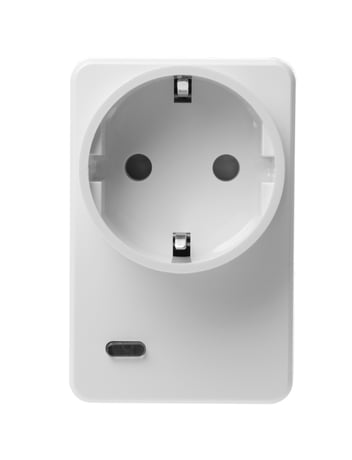
Product Image
1. Plug the Power Switch Meter into a power outlet. 2. Put the Z-Wave Gateway or Control Panel into Inclusion mode (please refer to the Z-Wave Gateway or Control Panel manual). 3. Within 1.5 seconds, press the Function Button 3 times. 4. Refer to the operation manual of the Z-Wave Gateway or Control Panel to complete the adding process. 5. If the device has already been added (included) into another Z-Wave Gateway/Control Panel, or if the device is unable to be added into the current Z-Wave Gateway/Control Panel, please exclude it first (see Removing Device) before attempting to include it into the current Z-Wave Gateway/Control Panel.
1. Put the Z-Wave Gateway or Control Panel into Exclusion mode (please refer to the Z-Wave Gateway or Control Panel manual). 2. Within 1.5 seconds, press the Function Button 3 times and the device will be removed from the Z-Wave network.
*. Press and hold the Function Button of the device for 10 seconds to factory reset. 1. Factory resetting the device will restore it to factory default settings (excluded from the Z-Wave network). The Z-Wave Gateway or Control Panel will still keep its Z-Wave settings. Please refer to the Gateway or Control Panel manual on how to remove the device’s Z-Wave settings. 2. Factory resetting the device will also clear all accumulated power data. 3. Before you remove or factory reset the Power Switch Meter, please ensure that the device DSK information has been removed or does not exist in the gateway. If you remove or factory reset the device, but its DSK still exists in the gateway, the gateway will automatically include the device again.
The DSK information is stored in the QR code format that is printed on a label and adhered to the front side of the device, as example shown on the right hand side.
| Type | Value(s) |
|---|
| Meter type |
|---|
| Electric Meter Consumption |