Zooz
Z-Wave Mutil-relay
ZW11
On/Off Power Switch
HW: 1 FW: 1.00
ZM5202
6.82.00
0x0312 (786)
0xa000 (40960)
0xa00a (40970)
ZC10-19126825
2019-12-20 12:17:32.401309
N/A
Enhanced 232 Slave
Always On Slave
This product is a multi-channel Z-Wave breaker with built-in S2 security.
This product is a multi-channel Z-Wave breaker with built-in S2 security.Built-in high-power relay, multi-type external switch selection.Very convenient.
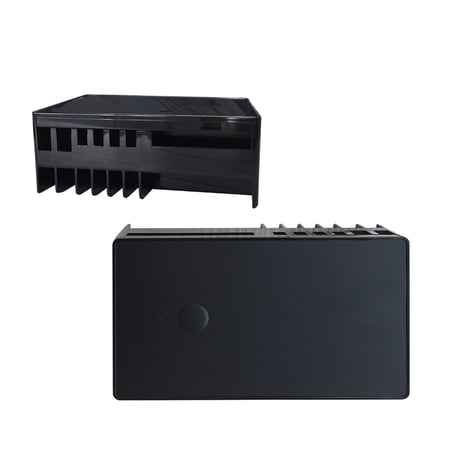
Product Image


1 - Parameter 1
Restores state after power failureSize: 1 byte
Default: 1
Minimum: 0
Maximum: 4
Possible values
| From | To | Desription |
|---|---|---|
| 0 | 0 | All Relays OFF |
| 1 | 1 | All relays remember the status prior to power outage and turns back to it |
| 2 | 2 | All relays turned on after power failure |
| 3 | 3 | R1&R2 state recovered, R3 – OFF |
| 4 | 4 | R1&R2 state recovered , R3-ON |
2 - Parameter 2
SW1 Type SelectSize: 1 byte
Default: 2
Minimum: 0
Maximum: 2
Possible values
| From | To | Desription |
|---|---|---|
| 0 | 0 | momentary switch |
| 1 | 1 | toggle switch (contact closed -ON, contact opened - OFF) |
| 2 | 2 | toggle switch(device changes status when switch changes status) |
3 - Parameter 3
SW2 Type SelectSize: 1 byte
Default: 2
Minimum: 0
Maximum: 2
Possible values
| From | To | Desription |
|---|---|---|
| 0 | 0 | momentary switch |
| 1 | 1 | toggle switch (contact closed -ON, contact opened - OFF) |
| 2 | 2 | toggle switch(device changes status when switch changes status) |
4 - Parameter 4
SW3 Type SelectSize: 1 byte
Default: 2
Minimum: 0
Maximum: 2
Possible values
| From | To | Desription |
|---|---|---|
| 0 | 0 | momentary switch |
| 1 | 1 | toggle switch (contact closed -ON, contact opened - OFF) |
| 2 | 2 | toggle switch(device changes status when switch changes status) |
5 - Parameter 5
LED indicatorSize: 1 byte
Default: 0
Minimum: 0
Maximum: 3
Possible values
| From | To | Desription |
|---|---|---|
| 0 | 0 | led OFF when output ON,led ON when output OFF |
| 1 | 1 | led ON when output ON,led OFF when output OFF |
| 2 | 2 | led always OFF |
| 3 | 3 | led always ON |
6 - Parameter 6
Relay-1(EP1)Auto Turn-Off TimerSize: 4 bytes
Default: 0
Minimum: 0
Maximum: 65535
Possible values
| From | To | Desription |
|---|---|---|
| 0 | 65535 | The countdown time, Relay-1 OFF |
7 - Parameter 7
Relay-1(EP1)Auto Turn-On TimerSize: 4 bytes
Default: 0
Minimum: 0
Maximum: 65535
Possible values
| From | To | Desription |
|---|---|---|
| 0 | 65535 | The countdown time, Relay-1 ON |
8 - Parameter 8
Relay-2(EP2)Auto Turn-Off TimerSize: 4 bytes
Default: 0
Minimum: 0
Maximum: 65535
Possible values
| From | To | Desription |
|---|---|---|
| 0 | 65535 | The countdown time, Relay-2 OFF |
9 - Parameter 9
Relay-2(EP2)Auto Turn-On TimerSize: 4 bytes
Default: 0
Minimum: 0
Maximum: 65535
Possible values
| From | To | Desription |
|---|---|---|
| 0 | 65535 | The countdown time, Relay-2 ON |
10 - Parameter 10
Relay-3(EP3)Auto Turn-Off TimerSize: 4 bytes
Default: 0
Minimum: 0
Maximum: 65535
Possible values
| From | To | Desription |
|---|---|---|
| 0 | 65535 | The countdown time, Relay-3 OFF |
11 - Parameter 11
Relay-3(EP3)Auto Turn-On TimerSize: 4 bytes
Default: 0
Minimum: 0
Maximum: 65535
Possible values
| From | To | Desription |
|---|---|---|
| 0 | 65535 | The countdown time, Relay-3 ON |
12 - Parameter 12
Realy-1(EP1)Manual ControlSize: 1 byte
Default: 1
Minimum: 0
Maximum: 1
Possible values
| From | To | Desription |
|---|---|---|
| 0 | 0 | manual control disabled |
| 1 | 1 | manual control enabled |
13 - Parameter 13
Realy-2(EP2)Manual ControlSize: 1 byte
Default: 0
Minimum: 0
Maximum: 1
Possible values
| From | To | Desription |
|---|---|---|
| 0 | 0 | manual control disabled |
| 1 | 1 | manual control enabled |
14 - Parameter 14
Realy-3(EP3)Manual ControlSize: 1 byte
Default: 0
Minimum: 0
Maximum: 1
Possible values
| From | To | Desription |
|---|---|---|
| 0 | 0 | manual control disabled |
| 1 | 1 | manual control enabled |
ADD the ZW11 from the existing Z-Wave home control network with your primary controller. Refer to your primary controller instructions to process the inclusion setup procedure. When prompted by your primary controller, click the Program button three times in one second.
Remove the ZW11 from the existing Z-Wave home control network with your primary controller. Refer to your primary controller instructions to process the exclusion setup procedure. When prompted by your primary controller, click the Program button three times in one second.
press 4x, then LED lit for 4s, within this time press 4x again – LED blinks 3 times then off to FACTORY RESET
| Type | Value(s) |
|---|