Simon
S100 Master Rocker for Roller Blind (Russia)
10004081-13x
Wall Controller
HW: 1 FW: 4.24:76.51
ZM5202
6.51.07
0x0267 (615)
0x0005 (5)
0x0000 (0)
ZC10-20016838
2020-01-13 11:13:47.484936
N/A
Enhanced Slave
Always On Slave
Simon Master Roller Blind iO is a wall controller designed to increase the number of control points that manages roller blinds. It is designed as additional control that works over window covering devices.
Master Roller Blind IO is ready to operate with Z-Wave controllers and configured to be managed by Simon100 IO APP using the HUB plug IO for getting a better user experience. Sending the Blind controller by other window covering devices Up/Down/Stop.
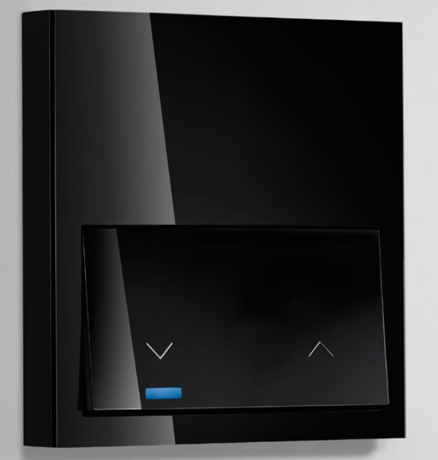
Product Image


1 - Association LED
Allows to turn ON or OFF the central LEDSize: 1 byte
Default: 0
Minimum: 0
Maximum: 0
Possible values
| From | To | Desription |
|---|---|---|
| 0 | 0 | Turns the LED OFF |
| 255 | 255 | Turns the LED ON |
12 - Behavior of LED in repose
Sets the central led ilumination when the key is in repose stateSize: 1 byte
Default: 0
Minimum: 0
Maximum: 0
Possible values
| From | To | Desription |
|---|---|---|
| 0 | 0 | LED OFF |
| 255 | 255 | UP and DOWN LED on at 20 percent of maximum level |
13 - Lock Input
Locks or Unlocks the direct control of the loadSize: 1 byte
Default: 0
Minimum: 0
Maximum: 0
Possible values
| From | To | Desription |
|---|---|---|
| 0 | 0 | Unlock the direct control of load |
| 255 | 255 | Lock the direct control of load |
15 - Reset default
Resets groups, Z-Wave status, and some or all configurations depending on the configuration value (write only)Size: 2 bytes
Default: 0
Minimum: 0
Maximum: 0
Possible values
| From | To | Desription |
|---|---|---|
| 17170 | 17170 | Parameters, except Lock long press are restored to default |
| 39015 | 39015 | Parameters, Groups, and Z-Wave status are restored to default |
18 - Manual association lock
Locks or unlocks the manual associationSize: 1 byte
Default: 0
Minimum: 0
Maximum: 0
Possible values
| From | To | Desription |
|---|---|---|
| 0 | 0 | Unblocked |
| 255 | 255 | Blocked |
19 - Press action
Controls the behavior of the product when the key is pressedSize: 1 byte
Default: 1
Minimum: 0
Maximum: 0
Possible values
| From | To | Desription |
|---|---|---|
| 0 | 0 | When short press, switches between the last power on and off (depending on the status of the associated control) by sending a Basic Set to 0x00 or 0xFF to the associated nodes. |
| 1 | 1 | When short press, always activates those associated with the last power on by sending a Basic Set to 0xFF |
| 2 | 2 | When short press, always deactivates associates by sending a Basic Set to 0x00 |
| 3 | 3 | When short press, on the left side sends a Basic Set to 0x00 and the DOWN 5s LED lights up. By short press, on the right side. A Basic Set is sent to 0xFF and the UP 5s led is lit. |
| 4 | 4 | When short press, always activates the associated nodes by sending a Basic Set to 0xFF. Pressing from 2 seconds to 10 seconds, always turns off the associated nodes by sending a Basic Set to 0x00. Does not send Node Info nor does the central LED flash. |
| 6 | 6 | When short press, on the left side sends a Basic Set with VALUE OFF or 0x00 (depending on whether an OFF VALUE has been set). If VALUE OFF is set, the DOWN LED lights up for 5sec. Otherwise the UP and DOWN LEDs will be activated briefly. When short press, on dich side sends a Basic Set to VALUE ON or 0x00 (depending on whether an ON VALUE has been set). If VALUE ON is set, the UP LED is lit for 5 seconds. Otherwise the UP and DOWN LEDs will be activated briefly. |
| 7 | 7 | The associated nodes are controlled as described in the USE table KEYBOARD AND ANSWERS |
20 - Identify
Allows to identify a product using its central LED (write only)Size: 1 byte
Default: 0
Minimum: 0
Maximum: 0
Possible values
| From | To | Desription |
|---|---|---|
| 255 | 255 | the central LED blinks for 5 seconds in order to identify the device |
21 - Device state
Reports the actual state of the deviceSize: 2 bytes
Default: 0
Minimum: 0
Maximum: 0
Possible values
| From | To | Desription |
|---|---|---|
| 45056 | 45056 | Stop |
| 45057 | 45057 | Going up |
| 45058 | 45058 | Going down |
| 45312 | 45312 | Percentage of Height of the blind |
25 - OFF VALUE
Sets the value when the action is OFF in percentage (0-99)Size: 1 byte
Default: 0
Minimum: 0
Maximum: 0
Possible values
| From | To | Desription |
|---|---|---|
| 1 | 99 | Set the value of OFF |
26 - ON VALUE
Sets the value when the action is ON in percentage (0-99)Size: 1 byte
Default: 0
Minimum: 0
Maximum: 0
Possible values
| From | To | Desription |
|---|---|---|
| 1 | 99 | Set the value of ON |
27 - Lock long press
Locks or unlocks the long press on the keySize: 1 byte
Default: 0
Minimum: 0
Maximum: 0
Possible values
| From | To | Desription |
|---|---|---|
| 0 | 0 | Long press works as described previously |
| 255 | 255 | Long press from 2 seconds to 20 seconds does not send a Node info. With a long press above 30 seconds, all parameters except Lock long press are restored to default and device sends a Node Info. |
28 - Consult on Touch detection
Controls if a state of an associated device or devices will be consulted when touch is detectedSize: 1 byte
Default: 0
Minimum: 0
Maximum: 0
Possible values
| From | To | Desription |
|---|---|---|
| 0 | 0 | If there is 1 Associated device, when Touch is detected, controlled device state will be consulted |
| 255 | 255 | If there is 1 Associated device, when Touch is detected, controlled device state is not consulted. |
29 - Enable automatic reporting CENTRAL_SCENE
Enables or disables the Central Scene Command ClassSize: 1 byte
Default: 0
Minimum: 0
Maximum: 0
Possible values
| From | To | Desription |
|---|---|---|
| 0 | 0 | Enables CC Central Scene Notification when there are no nodes associated with the control group and Inhibits error signaling by pressing less than 2 seconds if there are no associated nodes. |
| 255 | 255 | Enables error signaling by pressing less than 2 seconds if there are no associated nodes |
When the pushbutton is released after a press of (2sec<T<10sec) the device will send a NIF to include from Z-Wave network or perform an association with other Z-Wave device. Central LED will Blink with 0,3 sec period to inform that NIF can be send after release of pushbutton. This process does not perform a default reset of configurations. Main LED will Blink with 0,3 sec period to inform that NIF can be send after release of pushbutton.
When the pushbutton is released after a press of (2sec<T<10sec) the device will send a NIF to exclude from Z-Wave network or perform an association with other Z-Wave device. Main LED will Blink with 0,3 sec period to inform that NIF can be send after release of pushbutton. This process does not perform a default reset of configurations. Main LED will Blink with 0,3 sec period to inform that NIF can be send after release of pushbutton.
When the pushbutton is released after a press of (30sec<T) the device will perform a factory default values operation, excluding it from network and reset the configuration parameters. Main LED will perform 1 Blink with 5 sec. Please use this procedure only when the network primary controller is missing or otherwise inoperable.
When the pushbutton is released after a press of (10sec<T<30sec) the device will Set it into Manual Association Mode. Central LED will blink slow during Association mode time. Association mode allows add devices to Device Group 2. If associated devices are Simon Devices, Master will turn on Central LED to inform the user about which devices are in. Once association is finished, Master will turn off the Central LED to allow the normal use of the devices.
| Type | Value(s) |
|---|