Everspring
Thermostatic Radiator Valve
AC301-1
Thermostat - HVAC
HW: 1 FW: 1.01:00.00
SD3502
6.81.03
0x0060 (96)
0x0015 (21)
0x0001 (1)
ZC10-19126824
2019-12-27 10:17:51.304733
N/A
Enhanced 232 Slave
Listening Sleeping Slave
Yes
Thermostatic Radiator Valves (TRVs) sense the air temperature around them and regulate the flow of water through the radiator which they are fitted to.
Thermostatic Radiator Valves (TRVs) sense the air temperature around them and regulate the flow of water through the radiator which they are fitted to. They can be set at a level that gives you the room temperature you want. These settings may have to be different in each room, and you can set the TRVs to suit each room and then leave them to do their job. The device can be set temperature by manual or by gateway. Main Feature: • Comply with S2 security and SmartStart solution • Manual/remote setting of desired temperature • Heat Mode and Energy Heat Mode • Manual override the preset settings • Open window detection • Frost protection • Child lock protection • Low battery indication • OTA function • Decalc function
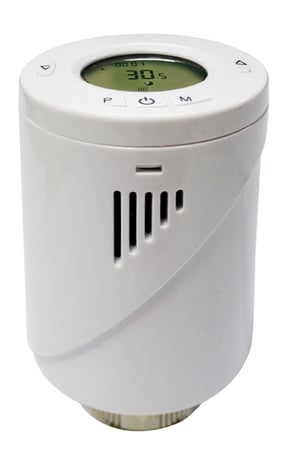
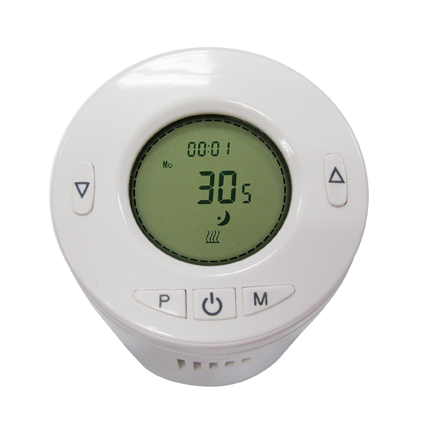
Product Image


1 - Temperature Auto Report period setting
Size: 2 bytes
Default: 120
Minimum: 1
Maximum: 255
Possible values
| From | To | Desription |
|---|---|---|
| 1 | 255 | 1~255(min) |
2 - Temperature offset for internal sensor
Size: 1 byte
Default: 0
Minimum: -80
Maximum: 80
Possible values
| From | To | Desription |
|---|---|---|
| -80 | 80 | -80~+80 offsets the measured temperature by -8.0℃~+8.0℃ |
3 - Maximum Set point value
Size: 1 byte
Default: 35
Minimum: 5
Maximum: 35
Possible values
| From | To | Desription |
|---|---|---|
| 5 | 35 | 5~35 for 5℃~35℃ |
4 - Minimum Set point value
Size: 1 byte
Default: 5
Minimum: 5
Maximum: 35
Possible values
| From | To | Desription |
|---|---|---|
| 5 | 35 | 5~35 for 5℃~35℃ |
5 - Frost protection temperature
Size: 1 byte
Default: 5
Minimum: 5
Maximum: 15
Possible values
| From | To | Desription |
|---|---|---|
| 5 | 15 | 5~15 for 5℃~15℃ |
6 - Open window detect function
Size: 1 byte
Default: 0
Minimum: 0
Maximum: 1
Possible values
| From | To | Desription |
|---|---|---|
| 0 | 1 | 0: Disable;1: Enable |
7 - Open window detect time period
Size: 1 byte
Default: 15
Minimum: 2
Maximum: 30
Possible values
| From | To | Desription |
|---|---|---|
| 2 | 30 | 2~30(min) |
8 - open window detect temperature drop setting
Size: 1 byte
Default: 4
Minimum: 4
Maximum: 8
Possible values
| From | To | Desription |
|---|---|---|
| 4 | 8 | 4=2℃;5=2.5℃;6= 3℃;7=3.5℃;8=4℃ |
9 - Open window detect delay time select
Size: 1 byte
Default: 30
Minimum: 10
Maximum: 60
Possible values
| From | To | Desription |
|---|---|---|
| 10 | 60 | 10~60(min) |
10 - Manual Override takeover period
Size: 1 byte
Default: 8
Minimum: 1
Maximum: 48
Possible values
| From | To | Desription |
|---|---|---|
| 1 | 48 | 1~48 means 30mins to 24hrs |
1. Put the Z-Wave Controller into inclusion mode. 2. Press the P button 3 times within 1.5 seconds to put the unit into inclusion mode.
1. Put the Z-Wave Controller into exclusion mode. 2. Press the P button 3 times within 1.5 seconds to put the unit into exclusion mode.
none
1. Press the P button 3 times within 1.5 seconds to put the unit into exclusion mode. 2. Within 1 second of step 1, press the button P again and hold for 5 seconds. 3. Node ID is excluded. The device reverts to factory default state. ((This procedure should only be used when the controller is inoperable.))
If you are connecting this unit to a Z-Wave Controller that utilizes the S2 security protocol, you may be asked by your controller to enter a 5 digit Device Specific Key (DSK) that is unique to each unit. This can be found in one of two places: - on the QR code label on the back of the unit - on the insert card inside the packaging
| Type | Value(s) |
|---|
| Group | Type |
|---|---|
| Power Management | Power status: Power has been applied |
| Sensor type |
|---|
| Air Temperature |