Zooz
Z-Wave Relay Dimmer switch
ZW34
Light Dimmer Switch
HW: 2 FW: 1.00
ZM5202
6.82.00
0x0312 (786)
0xa000 (40960)
0xa008 (40968)
ZC10-20016827
2019-12-30 17:06:48.047636
N/A
Enhanced 232 Slave
Always On Slave
This product is a Z-Wave multi-channel device.With dimming and relay two different functions.
This product is a Z-Wave multi-channel device.With dimming and relay two different functions. Built-in S2 security encryption
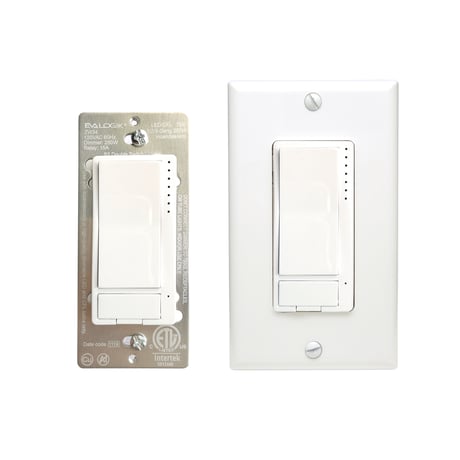
Product Image


1 - LED Indicator Mode for Dimmer
LED Indicator Mode for DimmerSize: 1 byte
Default: 0
Minimum: 0
Maximum: 3
Possible values
| From | To | Desription |
|---|---|---|
| 0 | 0 | On when off and off when on |
| 1 | 1 | On when on and off when off |
| 2 | 2 | Always off |
| 3 | 3 | Always on |
2 - LED Indicator Mode for Relay
LED Indicator Mode for RelaySize: 1 byte
Default: 0
Minimum: 0
Maximum: 3
Possible values
| From | To | Desription |
|---|---|---|
| 0 | 0 | On when off and off when on |
| 1 | 1 | On when on and off when off |
| 2 | 2 | Always off |
| 3 | 3 | Always on |
3 - LED Indicator Color for Dimmer
LED Indicator Color for DimmerSize: 1 byte
Default: 0
Minimum: 0
Maximum: 3
Possible values
| From | To | Desription |
|---|---|---|
| 0 | 0 | White |
| 1 | 1 | Blue |
| 2 | 2 | Green |
| 3 | 3 | Red |
4 - LED Indicator Color for Relay
LED Indicator Color for RelaySize: 1 byte
Default: 0
Minimum: 0
Maximum: 3
Possible values
| From | To | Desription |
|---|---|---|
| 0 | 0 | White |
| 1 | 1 | Blue |
| 2 | 2 | Green |
| 3 | 3 | Red |
5 - LED Indicator Brightness for Dimmer
LED Indicator Brightness for DimmerSize: 1 byte
Default: 1
Minimum: 0
Maximum: 2
Possible values
| From | To | Desription |
|---|---|---|
| 0 | 0 | Bright (100%) |
| 1 | 1 | Medium (60%) |
| 2 | 2 | Low (30%) |
6 - LED Indicator Brightness for Relay
LED Indicator Brightness for RelaySize: 1 byte
Default: 1
Minimum: 0
Maximum: 2
Possible values
| From | To | Desription |
|---|---|---|
| 0 | 0 | Bright (100%) |
| 1 | 1 | Medium (60%) |
| 2 | 2 | Low (30%) |
7 - LED Indicator Mode for Scene
LED Indicator Mode for SceneSize: 1 byte
Default: 1
Minimum: 0
Maximum: 1
Possible values
| From | To | Desription |
|---|---|---|
| 0 | 0 | Enable |
| 1 | 1 | Disable |
8 - Auto Turn-Off Timer for Dimmer
Auto Turn-Off Timer for DimmerSize: 4 bytes
Default: 0
Minimum: 0
Maximum: 65535
Possible values
| From | To | Desription |
|---|---|---|
| 0 | 65535 | The countdown time, the Dimmer Off |
9 - Auto Turn-On Timer for Dimmer
Auto Turn-On Timer for DimmerSize: 4 bytes
Default: 0
Minimum: 0
Maximum: 65535
Possible values
| From | To | Desription |
|---|---|---|
| 0 | 65535 | The countdown time, the dimmer on |
10 - Auto Turn-Off Timer for Relay
Auto Turn-Off Timer for RelaySize: 4 bytes
Default: 0
Minimum: 0
Maximum: 65535
Possible values
| From | To | Desription |
|---|---|---|
| 0 | 65535 | The countdown time, the Relay off |
11 - Auto Turn-On Timer for Relay
Auto Turn-On Timer for RelaySize: 4 bytes
Default: 0
Minimum: 0
Maximum: 65535
Possible values
| From | To | Desription |
|---|---|---|
| 0 | 65535 | The countdown time, the Relay on |
12 - Restores state after power failure
Restores state after power failureSize: 1 byte
Default: 3
Minimum: 0
Maximum: 8
Possible values
| From | To | Desription |
|---|---|---|
| 0 | 0 | dimmer, relay off |
| 1 | 1 | dimmer off, relay on |
| 2 | 2 | dimmer on, relay off |
| 3 | 3 | previous state for dimmer, previous state for relay |
| 4 | 4 | previous state for dimmer, relay on |
| 5 | 5 | previous state for dimmer, relay off |
| 6 | 6 | dimmer on, previous state for relay |
| 7 | 7 | dimmer off, previous state for relay |
| 8 | 8 | dimmer on, relay on |
13 - Ramp rate
Ramp rate (local button only, remote control by command class)Size: 1 byte
Default: 1
Minimum: 0
Maximum: 99
Possible values
| From | To | Desription |
|---|---|---|
| 0 | 99 | from 0x63 to 0x00 or from 0x00 to 0x63 need Required time |
14 - Multilevel minimum value can be set
Multilevel minimum value can be setSize: 1 byte
Default: 1
Minimum: 0
Maximum: 99
Possible values
| From | To | Desription |
|---|---|---|
| 0 | 99 | The minimum brightness of a dimmer |
15 - Multilevel maximum value can be set
Multilevel maximum value can be setSize: 1 byte
Default: 99
Minimum: 0
Maximum: 99
Possible values
| From | To | Desription |
|---|---|---|
| 0 | 99 | The maximum brightness of a dimmer |
17 - when switch is on or off and quickly press UPPER paddle 2 times,
when switch is on or off and quickly press UPPER paddle 2 times, switch turns on to x brightnessSize: 1 byte
Default: 0
Minimum: 0
Maximum: 1
Possible values
| From | To | Desription |
|---|---|---|
| 0 | 0 | turn on to 99 |
| 1 | 1 | turn on to the value relate with parameter 15 |
18 - Double Tap Behavior
Double Tap BehaviorSize: 1 byte
Default: 0
Minimum: 0
Maximum: 2
Possible values
| From | To | Desription |
|---|---|---|
| 0 | 0 | enable double tap to full brightness, single tap to last brightness level or custom value set in parameter 23 |
| 1 | 1 | disable double tap to full brightness, single tap to last brightness level or custom value set in parameter 23 |
| 2 | 2 | isable double tap to full brightness, single tap always to full brightness |
19 - Enable or Disable local / Z-Wave control for DIMMER
Enable or Disable local / Z-Wave control for DIMMERSize: 1 byte
Default: 1
Minimum: 0
Maximum: 2
Possible values
| From | To | Desription |
|---|---|---|
| 0 | 0 | disable local on/off control |
| 1 | 1 | enable local and Z-Wave control (normal operation like now) |
| 2 | 2 | disable local and Z-Wave on/off control |
20 - Enable or Disable local / Z-Wave control for RELAY
Enable or Disable local / Z-Wave control for RELAYSize: 1 byte
Default: 1
Minimum: 0
Maximum: 2
Possible values
| From | To | Desription |
|---|---|---|
| 0 | 0 | disable local on/off control |
| 1 | 1 | enable local and Z-Wave control (normal operation like now) |
| 2 | 2 | disable local and Z-Wave on/off control |
21 - Dimmer Speed Setting (only for local press & hold)
Dimmer Speed Setting (only for local press & hold)Size: 1 byte
Default: 4
Minimum: 0
Maximum: 99
Possible values
| From | To | Desription |
|---|---|---|
| 0 | 99 | Time required for local key dimming |
22 - Ramp rate for Z-Wave on/off controlled
Ramp rate for Z-Wave on/off controlledSize: 1 byte
Default: 0
Minimum: 0
Maximum: 1
Possible values
| From | To | Desription |
|---|---|---|
| 0 | 0 | on/off ramp rate for Z-Wave same as manual control (set in Parameter 13) |
| 1 | 1 | on/off ramp rate for Z-Wave control set through command class (like now) |
23 - default brightness level
Default brightness level - in this parameter define default brightness levelSize: 1 byte
Default: 0
Minimum: 0
Maximum: 99
Possible values
| From | To | Desription |
|---|---|---|
| 0 | 99 | in this parameter define default brightness level |
ADD the ZW34 from the existing Z-Wave home control network with your primary controller. ---Refer to your primary controller instructions to process the inclusion / exclusion setup procedure. ---When prompted by your primary controller, quickly press 3x UPPER PADDLE FOR DIMMER
Remove the ZW34 from the existing Z-Wave home control network with your primary controller. ---Refer to your primary controller instructions to process the inclusion / exclusion setup procedure. ---When prompted by your primary controller, quickly press 3x LOWER PADDLE FOR DIMMER
Press and hold for 15 seconds LOWER PADDLE OF DIMMER until all LED’s start blinking quickly, then release and within 5 press and hold the UPPER PADDLE OF DIMMER for 15 SECONDS until all LED’s blink again for 3 seconds to reset factory (Node:Please use this procedure only when the network primary controller is missing or otherwise inoperable.)
| Type | Value(s) |
|---|