Philio
Valves Controller with Water Meter
PAB04-1
On/Off Power Switch
HW: 1 FW: 1.01
SD3502
6.81.03
0x013C (316)
0x0001 (1)
0x0076 (118)
ZC10-20026864
2020-02-21 18:06:59.557349
N/A
Enhanced 232 Slave
Always On Slave
This valves controller PAB04 is a security enabled wireless switch, based on Z-Wave Plus technology. Connect PAB04 with an external water meter which can output pulse signals. PAB04 is able to detect instance water flow and the accumulated water.
This valves controller PAB04 is a security enabled wireless switch, based on Z-Wave Plus technology. Z-Wave Plus TM enabled devices displaying the Z-Wave Plus TM logo can also be used with it regardless of the manufacturer, and can also be used in other manufacturer’s Z-Wave TM enabled networks. Remote On/Off control of the connected valve is possible with other manufacturer’s wireless Controller. Each switch is designed to act as a repeater. Repeaters will re-transmit the RF signal to ensure that the signal is received by its intended destination by routing the signal around obstacles and radio dead spots. Because PAB04 supports Security Command Class, it can learn with Secured controller. Its functionality and supported command classes is identical when included as a secure and non-secure device. Connect PAB04 with an external water meter which can output pulse signals. PAB04 is able to detect instance water flow and the accumulated water.
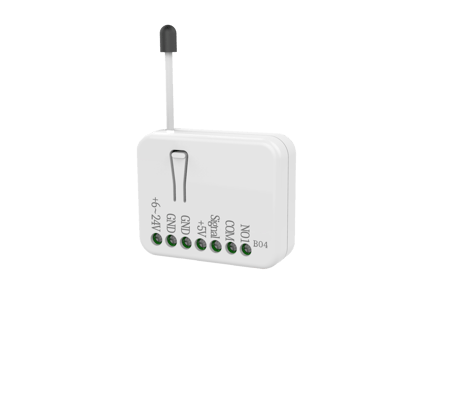
Product Image


1 - Unit of Accumulated Water Flow
If the setting is configured for accumulated cubic meters (set value =2), PAB04 will report its accumulated water flow every 1 hour to Group1 nodes. The default setting value is KL.Size: 1 byte
Default: 2
Minimum: 1
Maximum: 2
Possible values
| From | To | Desription |
|---|---|---|
| 1 | 1 | 1 : US Gallon |
| 2 | 2 | 2. KL |
2 - Threshold of Accumulated Water Flow
When the accumulated water is over the threshold of accumulated water flow, PAB04 will send meter report of its Accumulated water flow (KL or US gallon) to Group1 nodes. For example : If the threshold of accumulated water flow is set as 1KL. PAB04 will send meter report whenever it detects the accumulated water flow crossing over 1KL、2KL、3KL、‧‧‧etc.Size: 2 bytes
Default: 1
Minimum: 0
Maximum: 255
Possible values
| From | To | Desription |
|---|---|---|
| 0 | 0 | 0 : Disable accumulated meter report |
| 1 | 255 | 1~255 : 1~255 US Gallon or KL |
3 - Differential of Instant Water Flow
When the variation of instant water flow is over the differential, PAB04 will send Multilevel Sensor report (Liter/h) to group1 nodes. In order to avoid too frequent report, it will not report when the instant water flow vary lower than the configured percentage of one liter.Size: 1 byte
Default: 10
Minimum: 0
Maximum: 100
Possible values
| From | To | Desription |
|---|---|---|
| 0 | 0 | 0 : Disable instant water flow Report |
| 1 | 100 | 1~100 : 1% ~ 100% |
4 - Pulse count per liter
The calculation of accumulated water flow and instant water flow is based on this value of the attached meter. Check the specification of the water meter, you can find Pulse Frequency. For example : 7.5Q, Q is flow rate in L/min. Then the pulse count per liter will be 450, this value is count from 7.5 (L/min) multiply 60 seconds.Size: 2 bytes
Default: 450
Minimum: 1
Maximum: 32767
Possible values
| From | To | Desription |
|---|---|---|
| 1 | 32767 | 450 Pulse/L |
5 - Relay Control mode
If the relay control mode is set as 0 (NC), it will turn on the valve by closing the relay contact. If the relay control mode is set as 1 (NO), it will turn on the valve by opening the relay contact.Size: 1 byte
Default: 0
Minimum: 0
Maximum: 1
Possible values
| From | To | Desription |
|---|---|---|
| 0 | 0 | 0 : NC |
| 1 | 1 | 1 : NO |
6 - Periodic Auto Report Timer
The auto report timer define how long will PAB04 report the meter report of accumulated water flow. At the same time it also sand the Multilevel Sensor report of instant water flow and Switch Binary Report of the state of the connected valve.Size: 2 bytes
Default: 60
Minimum: 0
Maximum: 1440
Possible values
| From | To | Desription |
|---|---|---|
| 0 | 0 | 0 : Disable Periodic Auto Report |
| 1 | 1440 | 1~1440 :1min ~ 1440 min |
Add(Inclusion) : 1. Put your Z-Wave controller into inclusion mode by following the instructions provided by the controller manufacturer. 2. Pressing On/Off button three times within 2 seconds will enter inclusion mode.
Remove(Exclusion) : 1. Put your Z-Wave controller into exclusion mode by following the instructions provided by the controller manufacturer. 2. Pressing On/Off button three times within 2 seconds will enter exclusion mode.
Reset : 1. Pressing On/Off button three times within 2 seconds will enter inclusion mode. 2. Within 1 second, press On/Off button again for 5 seconds. 3. IDs are excluded.
1.Product has a DSK string. For example:41810-20735-05418-54177-08777-14431-45473-10737. User can find QR code and DSK string on our product package and product. 2.SmartStart enabled products can be added into a Z-Wave network by scanning the Z-Wave QR Code on the product, with a controller providing SmartStart inclusion. No further action is required and the SmartStart product will be added automatically to the closest network within 10 minutes of being switched on in the network vicinity.
| Type | Value(s) |
|---|
| Sensor type |
|---|
| Water Flow |
| Meter type |
|---|
| Water Meter Consumption |