LEEDARSON
Z-WAVE 700 Keypad
7BA-KP-V-B-C0
Entry Control Keypad Device
HW: 1 FW: 1.01
ZGM130
7.12.2
0x0300 (768)
0x0300 (768)
0x0044 (68)
ZC12-20030037
2020-03-20 13:21:27.812321
N/A
Enhanced 232 Slave
Listening Sleeping Slave
Security Keypad Z-Wave 700
The keypad provides a convenient user interface to arm or disarm the security system with a PIN code.
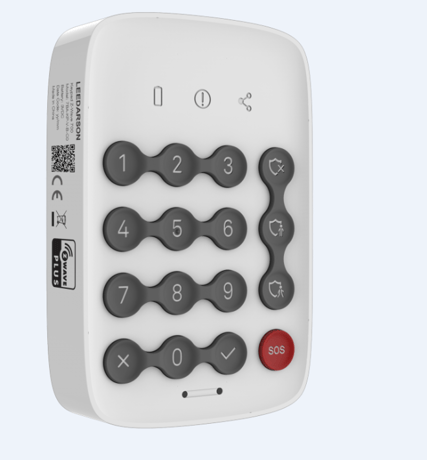
Product Image


1 - EntryExitDelay
CACHED_KEYS is sent when the cache size or the cache timeout is exceededSize: 1 byte
Default: 10
Minimum: 0
Maximum: 30
Possible values
| From | To | Desription |
|---|---|---|
| 0 | 30 | The Entry/Exit Delay Times |
2 - LowBatteryPercent
1 to 32 ASCII encoded characters. ASCII codes MUST be in the value range 0x00-0xF7. The string MUST be padded with the value 0xFF to fit 16 byte blocks when sent in a notification.Size: 1 byte
Default: 10
Minimum: 5
Maximum: 50
Possible values
| From | To | Desription |
|---|---|---|
| 5 | 50 | 1 to 32 ASCII encoded characters. ASCII codes MUST be in the value range 0x00-0xF7. The string MUST be padded with the value 0xFF to fit 16 byte blocks when sent in a notification. |
3 - Parameter 3
Turn on/off Proximity Sensor. Turn on: 1 Turn off: 0Size: 1 byte
Default: 1
Minimum: 0
Maximum: 1
Possible values
| From | To | Desription |
|---|---|---|
| 0 | 1 | Turn on/off Proximity Sensor. Turn on: 1 Turn off: 0 |
4 - PS Timeout
The wait time of PS for clear the motionSize: 1 byte
Default: 5
Minimum: 2
Maximum: 30
Possible values
| From | To | Desription |
|---|---|---|
| 2 | 30 | The wait time of PS for clear the motion |
5 - PS Sensitivity
The sensitivity of PSSize: 1 byte
Default: 0
Minimum: 0
Maximum: 1
Possible values
| From | To | Desription |
|---|---|---|
| 0 | 1 | The sensitivity of PS |
6 - L-Sensor Switch
Turn on/off Light Sensor Turn on: 1 Turn off: 0Size: 1 byte
Default: 1
Minimum: 0
Maximum: 1
Possible values
| From | To | Desription |
|---|---|---|
| 0 | 1 | Turn on/off Light Sensor Turn on: 1 Turn off: 0 |
7 - Day/Night threshold
The illuminance threshold to distinguish day and nightSize: 1 byte
Default: 50
Minimum: 0
Maximum: 255
Possible values
| From | To | Desription |
|---|---|---|
| 0 | 255 | The illuminance threshold to distinguish day and night(unit: lumen) Eg: 50 -> Will turn key backlight if current illuminance is less than 50 lux, or close the key backlight. |
8 - KeyBeep Switch
Turn on/off key tone Turn on: 1 Turn off: 0Size: 1 byte
Default: 1
Minimum: 0
Maximum: 1
Possible values
| From | To | Desription |
|---|---|---|
| 0 | 1 | Turn on/off key tone Turn on: 1 Turn off: 0 |
9 - ArmStatusIndicate Switch
Turn on/off arm status indicate after wake up Turn on: 1 Turn off: 0Size: 1 byte
Default: 1
Minimum: 0
Maximum: 1
Possible values
| From | To | Desription |
|---|---|---|
| 0 | 1 | Turn on/off arm status indicate after wake up Turn on: 1 Turn off: 0 |
1. Set the Z-Wave network main controller into learning mode (see Z-Wave network controller operating manual). 2. Trigger this action. 3. Network green LED will flashing at every 1 second to indicate that the inclusion is working, and solid green LED 3 seconds for indicate the inclusion is successful, otherwise the LED will be soild yellow in which you need to repeat the process from step 2.
Remove the Keypad from a Z-Wave network: 1. Set the Z-Wave network main controller into removing mode (see Z-Wave controller operating manual). 2. Trigger this button action. the Network LED will flashing at every 1 second. 3. If the removing is successful, the LED will solid green for 3 seconds. If the removing is failed then LED display yellow for 3 seconds, otherwise you need to repeat the process from step 2. Note: Keypad will start Smart Start Inclusion when it is removed from a Z-wave network.
Turn on/off arm status indicate after wake up Turn on: 1 Turn off: 0
Keypad will reset itself to factory default by sending “Device Reset Locally CC” when it is included into a non-security Z-wave network.
on page 5
NA
NA
| Group | Type |
|---|---|
| Home Security |
|