Leviton
Receptacle
ZW15R
Binary Switch
HW: 1 FW: 1.07
ZGM130
7.12.2
0x001D (29)
0x0037 (55)
0x0002 (2)
ZC12-20040041
2020-03-27 15:50:32.295222
N/A
Enhanced 232 Slave
Always On Slave
Tamper Resistant Split 120VAC Duplex Receptacle with hidden LED, Top controlled, bottom always on.
Tamper Resistant Split 120VAC Duplex Receptacle with white face plate and hidden LED, Top controlled, bottom always on. Color change kits are available to change to Light Almond, Ivory, Black, Brown, Gray. Shallow depth and screw terminals allow for easy installation. Built in LED can be configured to be off, on when the outlet is on or a finder LED to turn the outlet on in the dark.
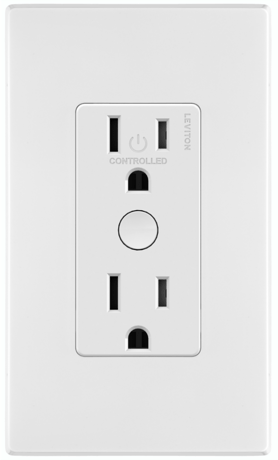
Product Image


7 - Locator Status
Locator LED StatusSize: 1 byte
Default: 0
Minimum: 0
Maximum: 255
Possible values
| From | To | Desription |
|---|---|---|
| 255 | 255 | Locater Mode |
| 254 | 254 | Status Mode |
| 0 | 0 | LED Off |
Classic Inclusion To A Z-Wave Network For older controllers Classic Inclusion is supported. Depending on the age of the controller the controller will need to be 3 to 35 feet from the device when including. 1. To enter programming mode, hold the button for 7 seconds. The status light will turn amber, release and the status light will blink. 2. Follow the Z-Wave controller instructions to enter exclusion mode. 3. Tap the top of the button one time. The status light will quickly flash green. 4. The Z-Wave controller will confirm successful exclusion from the network.
Exclusion From A Z-Wave Network When removing an outlet from a Z-Wave network, best practice is to use the exclusion command found in the Z-Wave controller. 1. To enter programming mode, hold the button for 7 seconds. The status light will turn amber, release and the status light will blink. 2. Follow Z-Wave controller directions to enter exclusion mode 3. Tap the button 1 time. The status light will quickly flash green. 4. The Z-Wave controller will remove the device from the network
Factory Default When removing an outlet from a network it is best practice to use the exclusion process. In situations where a device needs to be returned to factory default follow the following steps. A reset should only be used when a controller is inoperable or missing. 1. Hold the button for 7 seconds, the status light will turn amber. Continue holding the button for another 7 seconds (total of 14 seconds). The status light will quickly flash red/amber. 2. Release the button and the device will reset.
Page 8
| Type | Value(s) |
|---|