ABUS
Keypad
PLBE10000
Entry Control Keypad Device
HW: 1 FW: 1.01
ZGM130
7.12.2
0x0403 (1027)
0x0004 (4)
0x0001 (1)
ZC12-20050055
2020-04-30 11:01:21.649053
N/A
Enhanced 232 Slave
Listening Sleeping Slave
Wireless indoor keypad with 2-way communication to control the ABUS Nexello security system (activation, internal activation, deactivation, panic alarm)
The hotkey function simplifies everyday life, e.g. by controlling lighting, heating, etc. Users receive direct feedback via LEDs and/or loudspeakers on various actions Faults (battery, inevitability, reception) can be quickly verified by 3 LEDs Keypad wakes up automatically when approaching (< 20cm) Easy to install on walls, incl. mounting bracket Sabotage protection, push message e.g. when battery is low Updates Over-the-Air (OTA), AES-128-bit encrypted, Z-Wave compatible
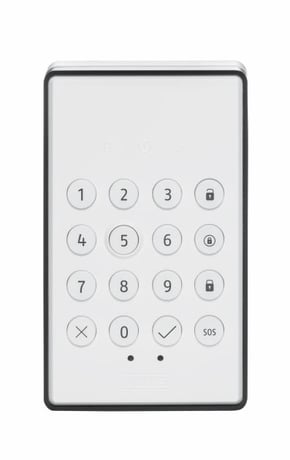
Product Image


2 - Threshold value battery alarm
The threshold of Low power. Percentage value from when the low battery alarm should be transmitted.Size: 1 byte
Default: 10
Minimum: 5
Maximum: 50
Possible values
| From | To | Desription |
|---|---|---|
| 5 | 50 | Adjustable from 5 - 50 in percent |
3 - Proximity sensor Active / Deactive
Activates / deactivates the proximity sensorSize: 1 byte
Default: 1
Minimum: 0
Maximum: 1
Possible values
| From | To | Desription |
|---|---|---|
| 0 | 0 | Sensor is deactivated |
| 1 | 1 | Sensor is activated |
4 - Waiting time between two motion alarms
The time to clear the motion. i.e. Waiting time from one motion alarm to the next triggering.Size: 1 byte
Default: 5
Minimum: 2
Maximum: 30
Possible values
| From | To | Desription |
|---|---|---|
| 2 | 30 | Adjustable from 2 - 30 in seconds |
5 - Proximity sensor Sensitivity
Sensitivity value of the proximity sensor. The value 31 is the lowest sensitivity. The value 4 is the highest sensitivity.Size: 1 byte
Default: 9
Minimum: 4
Maximum: 31
Possible values
| From | To | Desription |
|---|---|---|
| 4 | 31 | Adjustable from 4 - 31 |
6 - Light sensor Active / Deactive
Activate/deactivate the light sensor.Size: 1 byte
Default: 1
Minimum: 0
Maximum: 1
Possible values
| From | To | Desription |
|---|---|---|
| 0 | 0 | Sensor is deactivated |
| 1 | 1 | Sensor is activated |
7 - Threshold value for day / night
Threshold value from which LUX value the day or night value is sent.Size: 1 byte
Default: 50
Minimum: 0
Maximum: 255
Possible values
| From | To | Desription |
|---|---|---|
| 0 | 255 | Adjustable from 0 - 255 in Lux |
8 - Key Tones Active / Deactive
Activates / deactivates the button tones.Size: 1 byte
Default: 1
Minimum: 0
Maximum: 1
Possible values
| From | To | Desription |
|---|---|---|
| 0 | 0 | Sound is deactivated |
| 1 | 1 | Sound is activated |
9 - Status display Active / Deactive
Enable / disable the status display when the device wakes up.Size: 1 byte
Default: 1
Minimum: 0
Maximum: 1
Possible values
| From | To | Desription |
|---|---|---|
| 0 | 0 | Display status is deactivated |
| 1 | 1 | Display status is activated |
If your Z-wave controller does not support SmartStart, follow these instructions for Product Classic Inclusion: Activate the inclusion mode (teach-in mode) on the Z-Wave controller. (for more details, please refer to the Z-Wave controller's user manual) Or press the "+" button (Include / Add) in your Z-Wave app and follow the instructions to set the Z-Wave controller to include mode. Keep the device within range of the Z-Wave controller. Press the Link button 3 times quickly (within 1.5 seconds) to start the inclusion on the device. The Link LED starts flashing green for up to 60 seconds Successful inclusion is displayed in the app or on the Z-Wave controller and the link LED on the device lights up green. Repeat the inclusion process if it was not successful. If a new attempt fails as well, first carry out a factory reset on the device, see 2.5.
Activate the exclusion mode (learn mode) on the Z-Wave controller. (for more details, please refer to the Z-Wave controller's user manual) Or press the "-" button (Remove / Exclusion) in your Z-Wave app and follow the instructions to set the Z-Wave controller to Exclusion mode. Press the Link button 3 times quickly (within 1.5 seconds) to start the exclusion on the device. The Link LED starts flashing green for up to 60 seconds The successful exclusion is displayed in the app or on the Z-Wave controller and the link LED on the device lights up green.
It´s a FLIRS device and hence does not support wake up command class
Press and hold the Link button for at least 5 seconds. The device is now reset to factory settings. Hint: Please use this procedure only if the primary network controller is missing or otherwise not functional. If the device is set to factory default, the status is set to "not included" and the association settings and possible configurations are reset to default.
The first 5 digits of the DSK code can be found on the QR Code on the back of the product.
Not applicable
Not applicable
| Group | Type |
|---|---|
| Home Security |
|