Climax Technology
Smoke Detector
SD-29
Notification Sensor
HW: 255 FW: 4.01
ZM5202
6.81.06
0x018E (398)
0x0003 (3)
0x0018 (24)
ZC10-20046908
2020-04-29 07:34:39.674537
N/A
Enhanced 232 Slave
Listening Sleeping Slave
Yes
SD-29 series is a wireless smoke detector with built-in PIR motion sensor, temperature sensor and emergency light (optional). Designed to protect your family against potential fire hazards, the Smoke detector is also capable of detecting movements and reporting temperature to users.
The SD-29 is a wirelessly operated photo-electronic Smoke Detector designed to operate with any Z-Wave enabled controller devices; it also features smoke detecting, temperature sensing and IR detection. The Smoke Detector’s alarm situations, battery condition, operating conditions, supervisory data and general fault information are sent to the Z-Wave Gateway/Control Panel wirelessly. The device is also serially connected with other sensors in the Z-Wave gateway to serve as an extra siren.
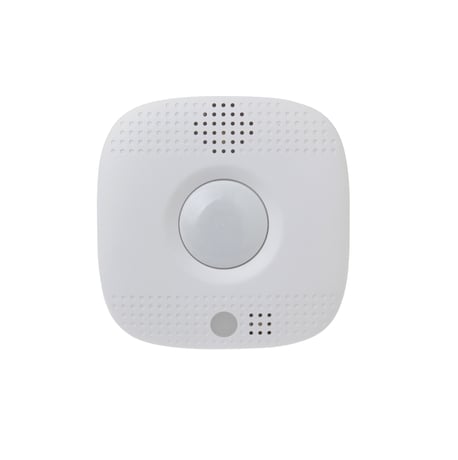
Product Image
1. Insert three 3V CR123 Lithium batteries into the battery compartment. Orient the battery according to the battery compartment polarity indication before insertion. 2. After batteries are inserted, the Smoke Detector will sound 2 short beeps, the Red LED will start to flash and initiates a 1-minute warm-up period. 3. During the 1-minute warming period, you can learn (include) the Smoke Detector into the Panel, refer to Add Device (Inclusion) for details. 4. Put the Z-Wave gateway or control panel into Inclusion or Learning mode (please refer to the Z-Wave gateway or control panel manual). 5. Within 1.5 seconds, press the Function button 3 times. The Smoke Detector will emit a 2-tone beep and the LED will turn on for ~2 seconds. Refer to the operation manual of the Z-Wave gateway or control panel to complete the learn-in process. 6. When the 1-minute warming period is over, one short beep will sound to indicate that the Smoke Detector is starting calibration process. Learning/Inclusion is prohibited during calibration. If the Smoke Detector has not been included in the panel yet, wait for calibration to complete before including the Smoke Detector. The completion of calibration process will be notified by a 2-tone beep and the Red LED will turn off. If the Smoke Detector gives out continuous beeps instead, it indicates that the Smoke Detector has failed the calibration. Remove the battery and restart from step 1 after a pause of at least 30 seconds. 7. After the warming-up and calibration process, if the Smoke Detector is not learned (included) into the Z-Wave gateway/Control Panel, complete the learning/inclusion process then refer to Installation section below to mount the Smoke Detector. 8. If the sensor has already been included (learnt) into another Z-Wave Gateway/Control Panel, or if the sensor is unable to be learnt into the current Z-Wave Gateway/Control Panel, please exclude it first (see Exclusion) before attempting to include it into the current Z-Wave Gateway/Control Panel.
1. Put the Z-Wave gateway or control panel into Exclusion mode (please refer to the Z-Wave gateway or control panel manual). 2. Within 1.5 seconds, press the Function button 3 times and the Smoke Detector will be removed from the Z-Wave network.
Listening Sleeping Slave (LSS)
(Only use factory reset when network Control Panel/Gateway is missing or inoperable). *. Press and hold the button of the smoke detector for 20 seconds. Release the button when you hear 3 beeps to perform factory reset.
| Type | Value(s) |
|---|
| Group | Type |
|---|---|
| Smoke Alarm |
|
| Heat Alarm |
|
| Home Security |
|
| Sensor type |
|---|
| Air Temperature |