Aeotec
AërQ - Temperature & Humidity Sensor
ZWA009-C
Notification Sensor
HW: 1 FW: 1.00
ZGM130
7.12.2
0x0371 (881)
0x0002 (2)
0x0009 (9)
ZC12-20080086
2020-08-06 15:07:35.591147
N/A
Enhanced 232 Slave
Reporting Sleeping Slave
Yes
Monitor climate and analyse air health with the AërQ sensor.
The AërQ is an intelligent sensor to monitor your environment at home. It measures temperature and humidity. Via an intelligent analysis, the sensor protects your health by detecting the danger of mould formations.
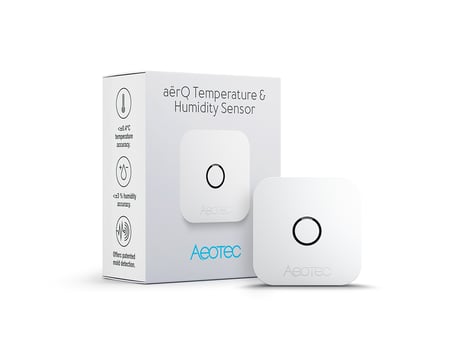
Product Image


1 - Minimum Temperature change to report
This value defines the minimum change of temperature to cause an unsolicited report of humidity to the central controller using Lifeline. If the value is set to 0, there will be no reports sent to the controller, when the temperature changes. However, periodic reports, managed by configuration parameter 4, may still be active.Size: 1 byte
Default: 20
Minimum: 0
Maximum: 100
Possible values
| From | To | Desription |
|---|---|---|
| 0 | 0 | disabled |
| 1 | 100 | 1/10 degree |
2 - Minimum humidity change to report
This value defines the minimum change of humidity to cause an unsolicited report of humidity to the central controller using Lifeline. If the value is set to 0, there will be no reports sent to the controller, when the humidity changes. However, periodic reports, managed by configuration parameter 4, may still be active.Size: 1 byte
Default: 5
Minimum: 0
Maximum: 20
Possible values
| From | To | Desription |
|---|---|---|
| 0 | 0 | disabled |
| 1 | 20 | % |
4 - Temperature and Humidity Periodic Reports
This parameter defines the time interval to send an unsolicited report. If the value is set to 0, there will be no periodic reports sent to the controller. However, reports on temperature/humidity changes, managed by configuration parameters 1 and 2, may still be active.Size: 2 bytes
Default: 43200
Minimum: 0
Maximum: 65535
Possible values
| From | To | Desription |
|---|---|---|
| 0 | 0 | disabled |
| 900 | 65535 | seconds |
5 - Temperature Upper Watermark value
This parameter defines a temperature. If the measured temperature surpasses this watermark a BASIC command is sent into Association Group 2Size: 2 bytes
Default: 0
Minimum: 0
Maximum: 1000
Possible values
| From | To | Desription |
|---|---|---|
| 0 | 0 | disabled |
| 1 | 1000 | 1/10 degree |
6 - Temperature Lower Watermark value
This parameter defines a temperature. If the measured temperature drops below this watermark a BASIC command is sent into Association Group 3Size: 2 bytes
Default: 0
Minimum: 0
Maximum: 1000
Possible values
| From | To | Desription |
|---|---|---|
| 0 | 0 | disabled |
| 200 | 1000 | 1/10 degree |
7 - Humidity Upper Watermark value
This parameter defines a relative humidity. If the measured relative humidity surpasses this watermark a BASIC command is sent into Association Group 4Size: 1 byte
Default: 0
Minimum: 0
Maximum: 90
Possible values
| From | To | Desription |
|---|---|---|
| 0 | 0 | disabled |
| 1 | 90 | % |
8 - Humidity Lower Watermark value
This parameter defines a relative humidity. If the measured temperature drops below this relative humidity a BASIC command is sent into Association Group 5Size: 1 byte
Default: 0
Minimum: 0
Maximum: 90
Possible values
| From | To | Desription |
|---|---|---|
| 0 | 0 | disabled |
| 1 | 90 | % |
9 - Low Temperature Trigger BASIC Set Command Value
This defines what BASIC command shall be sent out into association group 3Size: 1 byte
Default: 255
Minimum: 0
Maximum: 255
Possible values
| From | To | Desription |
|---|---|---|
| 0 | 255 | Values |
10 - High Temperature Trigger BASIC Set Command Value
This defines what BASIC command shall be sent out into association group 2Size: 1 byte
Default: 0
Minimum: 0
Maximum: 255
Possible values
| From | To | Desription |
|---|---|---|
| 0 | 255 | Value |
11 - Low Humidity Trigger BASIC Set Command Value
This defines what BASIC command shall be sent out into association group 5Size: 1 byte
Default: 255
Minimum: 0
Maximum: 255
Possible values
| From | To | Desription |
|---|---|---|
| 0 | 255 | Value |
12 - High Humidity Trigger BASIC Set Command Value
This defines what BASIC command shall be sent out into association group 4Size: 1 byte
Default: 0
Minimum: 0
Maximum: 255
Possible values
| From | To | Desription |
|---|---|---|
| 0 | 255 | Value |
13 - Offset value for Mould danger notification
This value allows to increase the humidity threshold for mold danger notification by max 10%Size: 1 byte
Default: 0
Minimum: 0
Maximum: 10
Possible values
| From | To | Desription |
|---|---|---|
| 0 | 10 | % |
255 - Reset parameter
This parameter helps reset configuration parameters and the device to factory defaults.Size: 4 bytes
Default: 0
Minimum: 0
Maximum: 1431655765
Possible values
| From | To | Desription |
|---|---|---|
| 1 | 1431655764 | Reset all Parameter settings to their default settings. |
| 1431655765 | 1431655765 | Completely factory reset sensor and send device reset locally notification. |
Inclusion 1. Insert the battery. 2. Press the button quickly three times in a row.
Exclusion 1. Press the button quickly three times in a row.
A click on the central button will wake up the device.
Reset to factory default This device also allows to be reset without any involvement of a Z-Wave controller. This procedure should only be used when the primary controller is inoperable. Keep the button pressed for 10 seconds. After 5 seconds the red LED will start blinking.
To run this device please insert fresh 1 * CR2477 batteries. Please make sure the internal battery is fully charged. Triple clicking the central button includes (adds) and excludes (removes) the device. A click on the central button will wake up the device. The device supports the Security S2 framework with unauthenticated and authenticated network keys. The DSK for the S2 inclusion can be found inside the sensors packaging. Please follow the instructions on the central controller when including. The device also supports Smart Start. Please scan the QR code on the outlet cover of the device and your controller will add the device automatically when powered up.
| Type | Value(s) |
|---|
| Group | Type |
|---|---|
| Heat Alarm |
|
| Power Management | Battery maintenance status: Replace battery now |
| Weather Alarm | Moisture alarm status: Moisture alarm |
| Sensor type |
|---|
| Air Temperature |
| Humidity |
| Dew Point |