Custos
Custos Ball Valve Servo
BVS-ZWU
Binary Switch
HW: 3 FW: 3.03
ZGM130
7.13.2
0x0270 (624)
0x0101 (257)
0x000A (10)
ZC12-20060073
2020-06-18 10:37:29.67444
N/A
Enhanced 232 Slave
Always On Slave
Custos Ball Valve Servo (BVS) is the most advance retrofit valve controller for real DIY
With patented mechanic design, Custos BVS can be installed by yourself on existing valve of your water main within 20 seconds without any tool, to provide fully automated shutoff against flooding. A super strong and advance mechanic combined with smart software algorithm allows the BVS to deal with even the toughest valve without compromising the integrity of your valve over the time. Key features: 1. Hassle free bare hand install in 20 seconds 2. Outdoor proof, can be deployed on water main outside your house 3. Build-in local leak detection probe, can work standalone 4. Elbow friendly, adjustable clamp span can fit in smallest space or oversized valve up to 1.25 inches 5. Smart adaptive torque control and self calibration, real plug and play without any hassle for adjustment or calibration.
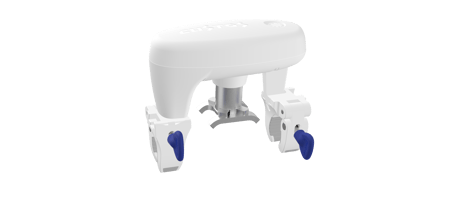
Product Image
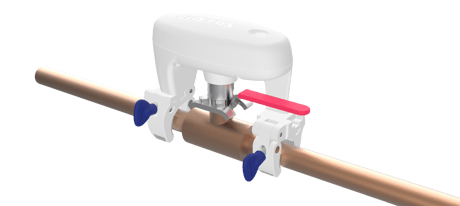
Z-Wave BVS Main Unit


17 - Inverse Water Valve Report
Inverses Switch Binary Report when Water Valve = 0x00 “Valve doesn’t let the water run through in Notification and real physical status.”Size: 1 byte
Default: 1
Minimum: 0
Maximum: 1
Possible values
| From | To | Desription |
|---|---|---|
| 0 | 0 | Disable: 0x00 = does not let water run through, 0xFF = let water run through. Based on Configuration CC setting 0x12 & 0x13 |
| 1 | 0 | Enable: 0x00 = let water run through, 0xFF = does not let water run through Based on Configuration CC setting 0x12 & 0x13 |
18 - Association Group 2 SET Value
Configure Association Group 2 Basic Set value when Binary Switch Report = 0xFF *(Related to Configuration setting 0x11)Size: 1 byte
Default: 1
Minimum: 0
Maximum: 2
Possible values
| From | To | Desription |
|---|---|---|
| 0 | 0 | Disable Basic Set (Send nothing) |
| 1 | 0 | Basic ON (0xFF) |
| 2 | 0 | Basic OFF (0x00) |
19 - Association Group 2 SET Value
Configure Association Group 2 Basic Set value when Binary Switch Report = 0x00 *(Related to Configuration setting 0x11)Size: 1 byte
Default: 2
Minimum: 0
Maximum: 2
Possible values
| From | To | Desription |
|---|---|---|
| 0 | 0 | Disable Basic Set (Send nothing) |
| 1 | 0 | Basic ON (0xFF) |
| 2 | 0 | Basic OFF (0x00) |
33 - Temperature Report Unit
Configure Temperature Unit report. The default Unit is depended on Regional Frequency Setting. (By default, US=°F and EU=°C)Size: 1 byte
Default: 2
Minimum: 0
Maximum: 2
Possible values
| From | To | Desription |
|---|---|---|
| 0 | 0 | Disable Auto Temperature Report |
| 1 | 0 | Report Celsius °C unit |
| 2 | 0 | Report Fahrenheit °F unit |
34 - Temperature Threshold Change
Configure Temperature threshold changed and send auto reportSize: 2 bytes
Default: 260
Minimum: 0
Maximum: 511
Possible values
| From | To | Desription |
|---|---|---|
| 0 | 255 | Higher Byte set to x0 represents Celsius °C unit |
| 256 | 511 | Higher Byte set to x1 represents Fahrenheit °F unit |
35 - Temperature Report Offset
Configure Temperature Offset degree; Higher byte 0x = Positive degree and 1x= Negative degree.Size: 2 bytes
Default: 256
Minimum: 0
Maximum: 4607
Possible values
| From | To | Desription |
|---|---|---|
| 0 | 255 | 0x0000 ~ 0x00FF, (0 ~ +255); Higher Byte 00 = Positive Celsius “+°C” e.g. 0x0002 = +2°C |
| 4096 | 4351 | 0x1000 ~ 0x10FF, (-0 ~ -255); Higher Byte 10 = Negative Celsius “-°C” e.g. 0x0002 = -2°C |
| 256 | 511 | 0x0100 ~ 0x01FF, (0 ~ +255); Higher Byte 01 = Positive Fahrenheit “+°F” e.g. 0x010A = +10°F |
| 4352 | 4607 | 0x1100 ~ 0x11FF, (-0 ~ -255); Higher Byte 10 = Negative Fahrenheit “-°F” e.g. 0x110A = -10°F |
36 - Overheat Trigger Value
Configure Overheat report trigger value. “Higher byte 0x00 represents Celsius °C unit, 0x01 represents Fahrenheit °F unitSize: 2 bytes
Default: 360
Minimum: 0
Maximum: 511
Possible values
| From | To | Desription |
|---|---|---|
| 0 | 255 | From 0°C to 255°C |
| 256 | 511 | From 0°F to 255°F |
37 - Overheat Recover value
Configure Overheat Recover report valueSize: 2 bytes
Default: 342
Minimum: 0
Maximum: 511
Possible values
| From | To | Desription |
|---|---|---|
| 0 | 255 | From 0°C to 255°C |
| 256 | 511 | From 0°F to 255°F |
38 - Association Group 4 Overheat Trigger
Configure Overheat Trigger Value in Association Group 4Size: 1 byte
Default: 0
Minimum: 0
Maximum: 2
Possible values
| From | To | Desription |
|---|---|---|
| 0 | 0 | Disable Basic Set (Send nothing) |
| 1 | 0 | Send Basic ON (0xFF) |
| 2 | 0 | Send Basic OFF (0x00) |
39 - Association Group 4 Overheat Cancel
Configure Overheat Cancellation SET valueSize: 1 byte
Default: 0
Minimum: 0
Maximum: 2
Possible values
| From | To | Desription |
|---|---|---|
| 0 | 0 | Disable Basic Set (Send Nothing) |
| 1 | 0 | Send Basic ON (0x0FF) |
| 2 | 0 | Send Basic OFF (0x00) |
40 - Freeze Trigger Value
Configure Freeze Trigger Report valueSize: 2 bytes
Default: 288
Minimum: 0
Maximum: 511
Possible values
| From | To | Desription |
|---|---|---|
| 0 | 255 | From 0°C to 255°C |
| 256 | 511 | From 0°F to 255°F |
41 - Freeze Recover Value
Configure Freeze Recover Report ValueSize: 2 bytes
Default: 292
Minimum: 0
Maximum: 511
Possible values
| From | To | Desription |
|---|---|---|
| 0 | 255 | From 0°C to 255°C |
| 256 | 511 | From 0°F to 255°F |
42 - Freeze Detection Valve Control
Enable / Disable Valve Control during Freeze when Water Leak is detected “Detected by built-in temperature sensor. Refer to Configuration CC parameter 0x28 (41) & 0x29 (42)Size: 1 byte
Default: 1
Minimum: 0
Maximum: 1
Possible values
| From | To | Desription |
|---|---|---|
| 0 | 0 | Ignore / Allowed to control Water Valve during Freeze detection |
| 1 | 0 | Forbidden to control Water Valve during Freeze detection |
43 - Association Group 5 Freeze Trigger
Configure Association Group 5 Freeze Detection Trigger Basic Set valueSize: 1 byte
Default: 0
Minimum: 0
Maximum: 2
Possible values
| From | To | Desription |
|---|---|---|
| 0 | 0 | Disable Basic Set (Send nothing) |
| 1 | 0 | Basic Set ON (0xFF) |
| 2 | 0 | Basic Set OFF (0x00) |
44 - Association Group 5 Freeze Cancel
Configure Association Group 5 Freeze Detection Cancellation Basic Set valueSize: 1 byte
Default: 0
Minimum: 0
Maximum: 2
Possible values
| From | To | Desription |
|---|---|---|
| 0 | 0 | Disable Basic Set (Send nothing) |
| 1 | 0 | Basic Set ON (0xFF) |
| 2 | 0 | Basic Set OFF (0x00) |
49 - Association Group 3 Water Leak Trigger
Configure Association Group 3 Water Leak Trigger Basic Set valueSize: 1 byte
Default: 1
Minimum: 0
Maximum: 2
Possible values
| From | To | Desription |
|---|---|---|
| 0 | 0 | Disable Basic Set (Send nothing) |
| 1 | 0 | Basic Set ON (0xFF) |
| 2 | 0 | Basic Set OFF (0x00) |
50 - Association Group 3 Water Leak Cancel
Configure Association Group Water Leak Cancellation Basic Set valueSize: 1 byte
Default: 0
Minimum: 0
Maximum: 2
Possible values
| From | To | Desription |
|---|---|---|
| 0 | 0 | Disable Basic Set (Send nothing) |
| 1 | 0 | Basic Set ON (0xFF) |
| 2 | 0 | Basic Set OFF (0x00) |
51 - Water Leak Detection Valve Control
Disable / Enable Valve Control when Water Leak detectedSize: 1 byte
Default: 1
Minimum: 0
Maximum: 1
Possible values
| From | To | Desription |
|---|---|---|
| 0 | 0 | Disable to control Water Valve when Water Leak is detected |
| 1 | 0 | Enable to control Water Valve when Water Leak is detected |
65 - Buzzer
Enable / Disable Built-in Buzzer SoundSize: 1 byte
Default: 1
Minimum: 0
Maximum: 1
Possible values
| From | To | Desription |
|---|---|---|
| 0 | 0 | Disable Buzzer |
| 1 | 0 | Enable Buzzer |
66 - LED Brightness Level
Configure Built-in LED Brightness LevelSize: 1 byte
Default: 80
Minimum: 0
Maximum: 99
Possible values
| From | To | Desription |
|---|---|---|
| 0 | 99 | Set Brightness Level from 0% ~ 99% |
67 - Touch Keylock Protection
Disable / Enable Touch Keylock ProtectionSize: 1 byte
Default: 0
Minimum: 0
Maximum: 1
Possible values
| From | To | Desription |
|---|---|---|
| 0 | 0 | Disable Keylock Protection |
| 1 | 0 | Enable Keylock Protection |
81 - Notification Report
Configure Notification Report in Association Group 1 Lifeline “Set Bit to 0 = Disable, Set Bit to 1 = Enable” Default value 0x0D (13) Only available values as below xxxx xxx0 = Disable to report valve Open / Close status xxxx xxx1 = Enable to report valve Open / Close status (Default) xxxx xx0x = Disable Overheat Detection (Default) xxxx xx1x = Enable Overheat Detection xxxx x0xx = Disable Freeze (Underheat) Detection xxxx x1xx = Enable Freeze (Underheat) Detection (Default) xxxx 0xxx = Disable Water Leak Detection xxxx 1xxx = Enable Water Leak Detection (Default)Size: 1 byte
Default: 13
Minimum: 0
Maximum: 15
Possible values
| From | To | Desription |
|---|---|---|
| 0 | 0 | Water Valve Open/Close Report - 0=Disable / *1=Enable |
| 2 | 0 | Freeze Detection - 0=Disable / *1=Enable |
| 3 | 0 | Water Leak Detection - 0=Disable / *1=Enable |
| 1 | 0 | Overheat Detection - *0=Disable / 1=Enable |
Classic Inclusion: Set your Z-Wave Gateway into Inclusion mode / Add device. i. Start: Short press Touch Sense Button 3 times. ii. Processing: Yellow LED and short beep sound keeping continue. For security inclusion support, you may need to entering first 5 digit that show on QR Code label, please refer to the instructions of central controller. iii. Success: Green LED on 1 second with 2 short beep sounds. iv. The LED indication changes to Green LED slow blinking from Yellow LED blinking.
Remove Custos BVS from Z-Wave Network: Set your Z-Wave Gateway into Exclusion mode / Remove device. i. Start: Short press Touch Sense Button 3 times. ii. Processing: Yellow LED and short beep sound keeping continue. iii. Success: Green LED on 1 second with 2 short beep sounds. iv. The LED indication Changes to Yellow LED blinking.
Factory Default Reset: To remove Custos BVS without involve gateway in Exclusion / Remove device operation and BVS will reset all setting to Factory Default Setting. i. Start: Long hold Touch Sense Button for 10 seconds then short click 5 times. ii. Processing: Yellow LED ON 1 second then wait 2-5 seconds. iii. Success: Green LED on 2 second with long beep sounds for 2 seconds. *Factory Default Reset will: a. Remote the BVS from Z-Wave Network; b. Delete the association setting; c. Restore the configuration settings to the default.
None
The DSK is printed on the product itself and also packaging label can be found outside the giftbox
| Type | Value(s) |
|---|
| Group | Type |
|---|---|
| Heat Alarm |
|
| Water Alarm |
|
| Water Valve | Valve operation status: Valve operation |
| Sensor type |
|---|
| Air Temperature |