Master
Zoe Power E
HZ06000
On/Off Power Switch
HW: 2 FW: 5.01:05.02
ZM5202
6.51.06
0x0440 (1088)
0x0002 (2)
0x0051 (81)
ZC10-20076954
2020-07-28 16:23:29.888371
N/A
Enhanced 232 Slave
Always On Slave
Zoe is a line-powered Z-Wave interface for 2 loads (OUT) and 2 push buttons/switches (IN). Advanced microprocessor control. Works with various types of inputs.
Zoe is a line-powered Z-Wave interface for 2 loads (OUT) and 2 push buttons/switches (IN). Compatible with any Vesta board HM03000 or HM02000+HA06900. Supports protected mode (Z-Wave network security mode) with AES-128 encryption. Advanced microprocessor control. Works with various types of inputs (switches, pushbuttons, two-way switches). To be installed in wall switch boxes of dimensions allowing for installation, conforming to provisions of applicable regulations. Zoe can work as stand-alone device, and can be connected to a Z-Wave network.
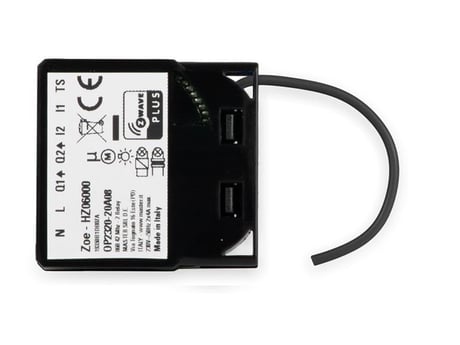
Product Image
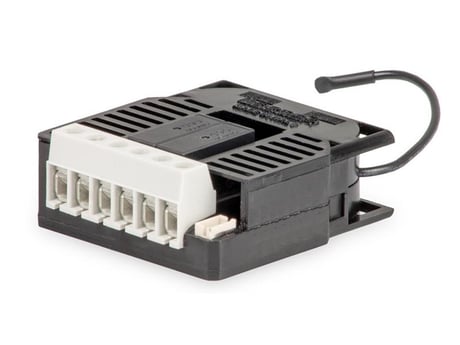
Device from sideway
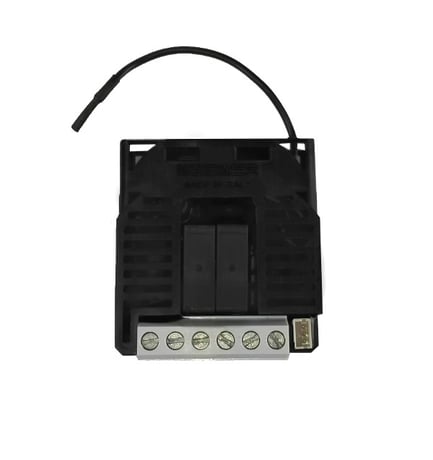
Device from backside


1 - Parameter 1
Parameter no. 1 – Input 1 switch type Available configuration parameters (data type is 1 Byte DEC): • default value 1 • 0 - mono-stable switch type (push button) • 1 - bi-stable switch typeSize: 1 byte
Default: 1
Minimum: 0
Maximum: 1
Possible values
| From | To | Desription |
|---|---|---|
| 0 | 0 | mono-stable switch type (push button) |
| 1 | 1 | bi-stable switch type |
2 - Parameter no. 2 – Input 2 switch type
Available configuration parameters (data type is 1 Byte DEC): • default value 1 • 0 - mono-stable switch type (push button) • 1 - bi-stable switch typeSize: 1 byte
Default: 1
Minimum: 0
Maximum: 1
Possible values
| From | To | Desription |
|---|---|---|
| 0 | 0 | mono-stable switch type (push button) |
| 1 | 1 | bi-stable switch type |
10 - Parameter no. 10 - Activate / deactivate functions ALL ON/ALL OFF
Available configuration parameters (data type is 2 Byte DEC): • default value 255 • 255 - ALL ON active, ALL OFF active. • 0 - ALL ON is not active ALL OFF is not active • 1 - ALL ON is not active ALL OFF active • 2 - ALL ON active ALL OFF is not active Zoe Power module responds to commands ALL ON / ALL OFF that may be sent by the main controller or by other controller belonging to the system.Size: 2 bytes
Default: 255
Minimum: 0
Maximum: 255
Possible values
| From | To | Desription |
|---|---|---|
| 255 | 255 | ALL ON active, ALL OFF active. |
| 0 | 0 | ALL ON is not active ALL OFF is not active |
| 1 | 1 | ALL ON is not active ALL OFF active |
| 2 | 2 | ALL ON active ALL OFF is not active |
11 - Parameter no. 11 - Automatic turning off output Q1 after set time
When relay Q1 is ON it goes automatically OFF after time defined by this parameter. Timer is reset to zero each time the module receive ON command regardless from where it comes (push button, associated module, controller,..). Available configuration parameters (data type is 2 Byte DEC): • default value 0 • 0 - Auto OFF disabled • 1 - 32535 = 1second (0,01s) - 32535 seconds (325,35s) Auto OFF enabled with define time, step is 1s or 10ms according to parameter nr.15.Size: 2 bytes
Default: 0
Minimum: 0
Maximum: 32535
Possible values
| From | To | Desription |
|---|---|---|
| 0 | 0 | Auto OFF disabled |
| 1 | 32535 | 1second (0,01s) - 32535 seconds (325,35s) Auto OFF enabled with define time, step is 1s or 10ms according to parameter nr.15. |
12 - Parameter no. 12 - Automatic turning on output Q1 after set time
When relay Q1 is OFF it goes automatically ON after time defined by this parameter. Timer is reset to zero each time the module receive OFF command regardless from where it comes (push button, associated module, controller,..). Available configuration parameters (data type is 2 Byte DEC): • default value 0 • 0 - Auto ON disabled • 1 - 32535 = 1second (0,01s) - 32536 seconds (325,35s) Auto ON enabled with define time, step is 1s or 10ms according to parameter nr.15.Size: 2 bytes
Default: 0
Minimum: 0
Maximum: 32535
Possible values
| From | To | Desription |
|---|---|---|
| 0 | 0 | Auto ON disabled |
| 1 | 32535 | 1second (0,01s) - 32536 seconds (325,35s) Auto ON enabled with define time, step is 1s or 10ms according to parameter nr.15. |
13 - Parameter no. 13 - Automatic turning off output Q2 after set time
When relay Q2 is ON it goes automatically OFF after time defined by this parameter. Timer is reset to zero each time the module receive ON command regardless from where it comes (push button, associated module, controller,..). Available configuration parameters (data type is 2 Byte DEC): • default value 0 • 0 - Auto OFF disabled • 1 - 32535 = 1second (0,01s) - 32535 seconds (325,35s) Auto OFF enabled with define time, step is 1s or 10ms according to parameter nr.15.Size: 2 bytes
Default: 0
Minimum: 0
Maximum: 32535
Possible values
| From | To | Desription |
|---|---|---|
| 0 | 0 | Auto OFF disabled |
| 1 | 32535 | 1second (0,01s) - 32535 seconds (325,35s) Auto OFF enabled with define time, step is 1s or 10ms according to parameter nr.15. |
14 - Parameter no. 14 - Automatic turning on output Q2 after set time
When relay Q2 is OFF it goes automatically ON after time defined by this parameter. Timer is reset to zero each time the module receive OFF command regardless from where it comes (push button, associated module, controller,..). Available configuration parameters (data type is 2 Byte DEC): • default value 0 • 0 - Auto ON disabled • 1 - 32535 = 1second (0,01s) - 32536 seconds (325,35s) Auto ON enabled with define time, step is 1s or 10ms according to parameter nr.15.Size: 2 bytes
Default: 0
Minimum: 0
Maximum: 32535
Possible values
| From | To | Desription |
|---|---|---|
| 0 | 0 | Auto ON disabled |
| 1 | 32535 | 1second (0,01s) - 32535 seconds (325,35s) Auto ON enabled with define time, step is 1s or 10ms according to parameter nr.15. |
15 - Parameter no. 15 - Automatic turning off / on seconds or milliseconds selection
Available configuration parameters (data type is 1 Byte DEC): • default value 0 • 0 – seconds selected • 1 – milliseconds selected Note that parameter is valid for both outputs Q1, Q2 and is the same for turning off or onSize: 1 byte
Default: 0
Minimum: 0
Maximum: 1
Possible values
| From | To | Desription |
|---|---|---|
| 0 | 0 | seconds selected |
| 1 | 1 | milliseconds selected |
30 - Parameter no. 30 - Saving the state of the relays Q1 and Q2 after a power failure
Available configuration parameters (data type is 1 Byte DEC): • default value 0 • 0 - Zoe Power module saves its state before power failure (it returns to the last position saved before a power failure) • 1 - Zoe Power module does not save the state after a power failure, it returns to "off" position.Size: 1 byte
Default: 0
Minimum: 0
Maximum: 1
Possible values
| From | To | Desription |
|---|---|---|
| 0 | 0 | Zoe Power module saves its state before power failure (it returns to the last position saved before a power failure) |
| 1 | 1 | Zoe Power module does not save the state after a power failure, it returns to "off" position |
40 - Parameter no. 40 – Power reporting in Watts on power change for Q1
Set value means percentage, set value from 0 – 100 = 0% - 100%. Available configuration parameters (data type is 1 Byte DEC): • default value 10 • 0 - reporting disabled • 1 - 100 = 1% - 100% Reporting enabled. Power report is send (push) only when actual power in Watts in real time changes for more than set percentage comparing to previous actual power in Watts, step is 1%. NOTE: if power changed is less than 1W, the report is not send (pushed), independent of percentage set.Size: 1 byte
Default: 10
Minimum: 0
Maximum: 100
Possible values
| From | To | Desription |
|---|---|---|
| 1 | 100 | 1 - 100 = 1% - 100% Reporting enabled. Power report is send (push) only when actual power in Watts in real time changes for more than set percentage comparing to previous actual power in Watts, step is 1%. |
| 0 | 0 | reporting disabled |
41 - Parameter no. 41 – Power reporting in Watts on power change for Q2
Set value means percentage, set value from 0 – 100 = 0% - 100%. Available configuration parameters (data type is 1 Byte DEC): • default value 10 • 0 - Reporting Disabled • 1 - 100 = 1% - 100% Reporting enabled. Power report is send (push) only when actual power in Watts in real time changes for more than set percentage comparing to previous actual power in Watts, step is 1%. NOTE: if power changed is less than 1W, the report is not send (pushed), independent of percentage set.Size: 1 byte
Default: 10
Minimum: 0
Maximum: 100
Possible values
| From | To | Desription |
|---|---|---|
| 1 | 100 | 1% - 100% Reporting enabled. Power report is send (push) only when actual power in Watts in real time changes for more than set percentage comparing to previous actual power in Watts, step is 1%. NOTE: if power changed is less than 1W, the report is not send (pushed), independent of percentage set. |
| 0 | 0 | Reporting Disabled |
42 - Parameter no. 42 – Power reporting in Watts by time interval for Q1
Set value means time interval (0 – 32535) in seconds, when power report is send. Available configuration parameters (data type is 2 Byte DEC): • default value 300 (power report in Watts is send each 300s) • 0 - reporting disabled • 1 - 32535 = 1 second - 32535 seconds. Reporting enabled, Power report is send with time interval set by entered value.Size: 2 bytes
Default: 300
Minimum: 0
Maximum: 32535
Possible values
| From | To | Desription |
|---|---|---|
| 1 | 32535 | 1 second - 32535 seconds. Reporting enabled, Power report is send with time interval set by entered value. |
| 0 | 0 | reporting disabled |
43 - Parameter no. 43 – Power reporting in Watts by time interval for Q2
Set value means time interval (0 – 32535) in seconds, when power report is send. Available configuration parameters (data type is 2 Byte DEC): • default value 300 (power report in Watts is send each 300s) • 0 - reporting disabled • 1 - 32535 = 1 second - 32535 seconds. Reporting enabled, Power report is send with time interval set by entered value.Size: 2 bytes
Default: 300
Minimum: 0
Maximum: 32535
Possible values
| From | To | Desription |
|---|---|---|
| 1 | 32535 | 1 second - 32535 seconds. Reporting enabled, Power report is send with time interval set by entered value. |
| 0 | 0 | reporting disabled |
63 - Parameter no. 63 – Output Q1 Switch selection
Set value means the type of the device that is connected to the Q1 output. The device type can be normally open (NO) or normally close (NC). Available configuration parameters (data type is 1 Byte DEC): • default value 0 • 0 - When system is turned off the output is 0V (NC). • 1 - When system is turned off the output is 230V (NO).Size: 1 byte
Default: 0
Minimum: 0
Maximum: 1
Possible values
| From | To | Desription |
|---|---|---|
| 0 | 0 | When system is turned off the output is 230V (NO). |
| 1 | 1 | When system is turned off the output is 0V (NC). |
64 - Parameter no. 64 – Output Q2 Switch selection
Set value means the type of the device that is connected to the Q2 output. The device type can be normally open (NO) or normally close (NC). Available configuration parameters (data type is 1 Byte DEC): • default value 0 • 0 - When system is turned off the output is 0V (NC). • 1 - When system is turned off the output is 230V (NO).Size: 1 byte
Default: 0
Minimum: 0
Maximum: 1
Possible values
| From | To | Desription |
|---|---|---|
| 0 | 0 | When system is turned off the output is 0V (NC). |
| 1 | 1 | When system is turned off the output is 230V (NO). |
110 - Parameter no. 110 – Temperature sensor offset settings
Set value is added or subtracted to actual measured value by sensor. Available configuration parameters (data type is 2 Byte DEC): • default value 32536 • 32536 - offset is 0.0C • From 1 to 100 - value from 0.1 °C to 10.0 °C is added to actual measured temperature. • From 1001 to 1100 - value from -0.1 °C to -10.0 °C is subtracted to actual measured temperature.Size: 2 bytes
Default: 32536
Minimum: 0
Maximum: 32536
Possible values
| From | To | Desription |
|---|---|---|
| 1 | 100 | value from 0.1 °C to 10.0 °C is added to actual measured temperature. |
| 1001 | 1100 | value from -0.1 °C to -10.0 °C is subtracted to actual measured temperature. |
| 32536 | 32536 | offset is 0.0C |
120 - Parameter no. 120 – Temperature sensor reporting
Parameter no. 120 – Temperature sensor reporting If digital temperature sensor is connected, module reports measured temperature on temperature change defined by this parameter. Available configuration parameters (data type is 1 Byte DEC): • Default value 5 = 0,5°C • 0 – Reporting disabled • 1- 127 = 0,1°C – 12,7°C, step is 0,1°CSize: 1 byte
Default: 5
Minimum: 0
Maximum: 127
Possible values
| From | To | Desription |
|---|---|---|
| 1 | 127 | 0,1°C – 12,7°C, step is 0,1°C |
| 0 | 0 | Reporting disabled |
• Connect module to power supply (with temperature sensor connected - if purchased), • enable add/remove mode on main controller • auto-inclusion (works for about 5 seconds after connected to power supply) or • press push button I1 three times within 3s (6 times change switch state within 3 seconds) or • press service button S (only applicable for 24 V SELV supply voltage) for more than 2 second.
• Connect module to power supply • bring module within maximum 1 meter (3feet) of the main controller, • enable add/remove mode on main controller, • press push button I1 5 times within 3s (10 times change switch state within 3 seconds) in the first 60 seconds after the module is connected to the power supply or • press service button S (only applicable for 24 V SELV
1. Connect the device to the power supply 2. Within the first minute (60 seconds) the device is connected to the power supply, toggle the switch connected to the I1 terminal 5 times within 3 seconds (5 times change switch state) OR if the device is powered by 24 V SELV supply, press and hold the S (Service) button for more than 6 seconds. By resetting the device, all custom parameters previously set on the device will return to their default values, and the node ID will be deleted. Use this reset procedure only when the main gateway (hub) is missing or otherwise inoperable.
| Type | Value(s) |
|---|
| Sensor type |
|---|
| Air Temperature |
| Meter type |
|---|
| Electric Meter Consumption |