Climax Technology
Smoke Detector
SD-29-AC
Notification Sensor
HW: 255 FW: 4.01
ZM5202
6.81.06
0x018E (398)
0x0003 (3)
0x0017 (23)
ZC10-20076944
2020-07-14 10:43:15.016132
N/A
Enhanced 232 Slave
Always On Slave
Yes
SD-29 series is a mini-sized wireless smoke detector with built-in PIR motion sensor, temperature sensor and emergency light (optional).
The SD-29 is a wirelessly operated photo-electronic Smoke Detector designed to operate with any Z-Wave enabled controller devices; it also features smoke detecting, temperature sensing and IR detection. The Smoke Detector’s alarm situations, battery condition, operating conditions, supervisory data and general fault information are sent to the Z-Wave Gateway/Control Panel wirelessly. The device is also serially connected with other sensors in the Z-Wave gateway to serve as an extra siren. When any other sensor in the Z-Wave network is activated and sends an alarm signal, the Smoke Detector will also raise alarm with its built-in buzzer as a siren to help sound warning.
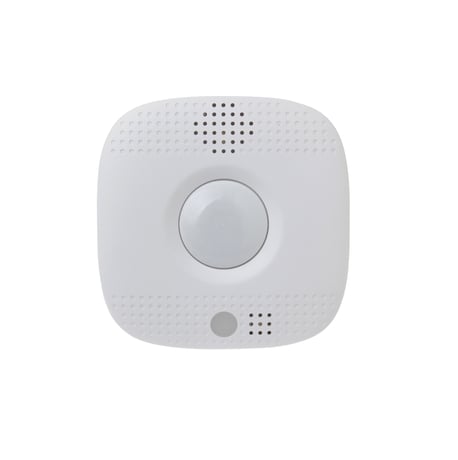
Product Image
1. Before you start, find the circuit breaker or fuse box. 2. Once you have found it, open the door and turn off the main power switch. 3. Two Wago 221 Splicing Connectors are provided. Take out one connector. Pull the lever up and insert the white wire. 4. Push the lever back down. The transparent housing allows you to check if the wire is connected properly. Make sure the wire is tightly held in place before you proceed. 5. Repeat Step 3 and Step 4 to insert the black wire. Inserting the two wires to the same side (right), as shown below, of the two connectors provides an easier installation in the following steps. 6. Insert the AC wires to the two connectors respectively, as shown below. Use a pair of tweezers to turn the Battery Switch to ON position (left side), the rechargeable battery will begin to charge. 7. Put the Z-Wave gateway or control panel into Inclusion or Learning mode (please refer to the Z-Wave gateway or control panel manual). 8. Within 1.5 seconds, press the Function button 3 times. The Smoke Detector will emit a 2-tone beep and the LED will turn on for ~2 seconds. Refer to the operation manual of the Z-Wave gateway or control panel to complete the learn-in process.
#. Put the Z-Wave gateway or control panel into Exclusion mode (please refer to the Z-Wave gateway or control panel manual). #. Within 1.5 seconds, press the Function button 3 times and the Smoke Detector will be removed from the Z-wave network.
Always on Slave (AOS) no Wake-Up Procedure.
(Only use factory reset when network Control Panel/Gateway is missing or inoperable.) 1. Remove the batteries of the Smoke Detector first. 2. Press and hold the Function button. While holding the Function button, power on the Smoke Detector by re-inserting the batteries, wait for 20 seconds to factory reset.
| Type | Value(s) |
|---|
| Group | Type |
|---|---|
| Smoke Alarm |
|
| Heat Alarm |
|
| Home Security |
|
| Power Management |
|
| Sensor type |
|---|
| Air Temperature |