Clare Controls
ClareOne Siren
ZW080-A17
Sound Switch
HW: 80 FW: 11.00
ZM5202
6.82.01
0x0194 (404)
0x0103 (259)
0x0050 (80)
ZC10-20086964
2020-08-20 11:01:15.207083
N/A
Enhanced 232 Slave
Always On Slave
ClareOne Siren is a smart siren based on Z-Wave.
ClareOne Siren support 5 Tones and this product supports Security 2 Command Class. While a Security S2 enabled Controller is needed in order to fully use the security feature. This product can be operated in any Z-Wave network with other Z-Wave certified devices from other manufacturers. All mains operated nodes within the network will act as repeaters regardless of vendor to increase reliability of the network.
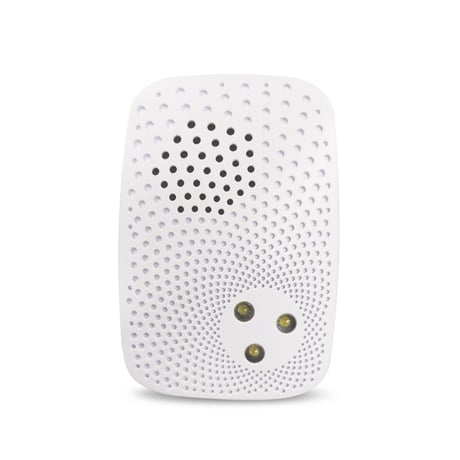
Product Image
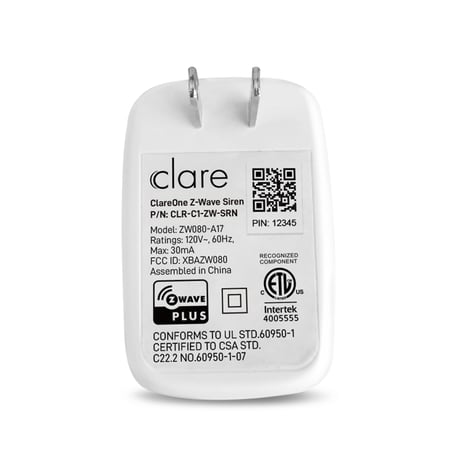
back side


38 - Parameter 1
This parameter is used to Enable or Disable the ability that click the Action Button to stop a playing tone.Size: 1 byte
Default: 1
Minimum: 0
Maximum: 1
Possible values
| From | To | Desription |
|---|---|---|
| 0 | 0 | Disable the ability that click the Action Button to stop a playing tone. |
| 1 | 1 | Enable the ability that click the Action Button to stop a playing tone. |
39 - Parameter 2
This parameter is used to set tone play mode.Size: 0 byte
Default: 1
Minimum: 0
Maximum: 127
Possible values
| From | To | Desription |
|---|---|---|
| 0 | 0 | Single loop playback. |
| 1 | 127 | Set play multiple times. |
80 - Parameter 3
This parameter is used to configure command to report to lifeline when tone changed.Size: 1 byte
Default: 2
Minimum: 0
Maximum: 2
Possible values
| From | To | Desription |
|---|---|---|
| 0 | 0 | Nothing |
| 1 | 1 | Enable Basic Report |
| 2 | 2 | Enable Switch Binary Report |
255 - Parameter 4
Reset Configuration Parameter to factory setting OR Factory Reset the product.Size: 4 bytes
Default: 0
Minimum: 0
Maximum: 1431655765
Possible values
| From | To | Desription |
|---|---|---|
| 0 | 0 | Reset Configuration Parameter to factory setting. Note: Configuration Report [Parameter=255, Size=4, Value=0x00000000] will be issued via Lifeline when this function executed. |
| 1431655765 | 1431655765 | Factory Reset the product and remove it from the network. Note: All Configuration Parameter will be reset to factory setting. |
1.Power the product. 2. Set your main controller into its 'add product' mode. Refer to its manual if you are unsure of how to perform. 3.Click button once.Network LED will flash quickly which indicates entering inclusion mode, and Node Info will be issued for adding. 4.If your controller supports S2 security, and you want to add the product into S2 Authenticated network, please scanthe QR code or enter the PIN code (the underlined 5-digits of the DSK) when prompted. [IMPORTANT] QR/PIN code can be found on the product. A full DSK string can be found on the packaging. 5. Wait for the adding process to end. 6. Confirm the adding result. Successful adding will be confirmed by the Z-Wave controller’s message or LED status.If adding is successful, Network LED will light stays on and then off. If its Network LED slow flash 3 times and then off ,it indicates adding is unsuccessful.The product will auto-reset and then activate SmartStart. Repeat the above steps or contact us for further support if needed.
1. Make sure the product is powered. 2. Set your main controller into its 'remove product' mode. Refer to its manual if you are unsure of how to perform. 3. Click button once. 4. Wait for the removing process to end. 5. Confirm the removing result. Successful removing will be confirmed by the Z-Wave controller’s message or LED status. If removing is successful, Network LED will slow flash 3 times and then off. Ifits Network LED allways stays off state, it indicates removing is unsuccessful.Repeat the above steps or contact us for further support if needed.
Reset procedure allows to restore theproduct back to its factory settings, which means all information about the Z-Wave controller anduser configuration will be deleted. 1. Make sure the product is powered. 2. Press and hold the buttonfor at least 20s, and then Factory Reset is performed.The product will issue a Device Reset Locally Command via its Lifeline to notify the Lifeline destination that the product has been reset to its factory default state. And it will perform the reset operation regardless of whether or not the delivery of the Device Reset Locally Notification is successful. 3. Pay attention to the Network LED state change. After few seconds the product will be reset and restarted, which is signaled with the Network LED slow flash 3 times and then off.
QR/PIN code can be found on the product.
| Type | Value(s) |
|---|