Custos
Wireless Water Detector 700
WWDZWU
Notification Sensor
HW: 1 FW: 2.00
ZGM130
7.14.3
0x0270 (624)
0x0201 (513)
0x010B (267)
ZC12-21010160
2021-01-07 10:49:03.690652
N/A
Enhanced 232 Slave
Reporting Sleeping Slave
Custos WWD (Wireless Water Detector) Super compact water detector with 4 side water detection and 5th remote water sensor probe
Custos WWD (Wireless Water Detector) Is the smallest Z-Wave compact wireless water detector with 4 sides water detection capabilities plus integrated port for remote water sensor probe as secondary physical/logical detector, innovative design allows it to work on all orientations without worrying accidental flip, incorporated high energy density lithium battery for up to X years of battery operation life span.
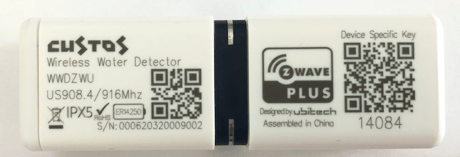
Product Image


16 - Sensors Function Set
Sensors Function Enable / DisableSize: 1 byte
Default: 15
Minimum: 0
Maximum: 15
Possible values
| From | To | Desription |
|---|---|---|
| 0 | 0 | Built-in Water Detection Probe *(Default Enabled) |
| 1 | 0 | Remote Water Detection Probe *(Default Enabled) |
| 2 | 0 | Overheat Detection *(Default Enabled) |
| 3 | 0 | Freeze Detection *(Default Enabled) |
17 - Water Leak Cancellation Report Set
Water Leak Probe Cancellation Report SetSize: 1 byte
Default: 1
Minimum: 0
Maximum: 1
Possible values
| From | To | Desription |
|---|---|---|
| 0 | 0 | Send Basic SET when Water Alarm Cancelled “Either” Built-in “or” Remote Water Detection Probe |
| 1 | 0 | Send Basic SET when Water Alarm Cancelled Built-in “And” Remote Water Detection Probe |
32 - Battery Level Change Auto Report
Battery Level Change Value to auto reportSize: 1 byte
Default: 10
Minimum: 0
Maximum: 99
Possible values
| From | To | Desription |
|---|---|---|
| 0 | 0 | Disable Battery Level Change Auto Report |
| 1 | 63 | Auto report when wake up every time. *(Default 0x0A = 10%) |
33 - Battery Threshold Level Report
Battery Lower Threshold Level ReportSize: 1 byte
Default: 30
Minimum: 1
Maximum: 99
Possible values
| From | To | Desription |
|---|---|---|
| 1 | 99 | Battery Lower Threshold Valve Report *(Default 30%) |
48 - Temperature Report Unit
Configure Temperature Report UnitSize: 1 byte
Default: 2
Minimum: 0
Maximum: 2
Possible values
| From | To | Desription |
|---|---|---|
| 0 | 0 | Disable Temperature Report |
| 1 | 0 | Report Celsius °C unit |
| 2 | 0 | Report Fahrenheit °F unit |
49 - Temperature Level Change Report
Temperature Level Change to auto reportSize: 2 bytes
Default: 260
Minimum: 0
Maximum: 511
Possible values
| From | To | Desription |
|---|---|---|
| 0 | 255 | From 0°C to 255°C |
| 256 | 511 | From 0°F to 255°F |
50 - Temperature Value Offset Report
Temperature Value Offset Report SetSize: 2 bytes
Default: 256
Minimum: 0
Maximum: 4607
Possible values
| From | To | Desription |
|---|---|---|
| 0 | 255 | From 0°C to 255°C |
| 4096 | 4351 | From -1°C to -255°C |
| 256 | 511 | From 0°F to 255°F |
| 4353 | 4607 | From -1°F to -255°F |
51 - Overheat Trigger Value
Overheat Trigger Value SETSize: 2 bytes
Default: 360
Minimum: 0
Maximum: 511
Possible values
| From | To | Desription |
|---|---|---|
| 0 | 255 | From 0°C to 255°C |
| 256 | 511 | From 0°F to 255°F |
52 - Overheat Cancellation Value
Overheat Cancellation Value auto reportSize: 2 bytes
Default: 342
Minimum: 0
Maximum: 511
Possible values
| From | To | Desription |
|---|---|---|
| 0 | 255 | From 0°C to 255°C |
| 256 | 511 | From 0°F to 255°F |
53 - Freeze Trigger Value
Configure Freeze Trigger Report valueSize: 2 bytes
Default: 360
Minimum: 0
Maximum: 511
Possible values
| From | To | Desription |
|---|---|---|
| 0 | 255 | From 0°C to 255°C |
| 256 | 511 | From 0°F to 255°F |
54 - Freeze Recover Value
Configure Freeze Recover Report ValueSize: 2 bytes
Default: 342
Minimum: 0
Maximum: 511
Possible values
| From | To | Desription |
|---|---|---|
| 0 | 255 | From 0°C to 255°C |
| 256 | 511 | From 0°F to 255°F |
64 - AG2 - Built-in Water Leak Trigger
Built-in Water Leak Trigger Basic SETSize: 1 byte
Default: 1
Minimum: 0
Maximum: 2
Possible values
| From | To | Desription |
|---|---|---|
| 0 | 0 | Disable Basic Set (Send nothing) |
| 1 | 0 | Basic Set ON (0xFF) |
| 2 | 0 | Basic Set OFF (0x00) |
65 - AG2 - Built-in Water Leak Cancellation
Built-in Water Leak Cancellation Basic SETSize: 1 byte
Default: 0
Minimum: 0
Maximum: 2
Possible values
| From | To | Desription |
|---|---|---|
| 0 | 0 | Disable Basic Set (Send nothing) |
| 1 | 0 | Basic Set ON (0xFF) |
| 2 | 0 | Basic Set OFF (0x00) |
66 - AG3 - Remote Water Leak Trigger
Remote Water Leak Trigger Basic SETSize: 1 byte
Default: 1
Minimum: 0
Maximum: 2
Possible values
| From | To | Desription |
|---|---|---|
| 0 | 0 | Disable Basic Set (Send nothing) |
| 1 | 0 | Basic Set ON (0xFF) |
| 2 | 0 | Basic Set OFF (0x00) |
67 - AG3 - Remote Water Leak Cancellation
Remote Water Leak Cancellation Basic SETSize: 1 byte
Default: 0
Minimum: 0
Maximum: 2
Possible values
| From | To | Desription |
|---|---|---|
| 0 | 0 | Disable Basic Set (Send nothing) |
| 1 | 0 | Basic Set ON (0xFF) |
| 2 | 0 | Basic Set OFF (0x00) |
68 - AG4 - Overheat Trigger Value
Overheat Trigger Value Basic SETSize: 1 byte
Default: 0
Minimum: 0
Maximum: 2
Possible values
| From | To | Desription |
|---|---|---|
| 0 | 0 | Disable Basic Set (Send nothing) |
| 1 | 0 | Basic Set ON (0xFF) |
| 2 | 0 | Basic Set OFF (0x00) |
69 - AG4 - Overheat Recover Value
Overheat Recover Value Basic SETSize: 1 byte
Default: 0
Minimum: 0
Maximum: 2
Possible values
| From | To | Desription |
|---|---|---|
| 0 | 0 | Disable Basic Set (Send nothing) |
| 1 | 0 | Basic Set ON (0xFF) |
| 2 | 0 | Basic Set OFF (0x00) |
70 - AG5 - Freeze Trigger Value
Freeze Trigger Value Basic SETSize: 1 byte
Default: 0
Minimum: 0
Maximum: 2
Possible values
| From | To | Desription |
|---|---|---|
| 0 | 0 | Disable Basic Set (Send nothing) |
| 1 | 0 | Basic Set ON (0xFF) |
| 2 | 0 | Basic Set OFF (0x00) |
71 - AG5 - Freeze Recover Value
Freeze Recover Value Basic SETSize: 1 byte
Default: 0
Minimum: 0
Maximum: 2
Possible values
| From | To | Desription |
|---|---|---|
| 0 | 0 | Disable Basic Set (Send nothing) |
| 1 | 0 | Basic Set ON (0xFF) |
| 2 | 0 | Basic Set OFF (0x00) |
80 - Resend Water Leak Notification Time
Resend Water Leak Notification Time SetSize: 1 byte
Default: 0
Minimum: 0
Maximum: 30
Possible values
| From | To | Desription |
|---|---|---|
| 0 | 0 | Do not resend |
| 1 | 30 | 1 - 30 Minutes |
96 - Buzzer Related Function Actions
Buzzer Related Function Actions SetSize: 1 byte
Default: 3
Minimum: 0
Maximum: 3
Possible values
| From | To | Desription |
|---|---|---|
| 0 | 0 | Buzzer Enable responds with GSensor in action *(Default 1 = Eanbled) |
| 1 | 0 | Buzzer Enable responds with Water Leak Detection *(Default 1 = Enabled) |
97 - Buzzer Sound Saving Mode
Sound works first 3’S Water Leak DetectedSize: 1 byte
Default: 1
Minimum: 0
Maximum: 1
Possible values
| From | To | Desription |
|---|---|---|
| 0 | 0 | Disable Saving mode (Buzzer sound works during whole Water Leak is detected) |
| 1 | 0 | Enable Saving mode (Buzzer function only works 3’s when Water Leak is detected) |
1. SmartStart: - To enable SmartStart, below methods can be used, please also refer to Gateway’s user manual i. Scan the Z-Wave QR Code or entering PIN Code or DSK String into S2 Enabled Gateway, please refer to item 16.11 SmartStart Labeling, . Re-install the battery then SmartStart will be enabled automatically, 2. Classic Inclusion / Add Device: - To enable Classic Inclusion: i. Set your Z-Wave Gateway into Inclusion Mode / Add Device processing. ii. Trigger Built-in Water Leak Sensor for 2 Seconds. iii. 2 x Buzzer Sound and 2 GREEN LED ON UI to confirm enter into Inclusion Mode iv. YELLOW LED will be flashing when Inclusion is processing.
1. Trigger Built-in Water Leak Sensor - Only works in Standalone Mode . Set your Z-Wave Gateway into Exclusion Mode / Remove Device processing, . Trigger Built-in Water Leak Sensor for 2 Seconds, 2. Use Gesture Recognition – Only works in Mesh Network Mode . Set your Z-Wave Gateway into Exclusion Mode / Remove Device processing, . Shaking Custos WWD in Vertical / Horizontal to wakeup it until get 1x Buzzer Sound & 1x GREEN LED ON, . Then stop shaking it, left WWD on the table in Horizontal position as Figure 11A, . Wait for Position Recognition confirmation UI with Buzzer Sounds & GREEN LED flashing 2 times “Event successUI”, . While GREEN & RED LEDs are flashing alternative for Gesture Recognition then turn Custos WWD from Horizontal to Vertical position “90°”and stick close to table surface as Figure 11B, . Wait for Gesture Recognition configuration UI with Buzzer Sounds & GREEN LED flashing 2 times “Event success UI” for completion
Shaking Custos WWD in Vertical/Horizontal to wakeup it until get 1xBuzzer Sound & 1xGREENLEDON,
To perform Factory Default Reset as following steps – Only works in Mesh Network Mode . Shaking Custos WWD in Vertical / Horizontal to wake up it until get 1x Buzzer Sound & 1x GREEN LED ON, . Then stop shaking it, left WWD on the table in Horizontal position as Figure 12A, . Wait for Position Recognition confirmation UI with Buzzer Sounds & GREEN LED flashing 2 times “Event success UI”, . While GREEN & RED LED are flashing alternative for Gesture Recognition then roll Custos WWD in one complete turn “360°”and stick close to table surface as Figure 12B, . Wait for Gesture Recognition configuration UI with Buzzer Sounds & GREEN LED flashing 2 times “Event success UI”, . Then WWD will perform soft reset after GREEN LED is flashing for 2 seconds, . After soft reset with RED LED & Buzzer Sound x1 to finished Factory Default Reset action then SmartStart also will be activated.
None
1. The QR code of DSK is printed on the product itself; 2. The full DSK & QR code of packing label can be are printed on found outside of giftbox
| Type | Value(s) |
|---|
| Group | Type |
|---|---|
| Heat Alarm |
|
| Water Alarm |
|
| Power Management |
|
| Sensor type |
|---|
| Air Temperature |