Aeotec
Water Sensor 7 Pro
ZWA019-A
Notification Sensor
HW: 1 FW: 0.00
ZGM130
7.12.2
0x0371 (881)
0x0102 (258)
0x0013 (19)
ZC12-20080098
2020-08-11 11:02:03.313389
N/A
Enhanced 232 Slave
Reporting Sleeping Slave
Yes
The Aeotec Water Sensor 7 Pro detects any liquid, which is spreaded by a leakage or other damage. It also measures the humidity and temperature of its environment.
The Water Sensor 7 pro brings more safety into your home. With its flexible sensor probe and the sensitive sensor point it detects the presence and absence of water at any given location. Furthermore the Watersensor 7 pro is enabled to accurately measure the temperature and humidity of its environment, so you are always informed about your room climate. Thanks to the latest Z-Wave 700 series technology, the Water Sensor 7 is distinguished with and increased range, S2 Security, OTA FW update and SmartStart.
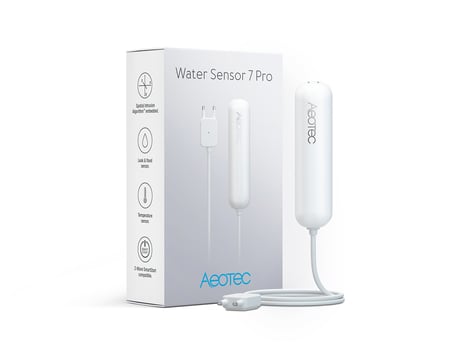
Product Image


3 - Visual LED Indications
This parameter defines when LEDs will indicate events. Disabling all indications may extend battery life. Value 0 means - No Indications.Size: 1 byte
Default: 7
Minimum: 0
Maximum: 7
Possible values
| From | To | Desription |
|---|---|---|
| 1 | 0 | Water Leakage Status Change |
| 2 | 0 | Wake Up |
| 3 | 0 | Water Leakage Status Change + Wake Up (values 1 + 2) |
| 4 | 0 | Device Tampering |
| 5 | 0 | Water Leakage Status Change + Device Tampering (values 1 + 4) |
| 6 | 0 | Wake Up + Device Tampering (values 2 + 4) |
| 7 | 0 | All LED indications on (values 1 + 2 + 4 summarized) |
4 - Range Test after double click
Allows to enable the activation of a Z-Wave range test with double clicking the tamper switch.Size: 1 byte
Default: 0
Minimum: 0
Maximum: 1
Possible values
| From | To | Desription |
|---|---|---|
| 0 | 0 | Disabled |
| 1 | 0 | Enabled |
5 - 2nd Association Group Trigger
This parameter defines the status of the magnet switch that causes sending a BASIC command to all devices of Association Group 2.Size: 1 byte
Default: 0
Minimum: 0
Maximum: 2
Possible values
| From | To | Desription |
|---|---|---|
| 0 | 0 | Switch after Water Leakage Start and Stop |
| 1 | 0 | Switch after Water Leakage Start and Stop |
| 2 | 0 | Switch after Water Leakage Start and Stop |
6 - Command Sent to Devices of Association Group 2
This parameter defines which commands is sent to 2nd Association GroupSize: 1 byte
Default: 2
Minimum: 0
Maximum: 2
Possible values
| From | To | Desription |
|---|---|---|
| 0 | 0 | On |
| 1 | 0 | Off |
| 2 | 0 | On and Off |
7 - BASIC command "On event" value
This is the BASIC command value sent in case of "On" event.Size: 1 byte
Default: 255
Minimum: 0
Maximum: 255
Possible values
| From | To | Desription |
|---|---|---|
| 0 | 99 | Value |
| 255 | 255 | Value |
8 - BASIC command "Off event" value
This is the BASIC command value sent in case of "Off" event.Size: 1 byte
Default: 0
Minimum: 0
Maximum: 255
Possible values
| From | To | Desription |
|---|---|---|
| 0 | 99 | Value |
| 255 | 255 | Value |
9 - Time Delay of "On" command frame
On command is sent after a delay defined in this parameter.Size: 2 bytes
Default: 0
Minimum: 0
Maximum: 32400
Possible values
| From | To | Desription |
|---|---|---|
| 0 | 32400 | seconds |
10 - Time Delay of "Off" command frame
Off command is sent after a delay defined in this parameter.Size: 2 bytes
Default: 0
Minimum: 0
Maximum: 32400
Possible values
| From | To | Desription |
|---|---|---|
| 0 | 32400 | seconds |
11 - Delay of Tamper Alarm Cancellation
Time a tamper alarm is delayed.Size: 2 bytes
Default: 0
Minimum: 0
Maximum: 32400
Possible values
| From | To | Desription |
|---|---|---|
| 0 | 32400 | seconds |
12 - Reporting Tamper Alarm Cancellation
This parameter defines if the alarm cancellation event is reported.Size: 1 byte
Default: 1
Minimum: 0
Maximum: 1
Possible values
| From | To | Desription |
|---|---|---|
| 0 | 0 | Do not send Report |
| 1 | 0 | Send Report |
16 - Minimum Temperature change to report
This value defines the minimum change of temperature to cause an unsolicited report of humidity to the central controller using Lifeline. If the value is set to 0, there will be no reports sent to the controller, when the temperature changes. However, periodic reports, managed by configuration parameter 18, may still be active.Size: 1 byte
Default: 20
Minimum: 0
Maximum: 100
Possible values
| From | To | Desription |
|---|---|---|
| 0 | 0 | Disabled |
| 1 | 100 | 1/10 degree |
17 - Minimum humidity change to report
This value defines the minimum change of humidity to cause an unsolicited report of humidity to the central controller using Lifeline. If the value is set to 0, there will be no reports sent to the controller, when the humidity changes. However, periodic reports, managed by configuration parameter 18, may still be active.Size: 1 byte
Default: 5
Minimum: 0
Maximum: 20
Possible values
| From | To | Desription |
|---|---|---|
| 0 | 0 | Disabled |
| 1 | 20 | % |
18 - Temperature and Humidity Periodic Reports
This parameter defines the time interval to send an unsolicited report. If the value is set to 0, there will be no periodic reports sent to the controller. However, reports on temperature/humidity changes, managed by configuration parameters 16 and 17, may still be active.Size: 2 bytes
Default: 43200
Minimum: 0
Maximum: 65535
Possible values
| From | To | Desription |
|---|---|---|
| 0 | 0 | Disabled |
| 900 | 65535 | Seconds |
255 - Reset Parameter
This parameter helps reset configuration parameters and the device to factory defaults 1 - 1431655764 (0x55555554) - Reset all Parameter settings to their default settings. 1431655765 - Completely factory reset sensor and send device reset locally notification.Size: 4 bytes
Default: 0
Minimum: 0
Maximum: 1431655765
Possible values
| From | To | Desription |
|---|---|---|
| 1 | 1431655764 | Reset all Parameter settings to their default settings. |
| 1431655765 | 1431655765 | Completely factory reset sensor and send device reset locally notification. |
Inclusion 1. Open the housing. 2. Remove the battery protection. 3. Press the tamper on the side of the appliance three times quickly.
Exclusion 1. Open the housing. 2. Press the tamper on the side of the appliance three times quickly.
The Node Information Frame (NIF) is the business card of a Z-Wave device. It contains information about the device type and the technical capabilities. The inclusion and exclusion of the device is confirmed by sending out a Node Information Frame. Beside this it may be needed for certain network operations to send out a Node Information Frame. To issue a NIF execute the following action: Press the tamper once
Reset to factory default This device also allows to be reset without any involvement of a Z-Wave controller. This procedure should only be used when the primary controller is inoperable. Once Cover is removed and the tamper switch is tripped, push the tamper for 5 seconds until the RED LED blinks once. Then release tamper and push it again for 5 seconds while the RED LED is blinking until the GREEN LED blinks once.
- The product is able to perform a range test to the gateway by setting parameter 4 as described in the manual
The DSK for the S2 inclusion can be found inside the sensors packaging.
| Type | Value(s) |
|---|
| Group | Type |
|---|---|
| Water Alarm | Sensor status: Water leak detected |
| Home Security | Cover status: Tampering, product cover removed |
| Power Management | Battery maintenance status: Replace battery now |
| Sensor type |
|---|
| Air Temperature |
| Humidity |