Atsumi Electric Co.,Ltd.
SmartLock
ZSL10
Lock
HW: 1 FW: 4.01:01.67:01.35
ZGM130
None
0x0427 (1063)
0x0004 (4)
0x0001 (1)
ZC12-20110130
2020-11-05 15:03:58.956115
N/A
Enhanced 232 Slave
Listening Sleeping Slave
Yes
This product "ZSL10" can remotely lock and unlock the door and check the status by remote control.
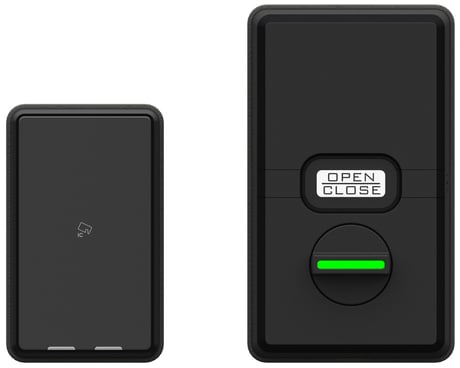
Product Image


13 - Device time setting
Set the device time. The time is treated as UNIX time. Based on UTC. The format is MSB.Size: 4 bytes
Default: 946684800
Minimum: 946684800
Maximum: 4102444799
Possible values
| From | To | Desription |
|---|---|---|
| 946684800 | 4102444799 | Default value 946684800 |
14 - Lock settings
First byte. 0 bit: 0 only 1 bit: Main/sub switching for double lock. 0 (default) main, 1 sub 2bit: O/C button. 0 disable,1(default) enabled 3,4bit: Lock mode. 00(default) automatic locking - short 01 automatic locking - long 10 manual 11 manual pattern 2 5,6bit: Volume. 00 mute, 01 small, 10(default) medium, 11large 7 bit: Setting the hanging. 0 left hanging door, 1(default) right hanging door 2nd byte 0~3bit: 0 only 4 bit: Motor torque. 0(default) normal , 1high 5 bit: Lock mode when unlocking thumb turn. 0 (default) Continuous-unlocking 1 automatic locking 6, 7 bit: Door sensor. 00 disable 01 (default) enabled 10 enabled pattern 2 11 Not usedSize: 2 bytes
Default: 50240
Minimum: 0
Maximum: 65200
Possible values
| From | To | Desription |
|---|---|---|
| 0 | 0 | Setting the hanging: [left hanging door] Volume: [mute] Lock mode: [automatic locking - short] O/C button:[disabled] Main/sub switching for double lock:[main] Door sensor:[disabled] Lock mode when unlocking thumb turn:[Continuous-unlocking] Motor torque:[normal] |
| 65200 | 0 | Setting the hanging: [right hanging door] Volume: [large] Lock mode: [manual pattern 2] O/C button: [enabled] Main/sub switching for double lock: [sub] Door sensor: [enabled pattern 2] Lock mode when unlocking thumb turn: [automatic locking] Motor torque: [high] |
| 50240 | 0 | Setting the hanging: [right hanging door] Volume: [medium] Lock mode: [automatic locking - short] O/C button: [enabled] Main/sub switching for double lock: [main] Door sensor: [enabled] Lock mode when unlocking thumb turn: [Continuous-unlocking] Motor torque: [normal] |
Set the controller in “Add(Inclusion)” mode. For the operation procedure, see the instruction manual of the controller. Press the SET button for about 5 seconds to start the registration operation and the O / C button will blink blue and beeps twice. Inclusion takes about 1 minute. Please confirm the inclusion is complete. After that, it flashes red, but this is not related to the success / failure of inclusion.
Set the controller in “Remove(Exclusion)” mode. For the operation procedure, see the instruction manual of the controller. Press the SET button for about 5 seconds to start the registration operation and the O / C button will blink blue and beeps twice. Please confIrm the inclusion is complete. After that, it flashes red, but this is not related to the success / failure of inclusion.
none
Use this procedure only in the event that the primary controller is lost. The controller information are cleared. The lock settings and user information do not change. Press the SET button three times in two seconds to start the reset operation and the O/C button will blink red and beeps.
QR code and Full DSK is located inside the battery box of IN-BODY and on the packing box.
| Type | Value(s) |
|---|