NICE Spa
BusT4-Z-Wave interface
IBT4ZWAVE
Multilevel Switch
HW: 1 FW: 7.00
ZGM130
7.13.1
0x0441 (1089)
0x2400 (9216)
0x4000 (16384)
ZC12-20090117
2020-09-03 10:44:43.590482
N/A
Enhanced 232 Slave
Always On Slave
The IBT4ZWAVE accessory is a device that – by means of Z-Wave communication – allows for controlling the movement and status of Gate&Door-type Nice automations compatible with the BUS T4 (Opera) protocol.
The IBT4ZWAVE accessory is a device that – by means of Z-Wave communication – allows for controlling the movement and status of Gate&Door-type Nice automations compatible with the BUS T4 (Opera) protocol. Main features: • Compatible with Nice Gate&Door control units equipped with BUS T4 connector, • Allows to control the gate in Step-By-Step mode and control its status, • Equipped with two LEDs that inform about the device status, • Does not require additional power supply, • Compatible with Z-Wave and Z-Wave Plus controllers, • Supports Z-Wave network Security Modes: S0 with AES-128 encryption and S2 with PRNG-based encryption.
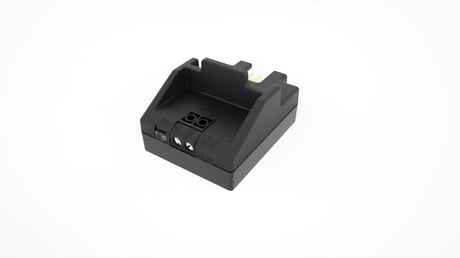
Product Image


30 - Alarm configuration - 1st slot
This parameter determines to which alarm frames and how the device should react. The parameters consist of 4 bytes, three most significant bytes are set according to the official Z-Wave protocol specification. Default value [0x00, 0x00, 0x00, 0x00] (disabled). The 4 bytes must be converted to a single decimal value to be entered in the gateway sending the configuration parameter value. Example: Event: Home Security (0x07) Status: Motion Detected (0x08) Parameter: None (0x00) Action: Open (0x01) = 0x07080001 which is 117964801 decimal to be entered in the gateway.Size: 4 bytes
Default: 0
Minimum: 0
Maximum: 4294967042
Possible values
| From | To | Desription |
|---|---|---|
| 0 | 255 | [LSB] – action |
| 256 | 65535 | Event/State Parameters |
| 65536 | 16777215 | Notification Status |
| 16777216 | 4294967042 | [MSB] – Notification Type |
31 - Alarm configuration - 2nd slot
This parameter determines to which alarm frames and how the device should react. The parameters consist of 4 bytes, three most significant bytes are set according to the official Z-Wave protocol specification. Default value [0x05, 0xFF, 0x00, 0x00](Water Alarm, any notification, no action). The 4 bytes must be converted to a single decimal value to be entered in the gateway sending the configuration parameter value. Example: Event: Home Security (0x07) Status: Motion Detected (0x08) Parameter: None (0x00) Action: Open (0x01) = 0x07080001 which is 117964801 decimal to be entered in the gateway.Size: 4 bytes
Default: 100597760
Minimum: 0
Maximum: 4294967042
Possible values
| From | To | Desription |
|---|---|---|
| 0 | 255 | [LSB] – action |
| 256 | 65535 | Event/State Parameters |
| 65536 | 16777215 | Notification Status |
| 16777216 | 4294967042 | [MSB] – Notification Type |
32 - Alarm configuration - 3rd slot
This parameter determines to which alarm frames and how the device should react. The parameters consist of 4 bytes, three most significant bytes are set according to the official Z-Wave protocol specification. Default value[0x01, 0xFF, 0x00, 0x00](Smoke Alarm, any notification, no action). The 4 bytes must be converted to a single decimal value to be entered in the gateway sending the configuration parameter value. Example: Event: Home Security (0x07) Status: Motion Detected (0x08) Parameter: None (0x00) Action: Open (0x01) = 0x07080001 which is 117964801 decimal to be entered in the gateway.Size: 4 bytes
Default: 33488896
Minimum: 0
Maximum: 4294967042
Possible values
| From | To | Desription |
|---|---|---|
| 0 | 255 | [LSB] – action |
| 256 | 65535 | Event/State Parameters |
| 65536 | 16777215 | Notification Status |
| 16777216 | 4294967042 | [MSB] – Notification Type |
33 - Alarm configuration - 4rd slot
This parameter determines to which alarm frames and how the device should react. The parameters consist of 4 bytes, three most significant bytes are set according to the official Z-Wave protocol specification. Default value [0x02, 0xFF, 0x00, 0x00] (CO Alarm, any notification, no action). The 4 bytes must be converted to a single decimal value to be entered in the gateway sending the configuration parameter value. Example: Event: Home Security (0x07) Status: Motion Detected (0x08) Parameter: None (0x00) Action: Open (0x01) = 0x07080001 which is 117964801 decimal to be entered in the gateway.Size: 4 bytes
Default: 50266112
Minimum: 0
Maximum: 4294967042
Possible values
| From | To | Desription |
|---|---|---|
| 0 | 255 | [LSB] – action |
| 256 | 65535 | Event/State Parameters |
| 65536 | 16777215 | Notification Status |
| 16777216 | 4294967042 | [MSB] – Notification Type |
34 - Alarm configuration - 5th slot
This parameter determines to which alarm frames and how the device should react. The parameters consist of 4 bytes, three most significant bytes are set according to the official Z-Wave protocol specification. Default value [0x04, 0xFF, 0x00, 0x00] (Heat Alarm, any notification, no action). The 4 bytes must be converted to a single decimal value to be entered in the gateway sending the configuration parameter value. Example: Event: Home Security (0x07) Status: Motion Detected (0x08) Parameter: None (0x00) Action: Open (0x01) = 0x07080001 which is 117964801 decimal to be entered in the gateway.Size: 4 bytes
Default: 83820544
Minimum: 0
Maximum: 4294967042
Possible values
| From | To | Desription |
|---|---|---|
| 0 | 255 | [LSB] – action |
| 256 | 65535 | Event/State Parameters |
| 65536 | 16777215 | Notification Status |
| 16777216 | 4294967042 | [MSB] – Notification Type |
01. Set the Z-Wave gateway into adding mode (see the Z-Wave gateway’s manual) 02. On the IBT4ZWAVE press and release the S1 button 3 times S1 03. LEDs on the IBT4ZW AVE will start slow flashing alternately 04. If you are adding in Security S2 Authenticated, input the underlined part of the DSK (label on the box) DSK: XXXXX-XXXXX-XXXXX-XXXXX XXXXX-XXXXX-XXXXX-XXXXX 05. When the adding process ends, the LEDs on the IBT4ZWAVE will show adding and antenna status (Table 1 in manual)
01. Set the Z-Wave gateway into remove mode (see the Z-Wave gateway’s manual) 02. On the IBT4ZWAVE press and release the S1 button 3 times S1 03. LEDs on the IBT4ZW AVE will start slow flashing alter nately 04. Wait for the removing process to end
01. Press and hold the S1 button 03. Wait 3 seconds 04. LEDs will show adding and antenna status (Table 1 in manual) for 3 seconds 05. LEDs will turn off for 3 seconds 06. LEDs will show selected antenna (Table 2 in manual) for 3 seconds 07. When both LEDs light up simultaneously, release the button 08. Press and release the S1 button 09. Both LEDs will flash once at the end of the procedure
If your controller is capable of QR scanning, scan the QR code placed on the label on the device and bottom of the box.
| Group | Type |
|---|---|
| Access Control |
|
| System | HW status: System hardware failure (manufacturer proprietary failure code provided) |