MCOHOME
9 in 1 MULTI-SENSOR
A8-9
Notification Sensor
HW: 255 FW: 6.00
ZM5202
6.71.03
0x015F (351)
0xA803 (43011)
0x135A (4954)
ZC10-20096971
2020-09-08 12:11:30.482943
N/A
Enhanced 232 Slave
Always On Slave
MCOHome A8-9 is a Z-Wave™ enabled multiple environmental monitoring sensor.
MCOHome A8-9 is a Z-Wave™ enabled multiple environmental monitoring sensor, with 3.5 inch TFT clear display and compliant to Z-Wave Plus™ standard. It is built in with Temperature, Humidity, PM2.5, CO2, VOC, PIR, illumination, Noise, Smoke sensor. Device can be added into any Z-Wave™ network, and is compatible with any other Z-Wave™ certified devices.
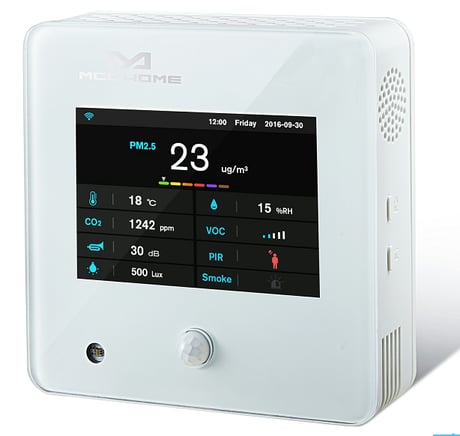
Product Image


1 - Parameter 1
This is the PM2.5 Delta Level which determine when to report the current PM2.5 value.Size: 1 byte
Default: 0
Minimum: 0
Maximum: 127
Possible values
| From | To | Desription |
|---|---|---|
| 0 | 127 | Value=0 indicates Turn off report , value>=1 indicates to report current PM2.5 value when change > n * 1ug/m3 |
2 - Parameter 2
This is the CO2 Delta Level which determines when to report the current CO2 value.Size: 1 byte
Default: 0
Minimum: 0
Maximum: 127
Possible values
| From | To | Desription |
|---|---|---|
| 0 | 127 | Value=0 indicates Turn off report , value>=1 indicates to report current CO2 value when change > n * 5ppm |
3 - Parameter 3
This is the temperature Delta Level which determines when to report the current temperature value.Size: 1 byte
Default: 0
Minimum: 0
Maximum: 127
Possible values
| From | To | Desription |
|---|---|---|
| 0 | 127 | Value=0 indicates Turn off report , value>=1 indicates to report current temperature value when change > n * 0.5℃ |
4 - Parameter 4
This is the humidity Delta Level which determines when to report the current humidity value.Size: 1 byte
Default: 0
Minimum: 0
Maximum: 127
Possible values
| From | To | Desription |
|---|---|---|
| 0 | 127 | Value=0 indicates Turn off report , value>=1 indicates to report current humidity value when change >n% |
5 - Parameter 5
This is the VOC Delta Level which determines when to report the current VOC value.Size: 1 byte
Default: 0
Minimum: 0
Maximum: 127
Possible values
| From | To | Desription |
|---|---|---|
| 0 | 127 | Value=0 indicates Turn off report , value>=1-127*5ppb Report change |
6 - Parameter 6
This is the Lux Delta Level which determines when to report the current Illumination value.Size: 2 bytes
Default: 0
Minimum: 0
Maximum: 32767
Possible values
| From | To | Desription |
|---|---|---|
| 0 | 32767 | Value=0 indicates Turn off report , value>=1 indicates to report current Illumination value when change >n*1 Lux |
7 - Parameter 7
This is the dB Delta Level which determines when to report the current Noise value.Size: 1 byte
Default: 0
Minimum: 0
Maximum: 127
Possible values
| From | To | Desription |
|---|---|---|
| 0 | 127 | Value=0 indicates Turn off report , value>=1 indicates to report current Noise value when change >n*1 dB |
8 - Parameter 8
This is the PIR Delta Level which determines when to report the current PIR value.Size: 1 byte
Default: 0
Minimum: 0
Maximum: 1
Possible values
| From | To | Desription |
|---|---|---|
| 0 | 1 | Value=0 indicates Turn off report , value=1 indicates report change |
9 - Parameter 9
This is the Smoke Delta Level which determines when to report the current Smoke value.Size: 1 byte
Default: 1
Minimum: 0
Maximum: 1
Possible values
| From | To | Desription |
|---|---|---|
| 0 | 1 | Value=0 indicates Turn off report , value=1 indicates report change |
Activate Add mode in the gateway. When device is powered on, hold F1 to choose interface for Add Z-Wave network. Click F2 five times until double curved arrow icon turns blue. Hold F2 and the device enters into learning mode, then Wifi icon turns blue and the device is added into Z-Wave network.
Activate Remove mode in the gateway. When device is powered on, hold F1 to choose interface for Remove Z-Wave network. Click F2 five times until double curved arrow icon turns blue. Hold F2 and the device enters into learning mode, then Wifi icon turns blue and the device is removed from Z-Wave network.
1, Press & hold F1 to enter Z-Wave setting interface, then press & hold F1 again to enter parameters setting interface; 2, Press & hold F2 to enter setting interface and select “default”; 3, Click F2 3 times and displays “OFF”-->“ON”-->“OK”-->“OFF”, factory setting is restored. Please use this procedure only when the network primary controller is missing or otherwise inoperable.
| Type | Value(s) |
|---|
| Sensor type |
|---|
| Illuminance |
| Humidity |
| Carbon Dioxide (CO2) Level |
| Moisture |
| Particulate Matter 2.5 |