Ecolink
Chime+Siren
ISZW7-ECO
Sound Switch DT
HW: 1 FW: 2.00:01.10
ZGM130
7.13.6
0x014A (330)
0x0007 (7)
0x3975 (14709)
ZC12-20100128
2020-09-16 11:35:44.29993
N/A
Enhanced 232 Slave
Always On Slave
The Ecolink Chime+Siren has 30 built in sound effects for alarms, notifications and doorbells. Load in your custom sounds via the microSD.
The Ecolink Chime+Sirenis a Z-Wave Plus enabled device designed to smoothly integrate into a Z-Wave Plus home automation network. This device will sound a siren or chime or doorbell on the automations created by the controller. This easy to install Security siren has 30 different build in sound effects for different notifications and sirens. It has a built in 24 hour battery back up in case of power outages or when used in a security system to prevent tampering to turn sirens off. It has a microSD slot to allow custom sounds to be loaded onto the device.
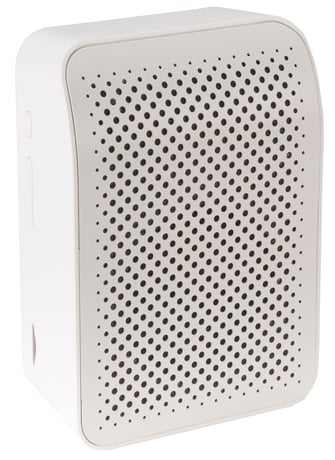
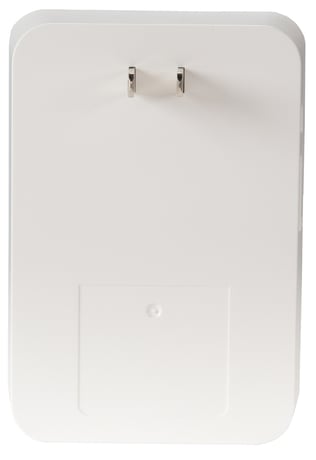
Product Image
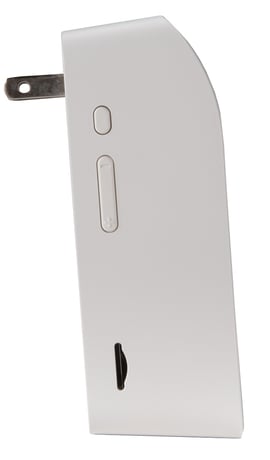
Side Profile with volume control, test/learn, and microsd slot
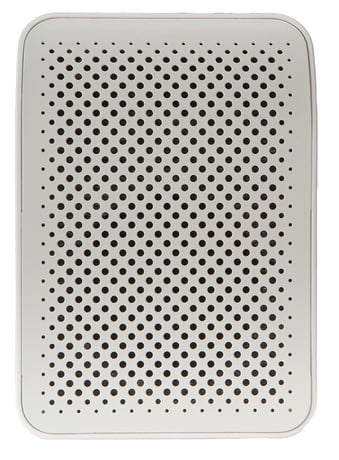
Front Face
Main Siren Photo


1 - Default Sound
Map Basic Set of 0xFF to play the sound number set here. e.g. a 1 is Siren and a 5 is a Chime.Size: 1 byte
Default: 5
Minimum: 1
Maximum: 100
Possible values
| From | To | Desription |
|---|---|---|
| 1 | 100 | Different types of sounds |
2 - Heartbeat Notification Timing
Seconds between automatic battery reports.Size: 4 bytes
Default: 3600
Minimum: 120
Maximum: 86400
Possible values
| From | To | Desription |
|---|---|---|
| 120 | 86400 | Seconds between automatic battery reports. |
3 - Supervision Encapsulation
Encapsulate Unsolicited Notifications in Supervision Get requests. 0: Disabled 1: Enabled.Size: 1 byte
Default: 1
Minimum: 0
Maximum: 1
Possible values
| From | To | Desription |
|---|---|---|
| 0 | 0 | disabled |
| 1 | 0 | enabled |
4 - Sound Volume
Sound volume as a percentage for non-emergency sounds (See Configuration Parameter #6). 1 to 100, whereas 0 is Mute, and 255 is Restore last volume before Mute.Size: 1 byte
Default: 50
Minimum: 0
Maximum: 100
Possible values
| From | To | Desription |
|---|---|---|
| 0 | 100 | Sound volume as a percentage for non-emergency sounds |
5 - Sounds Available
Number of sounds available to play.Size: 1 byte
Default: 30
Minimum: 0
Maximum: 255
Possible values
| From | To | Desription |
|---|---|---|
| 0 | 255 | Number of sounds available to play. |
6 - Emergency Sound Volume Adjustable
Enable Intrusion/Smoke/CO siren volume adjustable and mutable. 0 is Disabled (default). 1 is Enabled.Size: 1 byte
Default: 0
Minimum: 0
Maximum: 1
Possible values
| From | To | Desription |
|---|---|---|
| 0 | 0 | disabled alarm type sounds volume adjustments |
| 1 | 0 | enable alarm type sounds volume adjustments |
Adding to a Z-Wave Network (Classic Inclusion Method) Make sure the device has power. Press the Pair Button which is the smaller of the two buttons, and the device will enter classic inclusion mode which implements both classic inclusion with a Node Information Frame, and Network Wide Inclusion. During Classic Inclusion mode, the Green LED will blink two times every three seconds. When Classic inclusion times-out, the device will blink red and green.
Removing a Sensor from a Z-Wave Network To remove the device, place the controller into Remove or “Z-Wave Exclusion” mode. Press the smaller of the two buttons (Add/Test) following the same procedure to add for removal. Upon successful removal, the device’s red led will come on solid for 1 second. Note: Any Z-Wave Inclusion Controller can remove a Z-Wave device regardless of manufacturer or which network the device is currently added to.
the device is awake. It can receive commands all the time.
Factory Default Please use this procedure only when the network primary controller is missing or otherwise inoperable. To restore the device back to factory settings and remove it from any Z-Wave network. Hold the Pair button for 10 seconds. During the 10 seconds of continuing to hold the Add/Test button the green LED with flash, and after 10 seconds the red LED will come on solid for 1 second indicating that the factory default of the device has been successful, and the device is ready to add back into a Z-Wave network.
Page 1 of advanced operational manual. Instruction set #2 on the product setup guide.
| Type | Value(s) |
|---|
| Group | Type |
|---|---|
| Power Management |
|
| System | SW status: System software failure (manufacturer proprietary failure code provided) |