iBlinds
iblinds v3 Window Blind Motor
IB3.0
Window Covering DT
HW: 1 FW: 3.01
ZGM130
7.12.2
0x0287 (647)
0x0004 (4)
0x0071 (113)
ZC12-20110129
2020-09-29 15:30:22.948707
N/A
Enhanced 232 Slave
Listening Sleeping Slave
Yes
iblinds v3 Window Blind Motor
iblinds is a simple Z-Wave Plus device used to automate your existing window blinds. You can control any 2-2 ½ inch corded lift horizontal blinds in your home or office. Set a scheduled to open at sunrise and close at sunset, use voice control with Amazon Alexa and Google Home or manually control a single blind, or a group of them, from home or anywhere in the world with one touch of a button using your smartphone, tablet or Z-Wave remote.
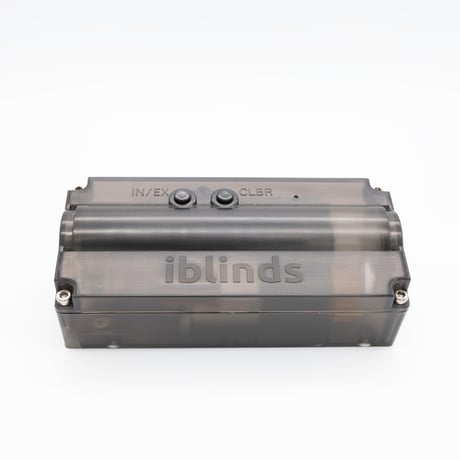
Product Image


1 - Close Interval
Used for auto calibration. Sets interval endpoint detection. Smaller interval will make the blinds close tighter.Size: 1 byte
Default: 22
Minimum: 15
Maximum: 30
Possible values
| From | To | Desription |
|---|---|---|
| 15 | 30 | Smaller interval will make the blinds close tighter |
2 - Reverse Direction
Used to reverse the direction of the blinds.Size: 1 byte
Default: 0
Minimum: 0
Maximum: 1
Possible values
| From | To | Desription |
|---|---|---|
| 0 | 0 | Forward Direction - 0% = Closed Down |
| 1 | 1 | Reverse Direction - 0% = Closed Up |
3 - Disable Report
Used to disable Z-Wave Report. This is useful for systems that poll iblinds immediately after sending a position command. Disable if this an immediate report is causing iblinds motor to function improperly.Size: 1 byte
Default: 0
Minimum: 0
Maximum: 1
Possible values
| From | To | Desription |
|---|---|---|
| 0 | 0 | Enable Device Reset Locally |
| 1 | 1 | Disable Device Reset Locally |
4 - Default ON Value
Used to set the default ON Level when manual push button is pushed- Default value for ON = 50% (0x32) , change this value if you wish to set the push button ON value to a different preset value.Size: 1 byte
Default: 50
Minimum: 0
Maximum: 99
Possible values
| From | To | Desription |
|---|---|---|
| 0 | 99 | Set the default On Value |
5 - Reserved
Reserved for ManufactuerSize: 1 byte
Default: 0
Minimum: 0
Maximum: 1
Possible values
| From | To | Desription |
|---|---|---|
| 0 | 1 | Reserved for Manufactuer |
6 - Speed
Used to set the default blind Speed. 0= No Delay. The Larger the number the slower the speed. Note: Duration Value >0 will always override the speed parameterSize: 1 byte
Default: 0
Minimum: 0
Maximum: 100
Possible values
| From | To | Desription |
|---|---|---|
| 0 | 100 | The larger the value the slower the speed |
Press the inclusion (IN/EX) button 3 times and wait for the device to be discovered and joined to the Z-Wave network. Follow the directions for your Z-Wave controller to uniquely identify your device. (Ex: Bedroom iblinds)
Press the exclude (IN/EX) button 3 times and wait for the device to be removed from the Z-Wave network.
Wake-up commands are handled by the Controller, this is a FLiRS device
Press the IN/EX button 5 times for Device Reset Locally (Factory Reset)
The DSK can be found on the bottom of the iblinds motor, the packaging and, on the back page of this Quick Start Guide.
N/A
N/A
| Type | Value(s) |
|---|