Ness
Scene Controller
ZA-207001
Wall Controller
HW: 1 FW: 1.00
ZM5101
6.51.08
0x0208 (520)
0x0202 (514)
0x000B (11)
ZC10-20106991
2020-10-15 11:24:50.983918
N/A
Enhanced 232 Slave
Portable Slave
Yes
The Scene Controller is a wireless, portable and rechargeable scene switch. It can control a Z-Wave device, such as smart plug, smart dimmer with a Z-Wave gateway.
The Scene Controller is a wireless, portable and rechargeable scene switch. It can control a Z-Wave device, such as smart plug, smart dimmer with a Z-Wave gateway. You can also activate a scene like sleep scene, movie scene and entertainment scene with it.
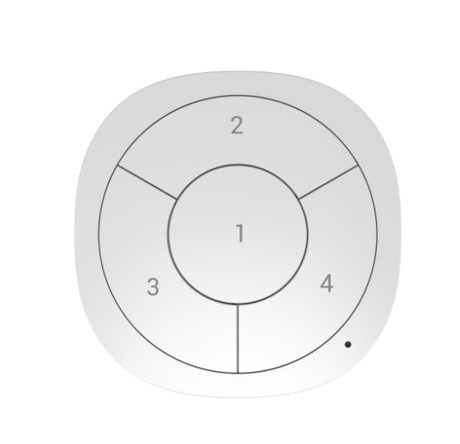
Product Image


254 - Enable/disable the configuration command
Lock/unlock all configuration parameters.Size: 1 byte
Default: 0
Minimum: 0
Maximum: 1
Possible values
| From | To | Desription |
|---|---|---|
| 0 | 0 | Unlock all configuration parameters. |
| 1 | 1 | Lock all configuration parameters |
255 - Reset Scene Controller
Reset Scene Controller and remove from the Z-Wave networkSize: 4 bytes
Default: 1
Minimum: -1
Maximum: 1431655765
Possible values
| From | To | Desription |
|---|---|---|
| 1431655765 | 1431655765 | Reset Scene Controller and remove from the Z-Wave network |
Included as a non-secure device (1) Insert the LIR2450 battery. (2) Set the Z-Wave network main controller into learning mode (see Z-Wave network controller operating manual). (3) Triple click the Z-button. (4) If the inclusion is successful, the LED will blink in blue less than for 5 seconds and then keep on for 15 seconds. Included as a secure device (1) Insert the LIR2450 battery. (2) Set the Z-Wave network main controller into learning mode (see Z-Wave network controller operating manual). (3) Pressing and holding the Z-button for 3 seconds. (4) If the inclusion is successful, the LED will blink in green less than for 5 seconds and then keep on for 15 seconds.
To remove the Scene Controller from the Z-Wave network: (1) Insert the LIR2450 battery. (2) Set the Z-Wave network main controller into excluding mode (see Z-Wave controller operating manual). (3) Triple click the Z-button, if the exclusion is successful, LED will blink in orange for less than 5 seconds and then keep on for 3 seconds.
Pressing and holding a button for 3 seconds. Led will turn to green, which means Scene Controller has been woken up.
Pressing and holding a button for 20 seconds. Release the button after 20 seconds, LED will keep in yellow for 3 seconds. Scene Controller will be reset to factory defaults if you short press the button within this 3 seconds. Please use this procedure only when the network primary controller is missing or otherwise inoperable.
Scene Controller's LED indicator can signal its communication quality with the Z-Wave main controller. To start testing: Press and hold the Z-button for 11 to 15 seconds, the LED will keep on in purple for 3 seconds, it will enter testing mode if you short press the Z-button during these 3 seconds. Blink in green –Scene Controller establish a direct communication with the main controller, and still under checking. Keep green – The green light should last about 2 seconds, which means the direct communication is stable. Blink in orange –Scene Controller can communicate with the main controller in intermediate radio transmit power level, and still under checking. Keep orange – The communication quality is moderate. Keep Red – The communication is failed.
Included as non-secure device: 1. Insert the LIR2450 battery. 2. Set the Z-Wave network main controller into learning mode (see Z-Wave network controller operating manual). 3. Triple click a button. 4. If the inclusion is successful, the LED will blink in blue less than for 5 seconds and then keep on for 15 seconds. Included as a secure device: 1. Insert the LIR2450 battery. 2. Set the Z-Wave network main controller into learning mode (see Z-Wave network controller operating manual). 3. Pressing and holding a button for 3 seconds. 4. If the inclusion is successful, the LED will blink in green less than for 5 seconds and then keep on for 15 seconds.
To remove the Scene Controller from the Z-Wave network: (1) Insert the LIR2450 battery. (2) Set the Z-Wave network main controller into remove mode (see Z-Wave controller operating manual). (3) Triple click the a button, if the exclusion is successful, LED will blink in orange for less than 5 seconds and then keep on for 3 seconds.
| Type | Value(s) |
|---|
| Group | Type |
|---|---|
| Smoke Alarm | Alarm status: Alarm silenced |
| Sensor type |
|---|
| General Purpose |