Universal Devices
ISY-994i IR Pro Z-Wave/Insteon/X10
ISY-994i ZW+/IR Pro
Central Controller
HW: 3 FW: 6.09:05.03
ZM5202
6.82.01
0x0193 (403)
0x0001 (1)
0x0007 (7)
ZC10-20106989
2020-10-05 15:13:31.626594
N/A
Static Controller
Central Static Controller
Create, maintain, and automate your Z-Wave network with the ISY-994i ZW+/IR Pro together with Insteon, X10 and Pro features.
The ISY-994i ZW+/IR Pro controller brings Z-Wave network management, automation including simple logic based on device status and controls, and integration with Insteon, X10 and other protocols and controls together in one cohesive environment.
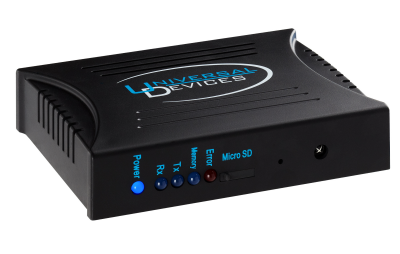
Product Image
1. Select Z-Wave | Learn Mode and wait for a popup window to appear. - If the popup window does not appear, Select Z-Wave | Advanced | Stop Adding or Removing a Z-Wave Device then try again. 2. The ISY will now wait to receive information from another Z-Wave device performing an action such as Add, Remove, etc. - The popup window will go away when the operation is complete. - In some cases this may take 30 to 60 seconds or longer to complete. Note: Learn Mode is only available if the Z-Wave network is empty or the ISY is not the SIS for the Z-Wave network.
When the Z-Wave dongle in the ISY is factory reset it is also given a new Home Id and new S0 security keys are generated. To factory reset the Z-Wave dongle, select Z-Wave | Advanced | Factory Reset Z-Wave Dongle If this controller is the primary controller for your network, resetting it will result in the nodes in your network being orphaned and it will be necessary after the reset to exclude and re-include all of the nodes in the network. If this controller is being used as a secondary controller in the network, use this procedure to reset this controller only in the event that the network primary controller is missing or otherwise inoperable.
1. Select Z-Wave | Add a Z-Wave Device and wait for a popup window to appear. If the popup window does not appear, Select Z-Wave | Advanced | Stop Adding or Removing a Z-Wave Device then try again. 2. Put the other controller into Learn Mode. Refer to the user guide for your product on how to do this. 3. The ISY will begin updating the other controller
Set Z-Wave | Options | Use Network Wide Search when adding or removing Z-Wave devices (NWI/NWE) to enable or disable NWI/NWE when adding or removing devices. 1. Select Z-Wave | Add a Z-Wave Device and wait for a popup window to appear. - If the popup window does not appear, Select Z-Wave | Advanced | Stop Adding or Removing a Z-Wave Device then try again. 2. Put the Z-Wave device you are adding into learn Mode. Refer to the user guide for your product on how to do this. In many cases this just requires you to press a button on the device. 3. The ISY will begin adding the device (this may occur a few seconds after you put the device into learn mode). - The popup window will go away and you will see your device added to the tree. Note: To add a device, it must not already be in a Z-Wave network. Therefore, if you are having trouble adding a device try removing it first.
1. Select Z-Wave | Remove a Z-Wave Device and wait for a popup window to appear. - If the popup window does not appear, Select Z-Wave | Advanced | Stop Adding or Removing a Z-Wave Device then try again. 2. Put the Z-Wave device into learn Mode. Refer to the user guide for your product on how to do this. In many cases this just requires you to press a button on the device. 3. The ISY will remove the device (this may occur a few seconds after you put the device intolearn mode). - The popup window will go away and the nodes for the device will be removed from the tree.
| Group | Type |
|---|---|
| Smoke Alarm |
|
| CO Alarm |
|
| CO2 Alarm |
|
| Heat Alarm |
|
| Water Alarm |
|
| Access Control |
|
| Home Security |
|
| Power Management |
|
| System |
|
| Emergency Alarm |
|
| Clock |
|
| Appliance |
|
| Home Health |
|
| Siren |
|
| Water Valve |
|
| Weather Alarm |
|
| Irrigation |
|
| Gas alarm |
|
| Pest Control |
|
| Light sensor |
|
| Water Quality Monitoring |
|
| Home monitoring |
|
| Request pending notification | State idle |
| Sensor type |
|---|
| Air Temperature |
| General Purpose |
| Illuminance |
| Power |
| Humidity |
| Velocity |
| Direction |
| Atmospheric Pressure |
| Barometric Pressure |
| Solar Radiation |
| Dew Point |
| Rain Rate |
| Tide Level |
| Weight |
| Voltage |
| Current |
| Carbon Dioxide (CO2) Level |
| Air Flow |
| Tank Capacity |
| Distance |
| Angle Position |
| Rotation |
| Water Temperature |
| Soil Temperature |
| Seismic Intensity |
| Seismic Magnitude |
| Ultraviolet |
| Electrical Resistivity |
| Electrical Conductivity |
| Loudness |
| Moisture |
| Frequency |
| Time |
| Target Temperature |
| Particulate Matter 2.5 |
| Formaldehyde (CH2O) Level |
| Radon Concentration |
| Methane (CH4) Density |
| Volatile Organic Compound Level |
| Carbon Monoxide (CO) Level |
| Soil Humidity |
| Soil Reactivity |
| Soil Salinity |
| Heart Rate |
| Blood Pressure |
| Muscle Mass |
| Fat Mass |
| Bone Mass |
| Total Body Water (TBW) |
| Basis Metabolic Rate (BMR) |
| Body Mass Index (BMI) |
| Acceleration X-Axis |
| Acceleration Y-Axis |
| Acceleration Z-Axis |
| Smoke Density |
| Water Flow |
| Water Pressure |
| RF Signal Strength |
| Particulate Matter 10 |
| Respiratory Rate |
| Relative Modulation Level |
| Boiler Water Temperature |
| Domestic Hot Water (DHW) Temperature |
| Outside Temperature |
| Exhaust Temperature |
| Water Chlorine Level |
| Water Acidity |
| Water Oxidation Reduction Potential |
| Heart Rate LF/HF Ratio |
| Motion Direction |
| Applied Force on Sensor |
| Return Air Temperature |
| Supply Air Temperature |
| Condenser Coil Temperature |
| Evaporator Coil Temperature |
| Liquid Line Temperature |
| Discharge Line Temperature |
| Suction (Input) Pressure |
| Discharge (Output) Pressure |
| Defrost Temperature (Sensor Defrost) |
| Ozone (O3) |
| Sulfur Dioxide (SO2) |
| Nitrogen Dioxide (NO2) |
| Ammonia (NH3) |
| Lead (Pb) |
| Particulate Matter 1 |
| Meter type |
|---|
| Electric Meter Consumption |
| Electric Meter Production |
| Gas Meter Consumption |
| Gas Meter Production |
| Water Meter Consumption |
| Water Meter Production |