Yale
Yale Assure Lock™ Z-Wave Enabled Touch Screen Deadbolt
YRD226-ZW3
Lock
HW: 2 FW: 2.13:43.19
ZGM130
7.12.2
0x0129 (297)
0x8002 (32770)
0x46D2 (18130)
ZC12-21020184
2021-02-23 17:38:58.936127
N/A
Enhanced 232 Slave
Listening Sleeping Slave
Yes
Lock and unlock your door with ease using the touchscreen keypad. Integrate your Yale lock into your Z-Wave home automation or security system for ultimate convenience.
Never worry about carrying around or losing your keys again. Unlock and lock your home with ease from the backlit touchscreen keypad. Create unique entry codes for friends and family and remove codes whenever you need to. This lock features Z-Wave and seamlessly integrates into 50+ home automation and security systems. When added to most Z-Wave automation systems, lock and unlock your door, create pin codes, view access history and receive notifications from anywhere. The lock is tamper resistant, easy to install and even easier to use!
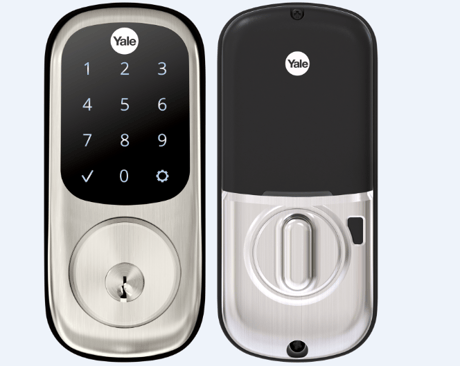
Product Image


1 - Volume
Set Volume Level to high (1), low (2), or silent (3).Size: 1 byte
Default: 2
Minimum: 1
Maximum: 3
Possible values
| From | To | Desription |
|---|---|---|
| 1 | 3 | Volume |
2 - Auto Relock
Set Auto Relock feature to enable or disable.Size: 1 byte
Default: 0
Minimum: 0
Maximum: 255
Possible values
| From | To | Desription |
|---|---|---|
| 0 | 255 | Auto Relock |
3 - Relock Time
Adjust the time your lock will auto relock.Size: 1 byte
Default: 30
Minimum: 0
Maximum: 127
Possible values
| From | To | Desription |
|---|---|---|
| 0 | 127 | Relock Time |
4 - Wrong Code Entry Limit
Adjust the limit for wrong code entries allowed by your lock.Size: 1 byte
Default: 5
Minimum: 0
Maximum: 5
Possible values
| From | To | Desription |
|---|---|---|
| 0 | 5 | Wrong Code Entry Limit |
5 - Language
Set the language to English (1), Spanish (2), or French (3).Size: 1 byte
Default: 1
Minimum: 1
Maximum: 3
Possible values
| From | To | Desription |
|---|---|---|
| 1 | 3 | Language |
6 - Shut Down Time
Adjust the time your lock is shutdown after reaching its wrong code entry limit.Size: 1 byte
Default: 60
Minimum: 0
Maximum: 127
Possible values
| From | To | Desription |
|---|---|---|
| 0 | 127 | Shut Down Time |
7 - Operating Mode
Set the Operating Mode to normal mode(0), vacation mode(1) or privacy mode(2).Size: 1 byte
Default: 0
Minimum: 0
Maximum: 2
Possible values
| From | To | Desription |
|---|---|---|
| 0 | 2 | Operating Mode |
8 - Reset to Factory Resets
Lock will execute Reset To Factory when parameter is set.Size: 1 byte
Default: 1
Minimum: 1
Maximum: 1
Possible values
| From | To | Desription |
|---|---|---|
| 1 | 1 | Reset to Factory Resets |
11 - One Touch Locking
Set One Touch Locking feature to enable or disable.Size: 1 byte
Default: 255
Minimum: 0
Maximum: 255
Possible values
| From | To | Desription |
|---|---|---|
| 0 | 255 | One Touch Locking |
12 - Privacy Button
Set Privacy Button feature to enable or disable.Size: 1 byte
Default: 0
Minimum: 0
Maximum: 255
Possible values
| From | To | Desription |
|---|---|---|
| 0 | 255 | Privacy Button |
13 - Lock Status LED
Set Lock Status LED feature to enable or disable.Size: 1 byte
Default: 0
Minimum: 0
Maximum: 255
Possible values
| From | To | Desription |
|---|---|---|
| 0 | 255 | Lock Status LED |
Install Yale Smart Module into slot above battery compartment IMPORTANT: Batteries must be removed before inserting Yale Smart Module: • Remove battery cover • Remove batteries • Insert Yale Smart Module • Reinstall batteries • Reinstall battery cover 2. Open Z-Wave system's smart home or alarm app on your smartphone or tablet 3. If you have Smart Start* enabled with your Z-Wave System follow in-app prompts to add a new device If you don't have smart start or are not sure, follow steps 4 - 6 4. On your lock keypad, enter your master entry code followed by the gear icon 5. Press the 7 key followed by the gear icon 6. Press the 1 key followed by the gear icon
Open Z-Wave system's smart home or alarm app and follow instructions for removing a device 2. On your lock keypad, enter your master entry code followed by the icon 3. Press the 7 key followed by the gear icon 4. Press the 3 key followed by the gear icon
Press Yale logo to wake up lock
Remove the battery cover and batteries. Remove the interior escutcheon to access the reset button. The reset button is located above the PCB cable connector. While pressing the reset button for a minimum of 3 seconds, reinstall batteries. Release reset button. Replace battery cover. Please use this procedure only when the network primary controller is missing or otherwise inoperable
Paragraph 8. Compability/ Principles for regulation. Water based heating - Electrical heating. Paragraph 9. Information shown in display. The main screen - Secondary screen - Connecting to an external relay. Paragraph 10. Hysteresis. Paragraph 11. Child lock. Paragraph 12. Standby and main screen.
Sticker on module and insert
| Type | Value(s) |
|---|
| Group | Type |
|---|---|
| Access Control |
|
| Power Management |
|