Vision
4 in 1 PIR Sensor
ZP3113JP-7
Notification Sensor
HW: 1 FW: 32.32
ZGM130
7.13.6
0x0109 (265)
0x2021 (8225)
0x2112 (8466)
ZC12-21020177
2021-02-08 10:12:01.197588
N/A
Enhanced 232 Slave
Reporting Sleeping Slave
This sensor monitors movement, and send Z-Wave™ signal when movement is detected inside the building. With Temperature, Humidity & Light sensor built inside, it will send the signal out when temperature, humidity & Lightness changed.
* Includes Motion, Temperature, Humidity, and Light sensor * 360-degree detection (suitable for ceiling fixture) * Compact Size: 59*59*41mm * 1 x CR123Battery * Low Battery Detection * LED Status Indicator * 100feet line of sight
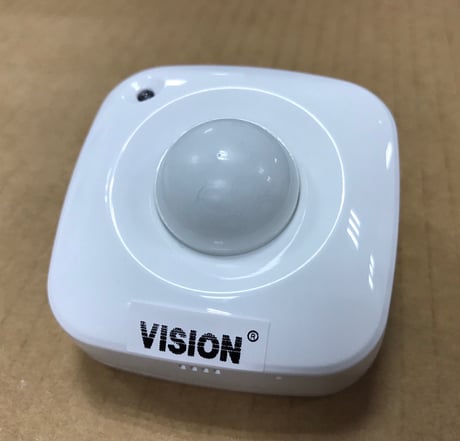
Product Image


1 - Temperature Unit Selection
0x00 = °C 0x01 = °FSize: 1 byte
Default: 0
Minimum: 0
Maximum: 1
Possible values
| From | To | Desription |
|---|---|---|
| 0 | 1 | Choose °F |
2 - Auto Temperature Report Interval
1~50 (Set up from 0.1°C~5°C)Size: 1 byte
Default: 30
Minimum: 1
Maximum: 50
Possible values
| From | To | Desription |
|---|---|---|
| 1 | 50 | Auto Temperature Interval from 0.1°C~5°C |
3 - Auto Humidity Report Interval
1~50 (Set up from 1%~50%)Size: 1 byte
Default: 20
Minimum: 1
Maximum: 50
Possible values
| From | To | Desription |
|---|---|---|
| 1 | 50 | Auto Humidity Report Interval from 1% ~ 50% |
4 - Auto Light Report Interval
0,5~50 (Set up from 0 for Off or 5%~50%)Size: 1 byte
Default: 25
Minimum: 0
Maximum: 50
Possible values
| From | To | Desription |
|---|---|---|
| 0 | 50 | Auto Light Report Interval from off or 5%~50% |
5 - Motion Re-triggering Duration
1 ~ 127 (unsigned decimal) Minutes (default: 3 minutes)Size: 1 byte
Default: 3
Minimum: 1
Maximum: 127
Possible values
| From | To | Desription |
|---|---|---|
| 1 | 127 | Motion Re-triggering Duration (in 1 ~ 127 minutes) |
6 - Motion Sensitivity
1 ~ 7 (default: 4)Size: 1 byte
Default: 4
Minimum: 1
Maximum: 7
Possible values
| From | To | Desription |
|---|---|---|
| 1 | 7 | Motion Sensitivity from level 1 ~ level 7 |
7 - LED Flash Mode Selection
1 ~ 3 (Mode 1 ~ Mode 3) Mode 1: LED Turn Off (Both Temp/PIR Trigger) Mode 2: LED Quick Flash (Temp. / PIR Trigger) Mode 3: PIR Trigger (Quick Flash) Temp. Trigger (LED Off)Size: 1 byte
Default: 1
Minimum: 1
Maximum: 3
Possible values
| From | To | Desription |
|---|---|---|
| 1 | 3 | LED Flash Mode Selection |
8 - PIR Trigger Notification Re-sending Times
0 ~ 10 (unsigned decimal) Times (default: 3 Times)Size: 1 byte
Default: 3
Minimum: 0
Maximum: 10
Possible values
| From | To | Desription |
|---|---|---|
| 0 | 10 | PIR Trigger Notification Re-sending Times from 0 time to 10 times |
For “Inclusion” in (adding to) a network: To add the ZP3113 to your Z-Wave network (inclusion), place your Z-Wave primary controller into inclusion mode. Press the Program Switch of ZP3113 once for sending the NIF. After sending NIF, Z-Wave will send the auto inclusion, otherwise, ZP3113 will go to sleep after 30 seconds. The LED indicator will be flashing while the inclusion is continued.
For “Exclusion” from (removing from) a network: To remove the ZP3113 from your Z-Wave network (exclusion), place your Z-Wave primary controller into “exclusion” mode, and following its instruction to delete the ZP3113 to your controller. Press the Program Switch of ZP3113 once to be excluded.
Wake Up Notification: Press “Program SW” once to send NIF and LED will flash once, it takes around 10 seconds to send “Wake Up Notification” for receiving all command classes or go to sleep mode after 10 seconds without receiving any command.
Factory Default Reset: Remove cover to trigged tamper switch, LED flash once & send out Alarm Report. Press Program Switch 10 times within 10 seconds, ZP3113 will send the “Device Reset Locally Notification” command and reset to the factory default. (Remark: This is to be used only in the case of primary controller being inoperable or otherwise unavailable.)
(1) The DSK label is on the backside of ZP3113-7 (2) Scan the DSK label to access the SmartStart if gateway 's UI supports SmartStart
Parameter1: Choose Temperature Unit (C or F) Parameter2: Temperature changed interval for the notification report. Parameter3: Humidity changed interval for the notification report. Parameter4: Lightness changed interval for the notification report. Parameter5: PIR retriggering interval for power saving. Parameter6: PIR Sensitivity Parameter7: LED Mode Selection for power saving. Parameter8: PIR Trigger Notification Re-sending Times
User doesn't need to trigger capability rediscovery on their controller.
| Group | Type |
|---|---|
| Home Security |
|
| Sensor type |
|---|
| Air Temperature |
| Illuminance |
| Humidity |